
Are you active on social media? If you need a quick way to transform photos and videos into polished Instagram Stories, Reels, or TikTok clips without deep editing, the Mojo app may be the tool you’re looking for. While it’s tailored for casual users, advanced creators will find its limits and may want a more robust solution – which we discuss at the end.
Mojo blends stylish templates with animated motion graphics to simplify short‑form content creation. Below, we examine its capabilities, pricing, and whether it’s the right fit for you in 2025.

1. Product Overview & Core Strengths
Designed with small businesses in mind, Mojo is a mobile‑first video editor that replaces a traditional timeline with preset templates and output presets for platforms such as Instagram, Snapchat, and TikTok. This approach delivers speed and ease, but it also constrains creative flexibility.
Key Updates in 2025
- AI‑Driven Template Personalization – Auto‑match your brand’s colors and fonts for consistent content.
- Dynamic Transitions & Animated Stickers – Regularly updated with trendy effects.
- Multi‑Scene Editing – Combine several animated slides into one seamless story.
- Team Collaboration (Pro) – Share and co‑create branding assets within a small team.
Pricing Plans
Mojo follows a freemium model: a free tier offers limited templates, while three paid tiers provide additional features.
- Mojo Pro – $4.99/month for an individual user.
- Mojo Teams – $8/user/month for teams of fewer than ten.
- Mojo Enterprise – Custom pricing for larger organizations.
2. Feature Deep Dive & Usability
Core Social‑Content Tools
- AI Template Personalization – Matches tones, fonts, and colors automatically.
- Animated Story Templates – Hundreds of vertical templates optimized for Instagram and TikTok.
- Multi‑Scene Story Creation – Build longer stories by stitching animated slides.
- Animated Stickers – Trendy, dynamic stickers to enhance visuals.
- Music Sync – Auto‑synchronizes animation speed with the beat of your chosen track.
- Pro Font Packs – Exclusive fonts for brand‑centric projects.
System Requirements
Mojo runs smoothly on mid‑range Android and iOS devices.
- iOS 14+ or Android 10+
- Minimum 2 GB RAM
- 300 MB storage space
3. Hands‑On Experience & Performance
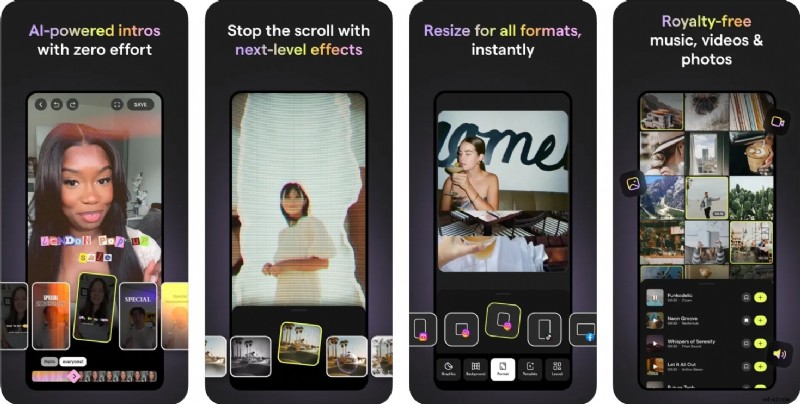
Our real‑world tests on mid‑ to high‑end phones confirm Mojo’s strengths and weaknesses.
Creative Workflow
The preset‑driven workflow enables marketers and beginners to produce polished reels and stories in minutes. However, as projects grow in complexity, the lack of granular control can become restrictive.
Speed & Stability
- Fast rendering – Ideal for short, animated clips.
- Device‑dependent lag – Simple templates run smoothly, while layered ones may momentarily stutter on lower‑end hardware.
- Low crash rate – Frequent updates keep the app stable.
- Export reliability – Quick, dependable exports for busy teams.
4. Pros & Cons
| Strengths | Weaknesses |
| Trendy, animated templates | Limited creative controls |
| Beginner‑friendly interface | Key features behind subscription |
| Platform‑specific optimization | No traditional timeline editing |
| Clean UI | Unsuitable for YouTube or long‑form content |
5. Ideal Users & Use Cases
Mojo shines for:
- Instagram stories and reels
- TikTok intros and branded hooks
- Quick promo videos for businesses
- Stylish video resumes or event invites
Best suited for:
- New influencers and brand managers
- Content creators juggling many tasks
- Designers needing rapid visual content
- Absolute beginners seeking instant polish
6. When You Need More Freedom: Filmora Mobile vs. Mojo

As projects demand deeper customization, Filmora Mobile offers a more comprehensive toolkit. While it shares Mojo’s template library, it adds a full timeline editor, unlimited length support, advanced AI tools, and cross‑platform compatibility.
Key Differences
- Editing style – Mojo: templates only; Filmora: timeline + templates.
- Aspect ratios – Mojo: vertical only; Filmora: any ratio, including 16:9 for YouTube.
- AI capabilities – Mojo: template matching; Filmora: AI Ultra HD, Optical Flow, AI Remover, and AI‑generated content.
- Audio tools – Mojo: basic sync; Filmora: voiceover, beat sync, keyframes.
- Collaboration – Mojo: team templates; Filmora: cloud sync and media sharing.
- Export options – Mojo: vertical formats; Filmora: HD/4K, custom ratios.
Both apps receive high ratings: 4.5 on the Apple Store and 4.6 on Google Play, underscoring their user‑friendly nature.
Conclusion
Choose Mojo if you need fast, stylish short‑form content with minimal effort. Opt for Filmora Mobile when you require deeper control, advanced audio/video tools, and versatility across formats.

Frequently Asked Questions
- Is Mojo suitable for longer videos? No – it’s best for short, animated social clips.
- Does Filmora Mobile support animated templates? Yes, and they’re fully customizable.
- Which app is more flexible beyond Instagram Stories? Filmora Mobile, with its multi‑format support.
- Is Filmora Mobile beginner‑friendly? Absolutely – it caters to all skill levels.
- What are the main differences between Mojo and Filmora? Mojo focuses on templates and speed; Filmora adds timeline editing, manual controls, richer audio tools, and professional‑grade effects.