
The story of Google Gemini marks a turning point in how humans interact with intelligence itself. Gemini AI goes beyond text generation. It understands tone, visuals, and context. Every idea gains emotional depth and creative purpose.
Its upcoming update, Gemini 3.0, which is rumoured to roll out soon, has also been eagerly anticipated by many for the improvements it will bring. Will it hold its ground against rising competitors?
In the meantime, this Gemini review will explore the power of Google Gemini that already shapes how people create, research, and communicate today, while giving you a picture of what to expect next.
Part 1: What Is Google Gemini and Why It Matters Now
Google Gemini is the evolution of Google's Bard project, upgraded into a powerful family of multimodal AI models. Gemini AI understands language and code. It can also reason across images and videos. This gives it a versatile approach to content creation and real-world problem-solving.
Unlike single-mode chatbots, Gemini combines language, visuals, and context. It can explain code, analyze images, summarize data, and generate ideas within the same conversation. For creators and students, that means no longer switching between separate tools.
Its biggest advantage lies in cross-integration. Inside Google Workspace, Gemini drafts slides, summarizes Docs, and suggests ideas in Gmail. For marketers, it simplifies campaign planning; for educators, it personalizes lessons. It's an AI designed to think, learn, and assist seamlessly.
Gemini Pricing Plans & Access
Google Gemini comes with several pricing tiers that shape how much access you get and how far the tools can go:
- Free Tier (Standard Model): Powered by the Gemini 2.5 Flash engine, it supports everyday chat, image prompts, and short-context reasoning. Ideal for learning and light creative use, though advanced tools like Deep research and NotebookLM remain locked.
- AI Pro ($19.99/month): Unlocks Gemini 2.5 Pro, Deep research, NotebookLM, and 2 TB of Google One storage. It includes a one-month free trial and seamless Workspace integration.
- AI Ultra ($249.99/month): Built for developers and professional creators. It offers extended context, precise multimodal understanding. It also provides advanced tools for high-end video and code generation.
| Free | AI Pro | AI Ultra | |
| Price | $0 | $19.99/month | $249.99/month |
| Gemini 2.5 Flash | ✅ | ✅ | ✅ |
| Gemini 2.5 Pro | Limited | ✅ | ✅ |
| Veo 3.1 | ❌ | Limited to Veo 3.1 Fast | ✅ |
| Monthly AI credits | 100 | 1,000 | 25,000 |
| Flow | ✅ | ✅ | ✅ |
| Whisk | ✅ | ✅ | ✅ |
| Jules | ❌ | ✅ | ✅ |
| NotebookLM | ✅ | ✅ | ✅ |
| YouTube Premium | ❌ | ❌ | ✅ |
| Storage | 15 GB | 2 TB | 30 TB |
Part 2: Gemini Core Strengths and Weak Spots
Now that pricing and access are clear, it's time to see what Gemini delivers. Where its power shines and where its limits quietly appear.
| Capability | Strength | Limitation |
| Text & Chat Intelligence | Deep reasoning, natural tone, multilingual support | Sometimes verbose and cautious |
| Code Generation | Supports major programming languages | Slower with long debugging |
| Image & Video Understanding | Accurate visual reasoning | Limited real-time video editing |
| Creative Writing | Adapts tone and emotion effectively | Occasionally lacks originality |
| App Integration | Tight Workspace connection | Still limited in third-party plug-ins |
Gemini demonstrates exceptional contextual understanding. It can analyze a photo, extract key data, and explain it narratively. Yet, its cautious tone occasionally limits creativity. While it outperforms earlier Bard models in logic, it still trails in dynamic storytelling, where human direction remains vital.
What's Next: Gemini 3.0
Though Google hasn't shared any firm details, the buzz around the next Google's Gemini 3.0 keeps getting louder. Many see it as Google's next big swing. The model is built to handle tougher creative work, stronger technical tasks, and bigger workloads without feeling heavy.
The early talk hints at upgrades that feel overdue: cleaner code suggestions, stronger long-form writing support, and sharper reasoning for complex research. But until Google lifts the curtain, anyone waiting for Gemini 3.0 will have to work with what's available right now.
Part 3: Gemini App Review: Interface, Access & Usability
The Gemini app brings Google's AI ecosystem into one clean, connected platform. Available on web and mobile, it integrates directly with Google Search, Docs, YouTube, and Workspace, allowing ideas to move smoothly between chat and content creation.
The interface is minimal and fast. Users can chat, upload images, or use voice prompts without switching screens. The multimodal input makes it easy to ask complex questions, generate scripts, or analyze visuals in seconds.
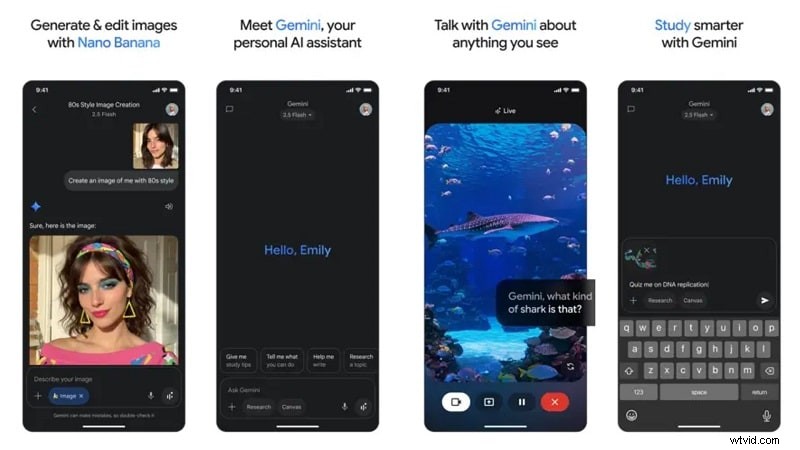
For creators, Gemini acts as a brainstorming tool, drafting captions, ideas, and summaries. Professionals use it to interpret data, organize notes, or write structured reports. Voice recognition is quick, and image understanding delivers accurate context detection, though response speed may vary with longer inputs.
Part 4: Visualizing Gemini AI Concepts with Powerful Video Editing Tools
Gemini AI can imagine ideas, but bringing those ideas to life visually is the next step. That's where Wondershare Filmora's AI editing suite becomes the perfect complement. Filmora can help transform that intelligence into cinematic storytelling.

Filmora, available on desktop and mobile, is an all-in-one video creation platform that empowers creators to produce expert-level work without long learning curves. It now works with Google's Veo 3 inside its text-to-video workflow, which gives you a quick way to generate scenes and then jump straight into hands-on editing.
 Secure Download
Step-by-Step Guide: Turning Gemini Ideas into a Complete Video
To give you a clear demonstration, we'll walk through the full process from shaping your idea in Gemini to building the final edit in Filmora.
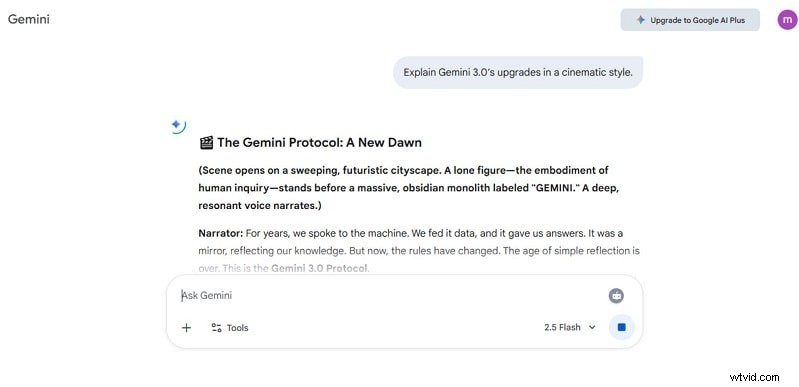
1. Generate a Concept with Gemini AI
Ask Gemini to write a script, tagline, or explainer idea. For instance: "Explain Gemini 3.0's upgrades in a cinematic style." The AI produces structured narration and scene cues.
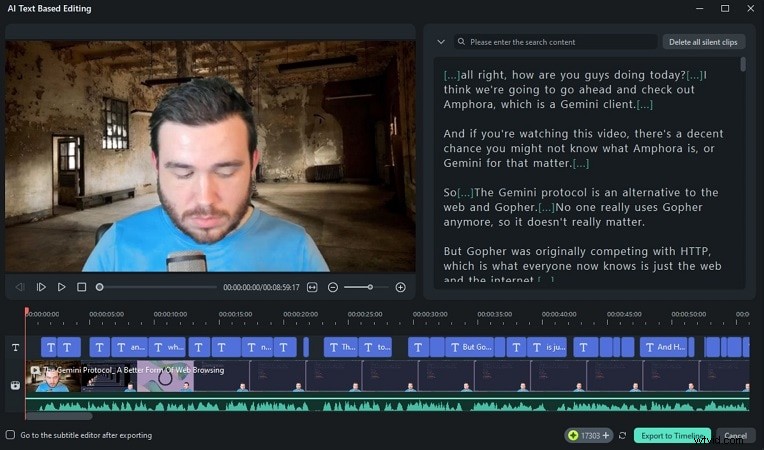
2. Import Script into Filmora
Open Filmora Desktop or Mobile. Use AI Text-Based Editing to paste the script and let Filmora automatically generate a timeline.
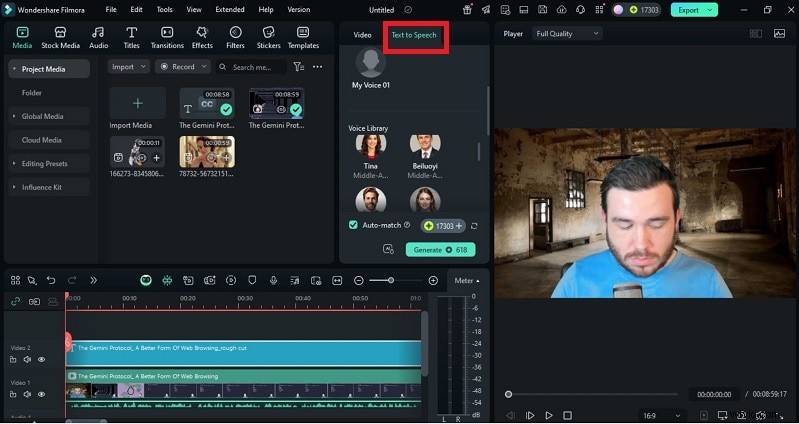
You can also turn your Gemini script into a speech using Filmora's Text-to-Speech, or clone your voice with AI Voice Cloning.
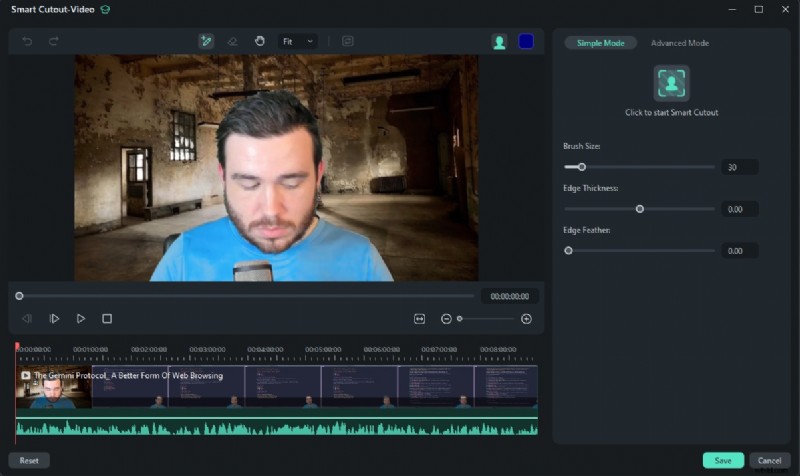
3. Add Visuals & Motion
Insert clips, photos, or generated visuals. Apply AI Smart Cutout to remove backgrounds or isolate characters. Combine it with Auto Beat Sync and Motion Tracking for cinematic transitions.
4. Add Music & Effects Automatically
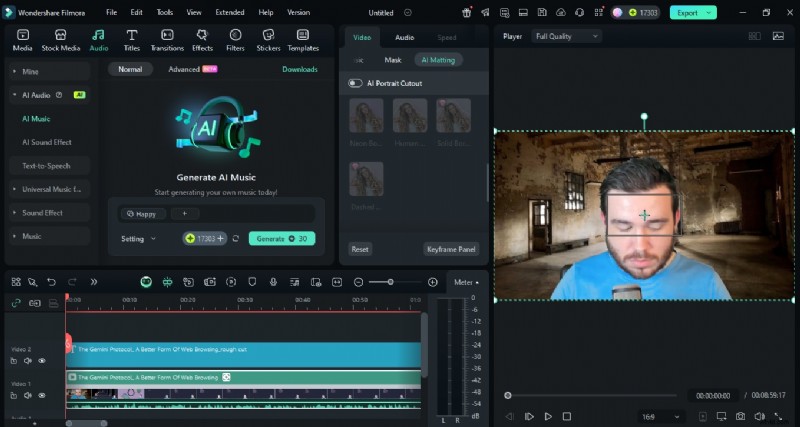
Use the AI Music Generator to create custom soundtracks matching your scene's emotion. Balance the audio automatically with Auto Ducking and add AI Sound Effects for more realism.
5. Polish & Export
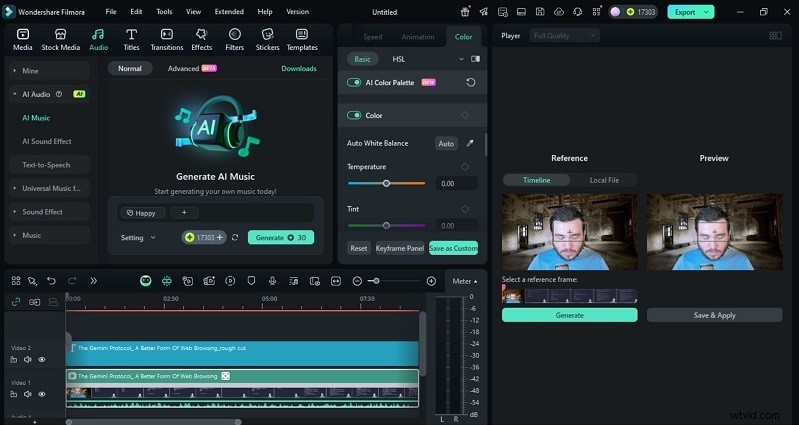
Before publishing, beautify the video with AI Video Enhancer. You can color correct it with Color Match. You can also create a slick thumbnail via AI Thumbnail Creator.
Secure Download
Part 5: Performance & Output: Gemini vs Real Creative Workflows
Gemini AI impresses in responsiveness and accuracy. It processes context-heavy prompts with notable coherence. Yet, compared to real creative workflows, its strength lies in speed over perfection.
When used with tools like Filmora, creators find balance. Gemini delivers smart ideas, and Filmora refines them into polished results. Gemini AI can draft a YouTube script in seconds. Filmora then manages the editing, voice, and visuals, cutting production time significantly.
This pipeline - AI ideation + Filmora editing — is redefining how creators work this year.
Part 6: Gemini vs Other AI Models
| Feature | Gemini | ChatGPT 4 | Claude 3 |
| Multimodal Support (text, image, video) | Native support for text and image, strong visual-reasoning; less widely cited for full video generation. | Strong text processing, added image support, video less native. | Supports text & image, less documented on video generation. |
| App Ecosystem / Integration | Deep integration with Google Workspace, Search & mobile: strong advantage. | Wide ecosystem of plugins, API support, third-party tools. | Enterprise-focused, fewer mainstream integrations. |
| Creative Use Cases (writing, storytelling, brainstorming) | Strong in research, multimodal reasoning; some reports say less "human-feel" in creative tone. | Excellent in narrative, creative writing, conversational tone. | Good at structured tasks, frameworks, less focused on creative flair. |
| Price / Token Limits / Access | Evidence of very large context windows (up to ~1 M tokens in some builds) for deep-document tasks. | Token/context limits lower in many reports; premium tiers cost more for equivalent use. | Smaller context windows in comparison; pricing models vary. |
Part 7: Gemini AI for Creators: Real Use Cases
Gemini AI empowers creators at every level:
- Scriptwriting & Voiceovers: Create narration scripts and easily convert them into lifelike voice using text-to-speech (TTS). You can even record your own voice.
- Research & Summarization: Help to summarise long research videos or podcast transcripts for editing.
- Multilingual Translation: AI translation can be used for subtitles, captions and dubbing.
- Content creation on social platforms gets smarter with Gemini AI. It helps write captions, plan storyboards, and shape ideas quickly. Filmora then refines the visuals with ready templates and creative effects.
Together, Gemini and Filmora AI make content production faster and more professional. They support multilingual creation for YouTubers, educators, and small businesses. This turnins simple ideas into polished stories.
Part 8: Verdict: Who Should Use Gemini
Google Gemini suits those who merge creativity with productivity. For creators, it drafts storylines; for experts, it simplifies data analysis. Students and educators benefit from its instant summarization and personalized explanations.
It's less ideal for users who need deep animation, 3D rendering, or complex editing control. Those areas are better managed by specialized software. When paired with Filmora, the workflow becomes seamless. Gemini shapes ideas, and Filmora brings them to life.
For anyone looking to turn intelligent writing into striking visuals, Gemini AI is the brain, and Filmora, the canvas.
Conclusion
Google Gemini marks a milestone in the evolution of AI, merging logic, emotion, and creativity. It's not just about smarter responses but smarter creation. When paired with Filmora, Gemini AI goes beyond text and code. It turns imagination into real, engaging video stories.
This Gemini app review shows that the future of creation is not human or AI alone. It's human creativity guided by intelligent tools that amplify every idea into a finished masterpiece.
Secure Download