
Magic Hour AI is a browser‑based platform that unifies image generation, text‑to‑video, and animated portrait creation into a single, user‑friendly interface. Designed for both novices and seasoned creators, it offers instant visual content from simple prompts or existing photos.
Key Features
Magic Hour AI streamlines the creative process by letting you generate, animate, and enhance visuals without leaving the browser.
Text‑to‑Video Generation
Input a scene description and the AI produces a short video clip that visualises your idea. Ideal for quick storytelling or promotional snippets.
Image‑to‑Video Animation
Upload a still photo and watch it come alive with subtle camera motion, dynamic effects, or simulated scene changes.
Animated Talking Portraits
Sync a portrait with voice or lip‑sync to create engaging talking photos for explainer videos or social media.
Text‑to‑Image Creation
Generate original images from detailed textual prompts, covering styles from cinematic realism to stylised illustration.
Creative Enhancements
Apply artistic filters, stylised transformations, or auto‑captioning to existing photos, expanding your creative palette.
Pricing & Free Tier
- Free for 10 image generations per day.
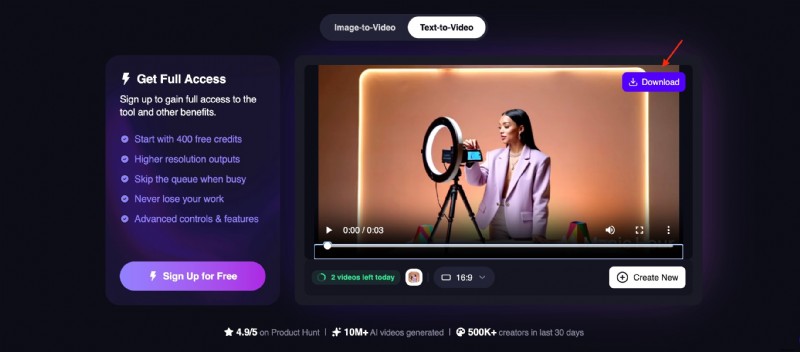
- Up to 3 text‑to‑video or image‑to‑video clips per day (max 3 s each).
- Talking portrait videos up to 5 s free; longer clips require an account.
- Lip‑sync and auto‑caption tools are free.
- New users receive 400 credits, which never expire.
Free plan limits: watermark on all outputs, 512 px maximum resolution, and non‑commercial use only. Paid tiers unlock higher resolution, commercial rights, and extended video length.
Pros & Cons
Magic Hour AI excels in speed and accessibility, but it can lack fine‑grained control compared to traditional editors.
- Pros
- Generous free tier with no credit card required.
- All core tools in one interface.
- Prompt‑based workflow suitable for non‑technical users.
- Encourages rapid experimentation.
- Unused credits roll over indefinitely.
- Cons
- Limited precision; post‑editing often needed.
- Output quality can be inconsistent.
- Short video length limits longer narratives.
- Artifacts may appear in complex scenes.
Hands‑On Evaluation
Our tests focused on image generation and image‑to‑video animation, the platform’s flagship strengths.
Image Generation
Results were sharp and stylistically diverse when prompts were detailed. The tool responds well to descriptors of environment, mood, and artistic style, though occasional inconsistencies surface with complex scenes.

- Clear prompts produce coherent images.
- Wide style range from cinematic to illustrative.
- Occasional distortion with intricate compositions.
- Optimised for speed rather than hyper‑realistic detail.
Image‑to‑Video Animation
Even without prompts, the AI adds gentle motion to still photos. Movements tend to be mechanical, and physics realism is limited, but the rapid transformation is valuable for low‑motion concepts.

- Works best for static or minimal‑motion subjects.
- Animation appears stiff; lacks organic flow.
- Weak grasp of real‑world physics.
- Fastest path from image to video clip.
Beyond Generation: The Need for Post‑Editing
While AI outputs are impressive, most creators benefit from a final polish step. Tools like Wondershare Filmora provide timeline editing, colour grading, and AI‑powered enhancements that turn raw clips into polished productions.

- Precise trimming and rearranging of clips.
- AI captions, copywriting, and visual effects.
- Cinematic transitions and overlays.
- Audio layering: voice‑overs, sound effects, music.
Combine Magic Hour AI’s quick generation with Filmora’s editing suite for a seamless workflow suitable for YouTube, TikTok, or Instagram.

Comparing Magic Hour AI to Other Platforms
Which tool is right for you depends on your goals. Below is a quick reference against three popular alternatives.
- Wondershare Filmora – full‑featured video editor with AI helpers.
- Runway ML – advanced AI platform for cinematic or experimental content.
- Pika – stylised AI video generator with expressive motion.
| Tool | Primary Focus | Key Strength | Best For |
| Magic Hour AI | AI content generation | Rapid prompt‑based visuals | Social‑media clips, prototypes, quick experiments |
| Wondershare Filmora | Video editing & enhancement | Timeline editing, AI effects | Polishing AI clips into finished videos |
| Runway ML | Advanced AI video creation | Powerful generative models | Cinematic or experimental projects |
| Pika | Stylised AI video generation | Dynamic motion effects | Expressive animation and storytelling |
Show More | |||
Verdict
- Magic Hour AI is ideal for quick, low‑effort content.
- Pairing with Filmora yields polished outputs.
- Runway ML offers superior cinematic quality.
- Pika excels in stylised motion expressiveness.
- At its price point, the free tier delivers excellent value.
Creating Professional Videos with Filmora
Here’s a step‑by‑step workflow that blends Magic Hour AI generation with Filmora editing.
Step 1 – Generate and Download AI Clips
Step 2 – Import into Filmora
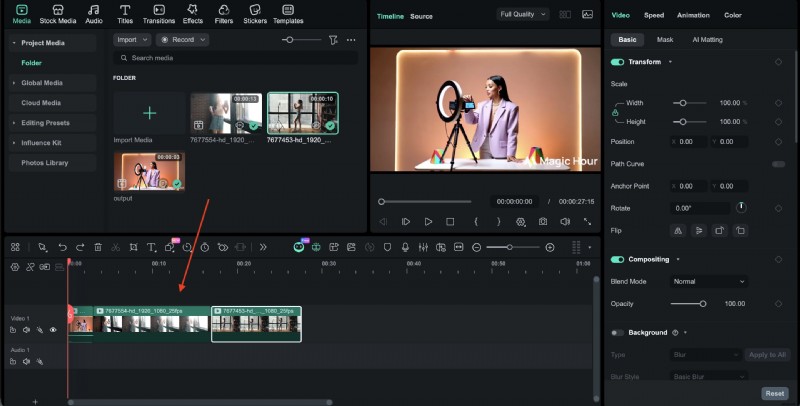
Step 3 – Trim & Arrange
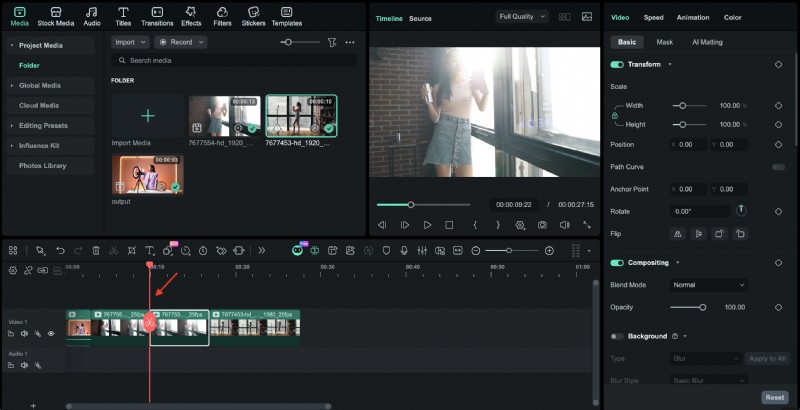
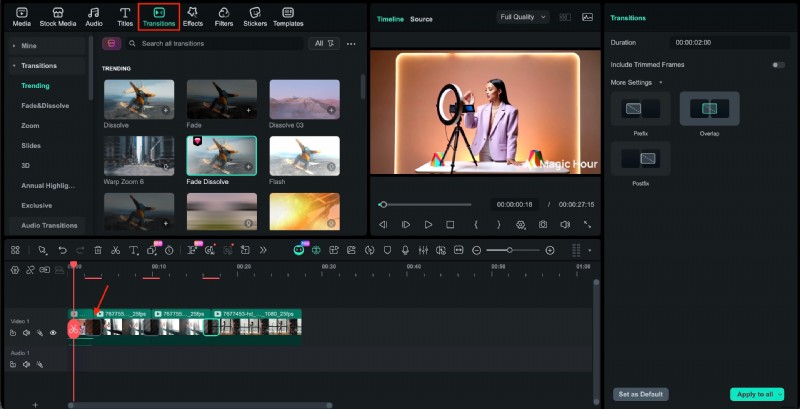
Step 4 – Add Transitions & Effects
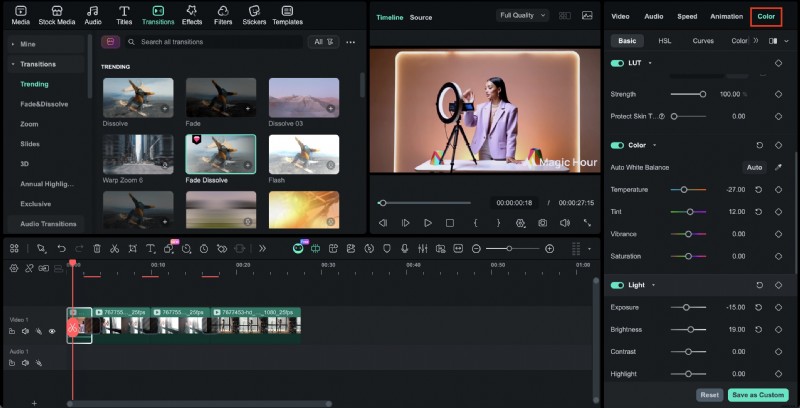
Step 5 – Adjust Colors
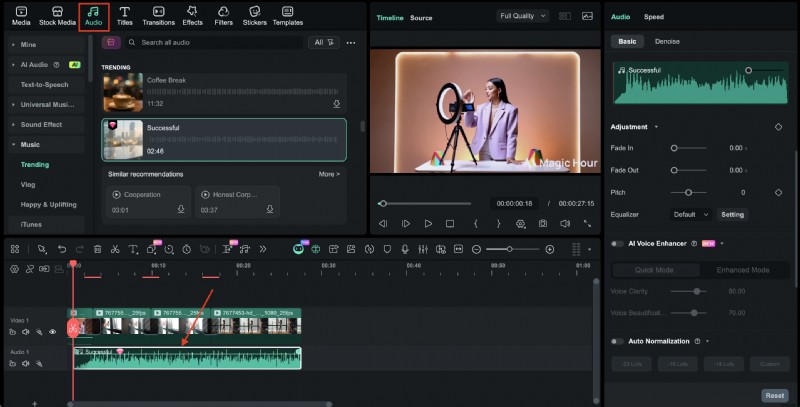
Step 6 – Add Music, Voiceover, or Captions
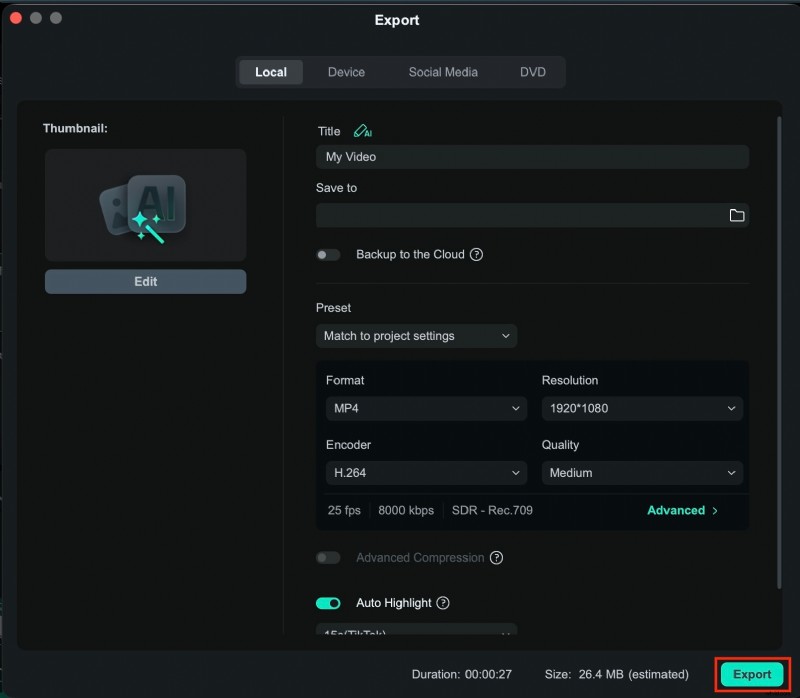
Step 7 – Export Final Video
Conclusion
Magic Hour AI provides an accessible entry point for AI‑driven visual creation, especially when you need fast, prompt‑based results. For polished, professional videos, pairing its output with a dedicated editor like Filmora ensures the final product meets industry standards.
Download Wondershare Filmora today to elevate your AI‑generated visuals into cinematic masterpieces.

FAQs
Does Magic Hour AI have a free version?
Yes. The free tier offers a limited number of credits per day for image and short‑video generation. Heavy usage typically requires a paid plan.
How does the credit system work?
Each generation consumes credits based on resolution, video length, and type. Higher‑tier plans provide more monthly credits and additional features.
Can content created with Magic Hour AI be used commercially?
Commercial rights are granted with paid plans. Free‑tier users should review the licensing terms before using generated content in commercial projects.