
Voice changers have become wildly popular in today's content landscape. Real-time audio mods are now a big part of everyday entertainment, whether you're playing games, streaming, or making prank movies. MorphVOX is one of the most well-known voice tools. It offers a range of products, including MorphVOX Pro, MorphVOX Junior, and MorphVOX Android.
As more people seek AI-powered creativity, integrated video and audio solutions are also gaining popularity. This review examines MorphVOX's capabilities and introduces a more innovative alternative for editing.

How We Tested
To evaluate the MorphVOX voice changer
- We tested the software on Windows, macOS, and Android.
- The tools included MorphVOX Pro, MorphVOX Junior, and MorphVOX Voice Changer Android.
- Testing covered streaming, voiceovers, gaming, and scripted prank videos.
- Performance, usability, and editing quality were compared across each platform.
Part 1. What is MorphVOX?
MorphVOX is available in multiple versions to suit both casual users and advanced editors. Below is a quick overview of the two main desktop options:
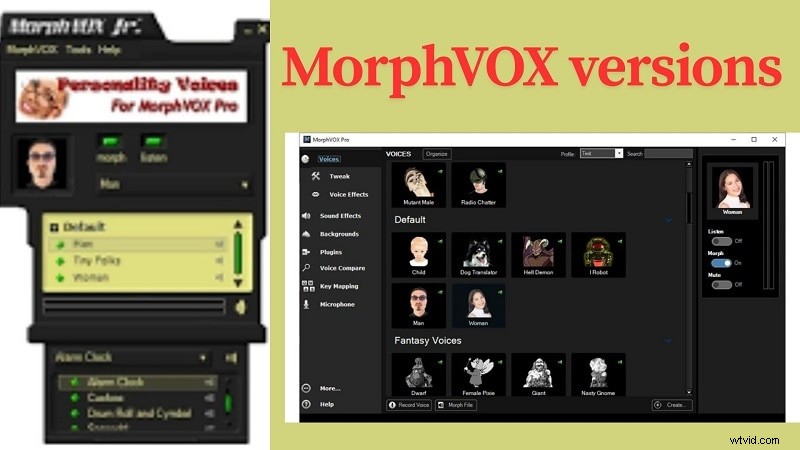
| Version | Platform | Key Features | Price |
| MorphVOX Junior | Windows | Free voice changer with 3 voice types (man, woman, Tiny Folks) and 4 sound effects like alarms and screeches. Best for pranks and light use. | Free |
| MorphVOX Pro | Windows, macOS | Full feature set including voice tuning, noise reduction, multi-band EQ, and support for Discord, CS:GO, Skype. Allows recording and file editing. | $39.99 (one-time) |
MorphVOX Pro voice changer is designed for users who require more precise control and superior audio quality in their audio editing.
Platforms supported
Windows, macOS, Android
Key Highlights of MorphVox voice changer
- Voice Comparison: With MorphVOX Pro, you can compare your changed voice with different settings. This helps you adjust tone and pitch more accurately to achieve the desired result.
- Key Mapping: The software lets you set hotkeys for voices and effects. This means you can switch between them quickly while talking or streaming, without stopping your activity.
- Microphone Support: MorphVOX Pro voice changer works with most standard microphones. You don't need to change your setup; it seamlessly integrates with your current gear for smooth voice edits.
What's New in 2025
The 2025 update of MorphVOX Pro voice changer brings several functional upgrades.

- It now features a cleaner interface with a better layout and easier access to tools. A new content organizer helps manage effects and settings more efficiently.
- You also get real-time voice visuals, such as spectrograms and frequency views.
- The update improves voice comparison and tuning tools. Noise reduction is now smarter, with digital and adaptive modes.
- Audio control is more refined with both pre- and post-equalizers. Plus, stereo microphone support and voice parsing detection are now included.
Pricing plans: MorphVOX Pro costs $19.99
Part 2. Features and Usability
MorphVOX keeps things compact but flexible. Its features offer more than just silly voices. For gamers and streamers, the depth of its sound control is surprisingly detailed.
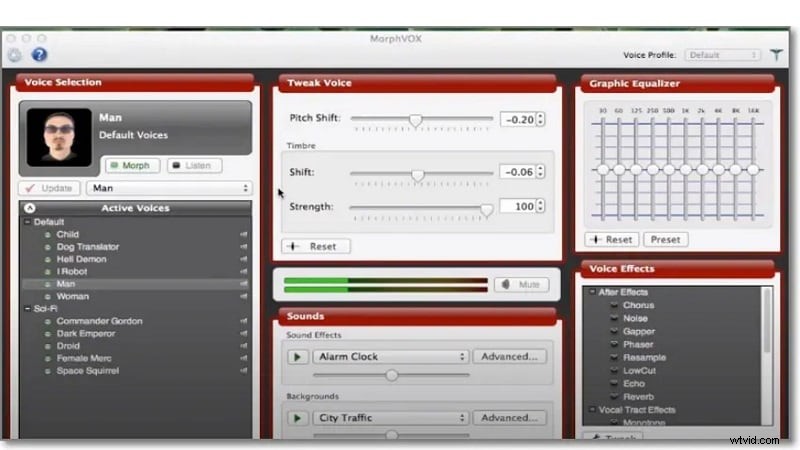
Core Features of MorphVox Voice Changer
- Quick Effects: Play voice effects instantly with one button. This is great for fast reactions during games or live streams.
- Voice Tuning: Make detailed changes to pitch, tone, and depth. This helps create the exact voice effect you want.
- Quick Voices: Switch between different voices using hotkeys. It saves time and keeps your focus on the conversation.
- Audio Customization: Add your own background sounds or custom effects. This gives your voice edits a personal touch.
- Voice Parsing Detection: The tool reads voice details in real-time. It adjusts automatically for a more natural sound.
- Audio Alarms: Set timers or alerts that play sounds or announce the time. A handy feature for reminders while you work or play.
System Requirements
- Vista/Windows 7/8/10
- 1.0 GB RAM
- 10 MB hard-disk space for program installation
- 16-bit Sound Card
- VGA Display
- Internet Connection
Part 3. What It's Like to Edit with Morphvox Voice Changer
In hands-on use, MorphVOX offers a mixed experience. It works well for live modulation but lacks deeper timeline editing.

Hands-On Feedback
On Windows, voice changes are smooth and latency-free. Mac users reported minor compatibility quirks. The Android app works fine, but it has limited customization options.
Performance Testing
CPU usage is minimal, but real-time effects may lag on lower-end devices. Exporting edited audio from the desktop is fast, although it is not available in batch format.
Part 4. A Closer Look: Pros and Cons of Morphvox Pro Voice Changer
With its tools unpacked, it's time to weigh the real impact. Does MorphVOX Pro deliver beyond the surface, or does it leave creators wanting more in key moments?

Pros
- Clean layout makes it easy to use, even for beginners.
- Works well with many popular online games.
- You can trigger sound effects instantly during use.
- The voice comparison feature helps fine-tune voice differences.
- A free trial is available to test core features before buying.
Cons
- The free version has very few voices and limited features.
- Once the trial ends, the software won't launch without payment.
- Some users report problems using it with Skype or Discord.
- Sound output can feel low in quality or clarity.
- Occasional crashes affect stability, especially on older systems.
Part 5: Who Is It For?
MorphVOX Pro isn't for everyone. It's best for quick-use cases but not for full production needs.
Recommended For:
- Game streamers (Discord, Twitch)
- Role-play communities
- YouTube prank channels
Not Ideal For:
- Video editors need full audio sync
- Podcasters wanting multitrack layers
- Users seeking AI-generated voices
- Those needing detailed EQ or export control
Part 6: Best alternative to Morphvox Voice Changer
While MorphVOX is great for real-time voice effects, it lacks features for creators who want to edit timelines, add AI narration, or match audio with visuals. If you're looking for a more integrated solution for video + audio editing, tools like Wondershare Filmora offer a significant upgrade.
MorphVOX works well as a standalone voice changer. But when you're creating video content, you need an all-in-one platform. That's where Filmora steps in.
Meet the Alternative: Wondeshare Filmora
Filmora is a reliable desktop video editor made for creators who need more advanced features. It features built-in voice changers, AI voice cloning, audio enhancement, and accurate timeline editing, offering a more integrated approach compared to standalone voice apps.
Filmora gives you complete creative freedom in one easy-to-use platform. It features professional-grade video editing and new audio capabilities that work together to create game videos, tutorials, and clips.
 Secure Download
Why We Recommend Filmora
- Voice modeling/AI Voice Cloning: Clone your own voice in seconds. Ideal for dubbing or narration, and works across timelines.
- Voice Changer Effects: Switch from natural to comic or dramatic tones with preset and adjustable filters.
- Audio Mixer & Equalizer: Control volume, pitch, and effects across multiple tracks for high-end sound balancing.
- AI Audio Denoise & Vocal Remover: Clear background noise or isolate vocals for podcast or music editing.
Pricing Plans
For more details, please visit the purchase page where various pricing plans are available.
Official Ratings and Brief Reviews
Filmora stands out for its intuitive interface, features, and modern style, earning high ratings. It is famous amongst creators looking for affordable tools that are not cumbersome to learning.
- G2 Rating: 4.5/5
- Trustpilot Rating: 4.5/5
Operating System
Windows, macOS, Android, iOS

Filmora
AI Video Editing App & Software
Best tool for making videos anywhere for all creators!
All-in-one platform for your video editing.
How to Use Filmora Voice Changer
Step 1
Open Filmora and Load Your Media Files
Open Filmora on your desktop and click on 'New Project.' After that, you can import video or audio files, which would show up in the timeline.
Secure Download
Step 2
Locate The Voice Changer Tool
In the timeline, click and select the audio or video clip you wish to edit. On the right side, there is the Property Panel. Click on audio, then go to Voice Changer. You will be presented with a menu containing various voice filters that you can select from.
Step 3
Check The Changes That You Made
Use the playback feature in the preview screen to check whether the voice changer effect matches the audio perfectly. If you're not satisfied, edit it further.
After you achieve the desired results, select Export, pick a suitable format for your video and save or share it.

Conclusion
Whether you're exploring voice tools for gaming, content, or quick pranks, this review highlights how each version of MorphVOX serves a different level of user. MorphVOX Pro offers more control than MorphVOX Junior, while MorphVOX Android maintains a fun and limited experience. However, editing needs often go beyond voice alone.
Filmora fills that creative space with precision tools, voice filters, and full timeline control. It helps bridge the gap between fun audio edits and professional-grade production. For creators building videos with purpose, Filmora brings both sound and story together in one clean editing environment.