
Why am I taking this Quiz?
I’m back in college and it’s time for final exams, and frankly the entire concept of one test possibly making or breaking my entire semester gives me nightmares.
I remember when I was in high school. I was never fond of taking test. I didn’t see much value in them and thought of them as a torture device that my teachers used against me. So, I understand why learners, of any age, aren’t excited to subjected to them, and view them merely as a sign that the training (that they probably didn’t want to take in the first place) is finally coming to an end.
Quizzing in Videos
After becoming an instructional designer, I gained much more of an appreciation for quizzes, realizing that a quiz is more than 10-20 questions for the learner to take a stab at. It’s a tool we use to measure the effectiveness of our training.
Before you begin creating training, whether it’s an eLearning module or a video, you must understand why you’re creating it and what you’d like it to accomplish. That’s why most training initiatives start with writing measurable objectives. Quizzing in videos is one method we use to determine if training objectives have been met, and it can easily be incorporated in your training videos using Camtasia.
Creating Your Quiz
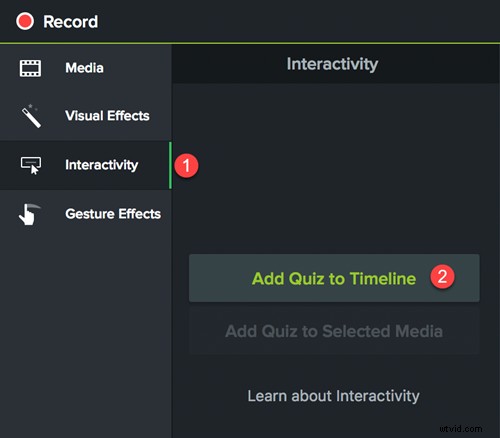
Here’s how I create quizzing in videos with Camtasia. First, place the playhead on the timeline where you’d like the quiz to appear. Then click Interactivity. Next, click on Add Quiz to Timeline. This creates a new quiz. From the Quiz properties box you can name your quiz, add your questions and answers and preview your work.
Quiz Results
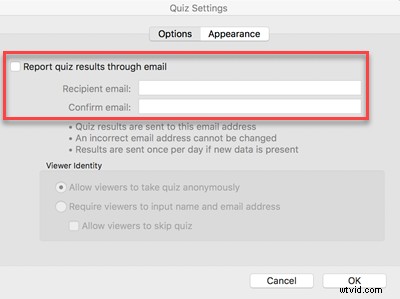
The quiz results can be accessed either through an LMS (Learning Management System) or emailed directly to you. Email is a great option for those that don’t have access to an LMS. And results tell you more than if a learner passed or failed. Reviewing results, you can see questions that were commonly missed, and determine if either the content or question needs to be adjusted. This is critical information for instructional designers, because it lets us know if the design is effective.
Value in Quizzing
In either case, as a student I’m still not excited by quizzes, but now I understand that a quiz is a vital part of an educator’s tool bag, and when used correctly can benefit both you and the learner long after the training is over.
P.S My sincerest apologizes to my 8th grade math teacher. Placing a lizard in a cookie tin was probably not the best way to protest your pop quiz.
About the Author
 Cindy Lucas is the owner of Digital Artifex, a custom training solutions company in Atlanta, GA. She is also a Learning Consultant, Instructional Designer, Trainer, Technophile, and Rick and Morty Fanatic.
https://www.linkedin.com/in/cindylucas24/