When you were casually wandering on Youtube or watching your favorite series, you may have noticed a label named “CC” at the bottom of your video.
You may have wondered how it is related to the “subtitles” you are currently reading. How could “subtitles” be abbreviated to “CC” ?”.
To put it simply, what you are watching right now are most likely subtitles. But, sometimes, what you see are CC: ”closed captions”.
Still don’t get it? 😉
No worry! Let me explain to you the difference between subtitles vs closed captions. And why you should choose one over the other, whether you’re a web user or a company that wants to increase video accessibility.
What are the differences between closed subtitles vs captions?
open captions, closed captions, subtitles… What is all this vocabulary? Well, I’ll show you what defines and differentiates these terms of language.
What define open captions and closed captions
It all started from the moment the U.S. government forced public television to improve the accessibility of their content. With the Americans with Disabilities Act (ADA), the television media at the time had to adapt to people with hearing and language impairments.
To do so, they included a textual representation of everything that was happening on the screen, whether it was actions, sound effects, character dialogue or narration, in their broadcasts. What we call captions!
Something like that :
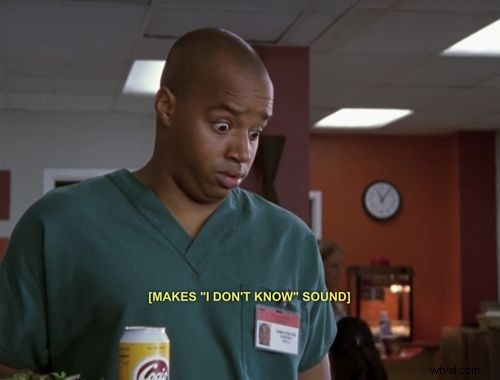
But they then had two choices for bringing the text into their broadcast: to put subtitles in advance in their content or to find a way to be able to add them afterward without modifying the content.
This resulted in two forms of captions: open captions (OC) that are integrated into the video and closed captions (CC) that can be removed :
- Open captions are embedded in the video format without being removable.
- Closed captions are encoded outside the video, which allows you to add and remove them as you wish.
The fact is that closed captions (CC) have become more and more popular in the end. Closed captions are much easier to manage because they can be created and broadcast live, with a teletypewriter transcribing the speeches heard live. On the other hand, media and companies of all kinds have quickly get rid of open captions because of their lack of flexibility.
What differentiates closed captions vs. subtitles?
Okay, the difference between closed and open captions is quite understandable. But why did they invent a different solution named “subtitles”?
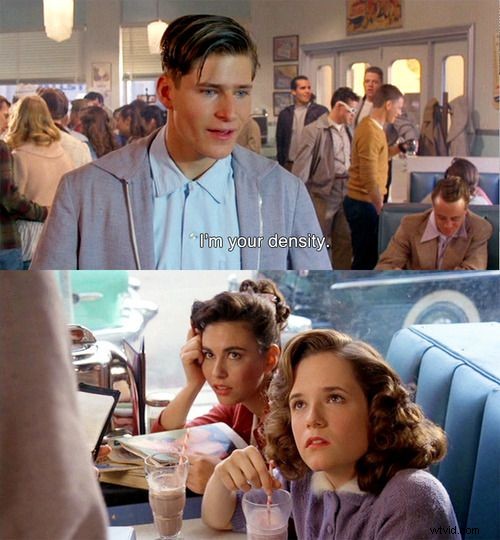
Unlike closed captions, subtitles are not a precise description of the action and sound included in a video.
Assuming that people can already hear sound effects, they only reproduce the dialogues of the characters and the narration. Their principle is to make speech understanding as simple as possible.
But that’s not all. Subtitles were also invented to respond to an almost pedagogical problem: to help people understand the content in a foreign language and even to learn that same language. Their aim is therefore to translate several languages and to reach a wide range of audiences.
To summarize :
- Captions = textual transcription of the action, sounds, and dialogues of a video for the hearing impaired.
- Subtitles = textual transcription of dialogues for people who speak a foreign language or who want to improve their understanding of what they see.
Now that you have understood the difference between subtitles and closed captions, what are the reasons for choosing one over the other?
Why should I choose between captions and subtitles?
If you are a company that wants to distribute marketing content, the difference in usage between captions and subtitles is not insignificant. Each form of text transcription can reflect a different image to your audience.
Why use closed captions ?
Pros :
- Makes your content accessible to the widest possible audience
- Gives your brand an image of open-mindedness and concern for social causes
- Allows your audience to understand your videos even in noisy environments
Cons:
- Is not necessarily the most ergonomic for normal viewers: indications of actions and noise can be disturbing.
Why use subtitles ?
Subtitles also have their advantages and disadvantages:
Pros:
- They make your content accessible to all types of languages and nationalities.
- They make your content more understandable to any type of audience
Cons :
- Your audience may miss other types of audio information that are not dialogue (as they watch the video while vacuuming for example).
Where can I make subtitles or captions ?
When you find which one of the textual display suits you the best, which solutions can help you to integrate them fast and easy ?
For 4 years, we have created in Checksub one of the easiest subtitling tools available for video creators, media, and translation agencies of all sorts. It combines some of the newest technologies in the market :
- the best speech recognition and machine translation APIs to analyze your video
- A powerful and very easy to use online transcription editor
- A collaborative platform for working with translators, clients, and other partners
If you want to add subtitles in your video, you may try it for free !
However, our solution doesn’t provide closed captions. You can add by yourself from your subtitle transcript with [] symbols.
Conclusion :
The choice between closed captions depends on the audience you want to target with your video content.
If you want to target a large portion of a defined population, including those who may have listening and comprehension problems, choose closed captions.
If you want to open your content to an audience of different and diverse nationalities, choose subtitles.
Eventually, you can always choose both, to have twice the visibility you want!