
Plenty of ways are available for downloading videos from Twitter, Facebook and YouTube. But you may find download embedded videos is not easy. In this post, we list the top 4 ways to help you download embedded videos successfully.
How much time do you spend on video streaming websites? Have you ever wondered download embedded videos from websites and watch them without distraction? If the answer is yes, you can try the following ways to download embedded videos to your device.
Top 4 Best Free Methods to Download Embedded Videos
- Download Embedded Videos Directly from Websites
- Download Embedded Videos with Browser Extension
- Download Embedded Videos with Chrome Browser
- Download Embedded Videos Online
If you are interested in how to edit embedded videos, you can use MiniTool MovieMaker released by MiniTool.
Download Embedded Videos Directly from Websites
You may find there is no download button available on some video-sharing websites. But they allow you to save videos directly from their websites like save images online.
Here’s the steps on how to download embedded video online.
Step 1. Open the website and find the video you want to save.
Step 2. Right-click on the video and choose the Save video as… option to save the embedded video.
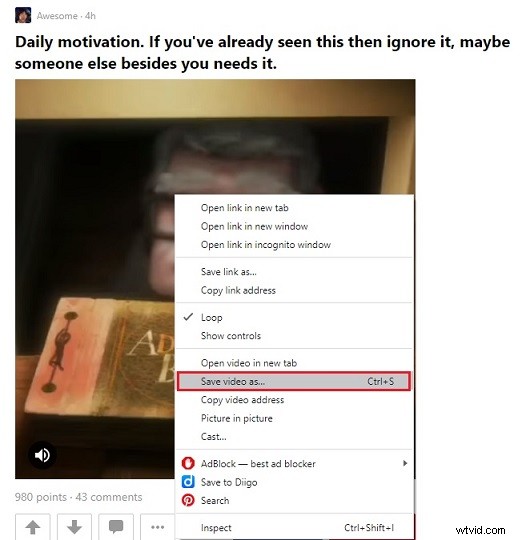
Step 3. Then select a destination folder and press the Save button.
Download Embedded Videos with Browser Extension
If the first method doesn’t work, you can use browser extension to capture embedded videos. Here highly recommend the NO.1 embedded video downloader – Video DownloadHelper. It’s available in both Chrome browser and Firefox browser. It allows for download HLS streamed videos, Dash videos, flash videos and so on.
More than that, you can convert the downloaded videos to any format such as AVI, WMV, MP4 and MP3.
Here’s how to download embedded video online.
Step 1. Go to Chrome Web Store and install Video DownloadHelper on your device.
Step 2. Open the video-sharing website and start playing the video.
Step 3. Click this button and choose the resolution you want. Then you can select Quick download, Download or Download & Convert from the drop-down list.
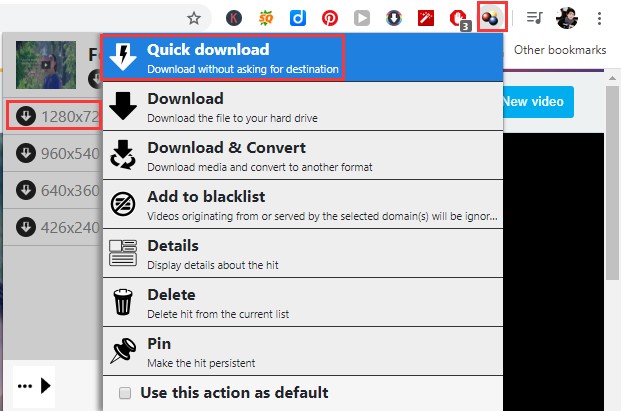
With this extension, you can not only download embedded flash videos, but also download embedded Vimeo videos online.
Related article: 2 Ways to Download Flash Videos Successfully.
Download Embedded Videos with Chrome Browser
Actually, you can also download embedded videos without extensions.
Here’s how:
Step 1. Launch the Chrome browser and enter the video site to find the target video.
Step 2. Hit the F12 key and navigate to Network > Media.
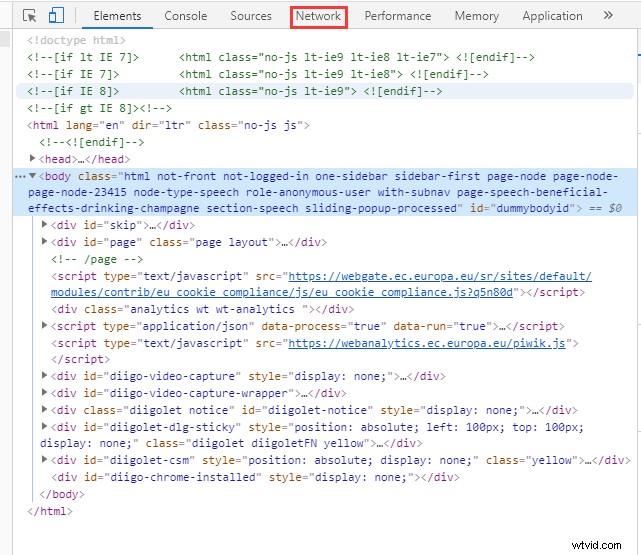
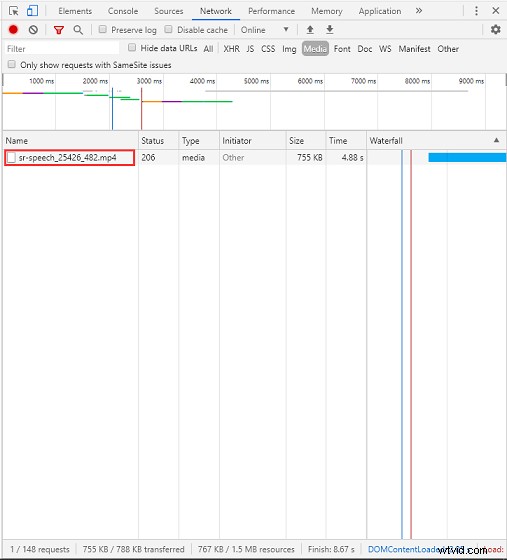
Step 3. Press the F5 key to refresh the webpage and click the Play button to play the video.
Step 4. Right-click on this file and choose the Open in new tab option. Then the embedded video will be downloaded automatically.
Download Embedded Videos Online
The last method is using an online video downloader to rip the embedded videos from websites. To download embedded video online, you can try Online Video Converter. It’s the most popular online video downloader that supports a variety of video streaming sites including Vimeo, VK, TED, Facebook, Godtube and many more.
With it, you can also download and convert the embedded video in the following formats: MP4, AVI, MOV, MP3, WAV, OGG, AAC, M4A, etc.
Here’s how:
Step 1. Enter the Online Video Converter website and paste the URL of the embedded video.
Step 2. Choose the format you like and click on Start to start convert URL.
Step 3. After that, tap on DOWNLOAD to download the embedded video.
Conclusion
Now, you must know how to download embedded videos in the top 4 ways. Have a try!
If you have better suggestions about this post, please leave a comment below.