
MIDI is commonly used for playing, editing and recording music. Sadly, MIDI files are not compatible with all media players. To play MIDI files on your computer, you’d better use a MIDI player. Here offers you the top 5 best MIDI players.
MIDI, formally known as Musical Instrument Digital Interface, is an electrical connector that can play a wide variety of electronic musical instruments, which is portable for composers, musicians and record producers.
Compare to recording audio files (Want to change your audio file format? Try MiniTool software – MiniTool MovieMaker), MIDI files are much smaller and take less space on the computer. But the drawback is MIDI files can’t be played on some media players. Thus, this post picks out 5 best MIDI players that works perfectly on your computer.
Top 5 Best MIDI Players
#1. Windows Media Player
Windows Media Player is a built-in media player for Windows. It supports the most popular file formats including MIDI, MP4, AAC, MP3, FLAC and more. With this ease-of-use software, you can play MIDI smoothly and convert it to other audio formats. Windows runs on all Windows operating systems.
#2. VLC
The second MIDI player I would recommend is VLC media player. You may heard of this player before. It’s a powerful cross-platform media player that works on Windows, Mac, iOS, Android, and Linux.
This free MIDI player is open-source. It can be used to play almost all formats and edit the media files. If you are interested in other interesting features of VLC, see this post: 4 Hacks You Need to Know about VLC Media Player.
#3. Logic Pro X
Logic Pro X is a MIDI sequencer software developed by Apple. It not only lets you play MIDI files but also lets you edit, record and produce audio files. What’s more, this MIDI player shows music notation in real-time as you play MIDI.
But unfortunately, this awesome software only available in the Mac Apple Store.
#4. Synthesia
Synthesia is a piano keyboard trainer but supports playing MIDI files as well as connecting with MIDI devices. Also, Synthesia offers more than 150 songs in the Music store. When connecting a digital keyboard, you can choose to show traditional sheet music or the falling notes.
Aside from that, this MIDI player can rate your performance and help you improve yourself. Synthesia supports Windows, Mac, iOS, and Android. Now, input MIDI files, connect a keyboard and have fun!
#5. 5K Player
5K Player is a free MIDI player for Windows and Mac. With it, you can play, modify and optimize MIDI files. Also, this program supports other audio formats including OGG, FLAC, MP3, etc.
Related article: 7 Best Free MIDI Editors to Edit MIDI Files | 2020 Guide.
How to Play MIDI Files
Now, let’s see how to play MIDI files with an online MIDI player – Online Sequencer. It allows you to import MIDI files and create your music online.
Step 1. Go to Online Sequencer and click on Import MIDI.
Step 2. Upload the MIDI file you want to play and click the Continue button.
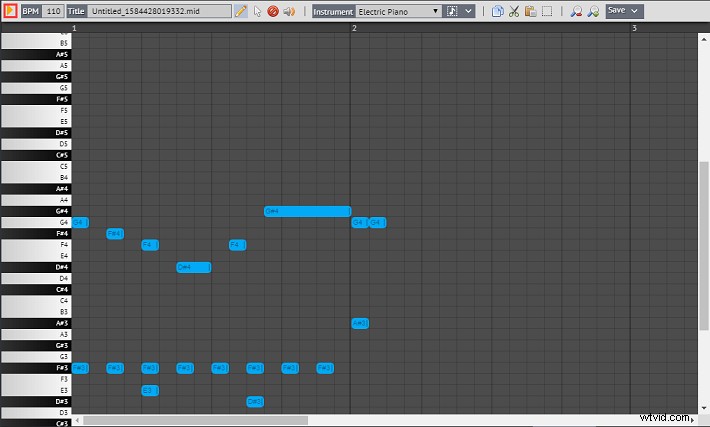
Step 3. Then tap on Preview/Import to open the edit window.
Step 4. Lastly, hit the playback button to play the MIDI file. Or you can edit it as you like.
Conclusion
This post provides 5 best MIDI players and tells you how to play MIDI files online. Which MIDI player do you prefer? Please tell us in the comments bar.