
A montage is a collection of images and video clips. If you want to make a video montage, here offers you 5 best video montage makers including MiniTool MovieMaker developed by MiniTool. Check out this post to learn more details.
MiniTool MovieMaker
MiniTool MovieMaker is a free montage maker that supports various media files including video, audio, image, and GIF. You can combine pictures, GIFs, video clips and music into one video. Meanwhile, it allows you to rearrange these files and do some editing.
What’s more, the video montage maker can be used to convert multiple pictures to a video or turn video into MP4, AVI, WMV, WebM, MP3, GIF, etc.
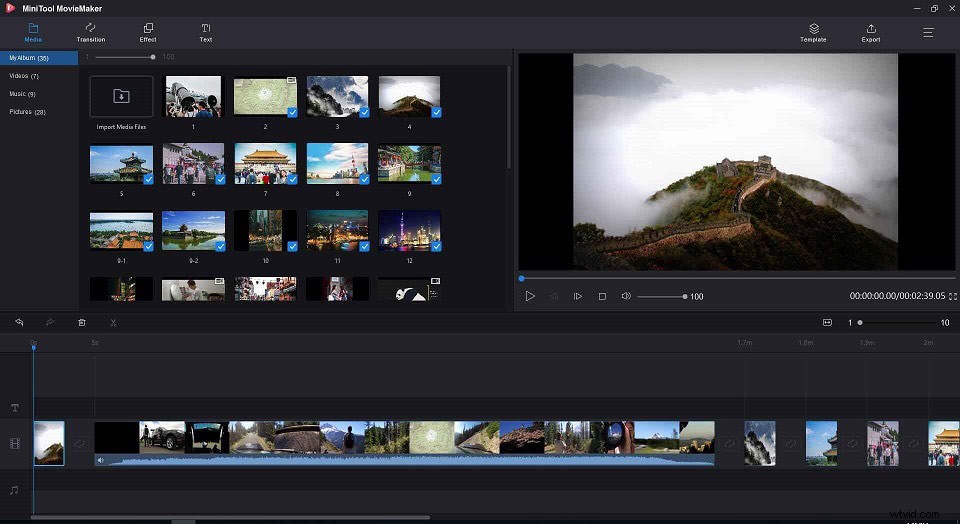
Here’s how to make a montage with MiniTool MovieMaker.
Step 1. Download and install MiniTool MovieMaker.
Step 2. Launch it and shut down the pop-up window to enter the main interface.
Step 3. Click on Import Media Files to open all footages you need.
Step 4. After importing the footages, drag and drop them to the timeline.
Step 5. Then you can edit these footages as you want, such as add transitions, apply effects, add text, add music, remove unwanted parts and so on.
Step 6. Go to the Export window by tapping on Export and configure the output settings.
Step 7. Finally, you can hit the Export button to export the video montage you just created.
The resolution of photo footage is too slow? Read this post to improve photo resolution: How to Increase Resolution of Image + 5 Online Photo Enhancers.
Kapwing
This is an online montage maker, which turns all of the images and videos into a montage online. It supports the following file formats: MOV, MP4, GIF, PNG, JPG, etc. It allows you to rearrange and design the imported clips. To enhance the video montage, you can add stickers, images, and text to it.
Moreover, the aspect ratio of montage can be landscape, square or 9:16.
Video Montage
Video Montage is a video montage maker app available for Android. It’s capable of merging multiple clips and cropping or trimming the unwanted parts. This handy montage maker also enables you to add music to video and change the video speed.
Unlike Kapwing, this app won’t watermark your video montage. See this post: Top 5 Online Watermark Removers to Get Rid of Watermarks.
VideoStudio
VideoStudio is a professional video editor that equips with a set of video editing tools including the video montage maker – Corel FastFlick. It offers exquisite templates, titles and over 1500 filters. You can put all clips together and turn them into a video montage. Then directly share your video montage to YouTube or Vimeo.
Apart from that, it lets you record your screen and webcam simultaneously, and do multi-camera editing.
If you are looking for a montage maker for all skill levels, VideoStudio is surely meet your needs.
Adobe Spark
Developed by Adobe Systems, Adobe Spark is not just a design software but a montage maker for creating video and photo montage. It holds thousands of stock photos and comes with all necessary editing tools.
With it, you can make video or photo montage anywhere anytime.
Conclusion
After reading this post, you must know the main features of the top 5 montage makers. Choose the one you like and make a video montage!