
If you desire to add music to video online, you’ve come to the right place. This post will introduce 2 online video editors and clear instructions on how to add audio to video online. And if you try to add music to large-size videos, MiniTool MovieMaker, a professional video editor, is recommended here.
Adding music to video is an effective method to make your videos more impressive and creative. Sometimes you might try to add music to video online just because of its convenience. This post chooses 2 best online tools to add audio to video online.
Add Music to Video Online – Clideo
Clideo is a professional online video editor that enables you to create movies with video clips, images, and GIFs. Except for adding audio to video online, it can merge, resize, cut, loop, crop, flip, and reverse videos. Also, it can make slideshow or meme, add subtitles to video, etc.
Here’s the guide on how to add music to video online with Cloideo:
Step 1. Enter Clideo.com and open the website.
Step 2. Under Tools section, find and click the Add Music to Video.
Step 3. Click the Choose Files to upload your video.
Step 4. Tap on the Add Audio to upload your audio.
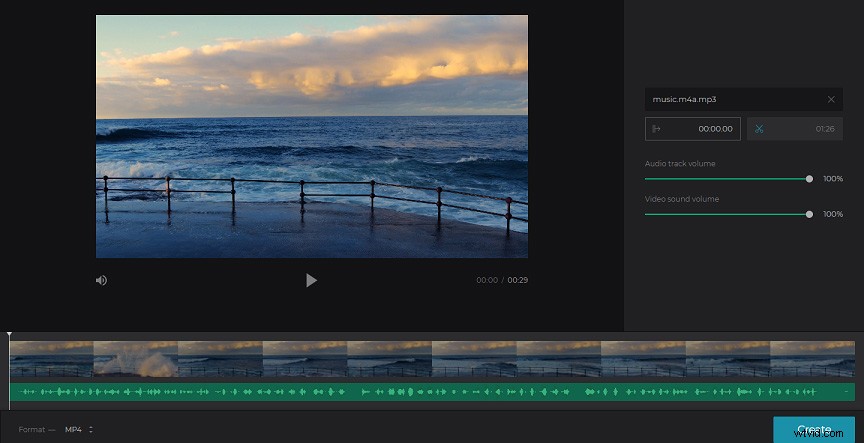
Step 5. Click the scissor icon to trim audio.
Step 6. Move the slider to adjust the audio track volume and video sound volume.
Step 7. Hit the Create to make the video with music.
Add Music to Video Online – FlexClip
If you want to add music to video online, Flexclip is also a must-try online video editor. With it, you can make videos with its various templates, such as birthday videos, wedding videos, music videos, etc. It also offers many editing tools, such as video cutter and trimmer, text editor, audio editor, and more.
Here’s the guide on how to music to video online with FlexClip:
Step 1. Open the FlexClip.com website and log in.
Step 2. Choose a video template and click Customize to enter the editing window.
Step 3. Click the Add Local Media to import your video.
Step 4. Choose the Add Music to select a song, click use to add it. Or hit the Browse My Files to add your audio files.
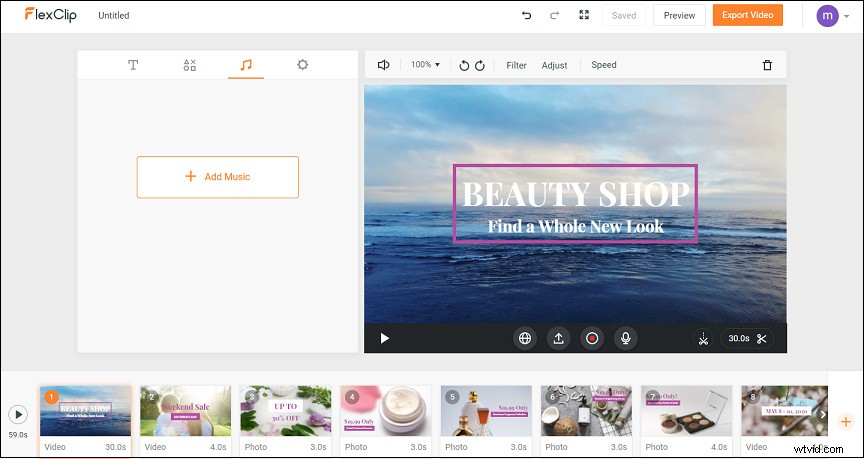
Step 5. Trim the audio track.
Step 6. Preview, export, and save your video.
Other 6 Tools to Add Music to Video Online
Besides Clideo and FlexClip, there’re many other tools for you to add audio to video online easily.
Here’s the list of other 5 video editors to add audio to video online.
- Kapwing
- Biteable
- Pixiko
- InVideo
- Adobe Spark Video
Bonus Tip - Add Music to Video Offline – MiniTool MovieMaker
MiniTool MovieMaker is a free and no-watermark video editor. With it, you can create videos from pictures and pictures and edit them as you like, such as trimming and splitting videos. And it’s also a GIF maker and audio editor. Besides, it can convert videos to GIF or GIF to video, and more.
Step 1. Download, install, and launch MovieMaker.
Step 2. Import your video and music files.
Step 3. Add these files to the timeline.
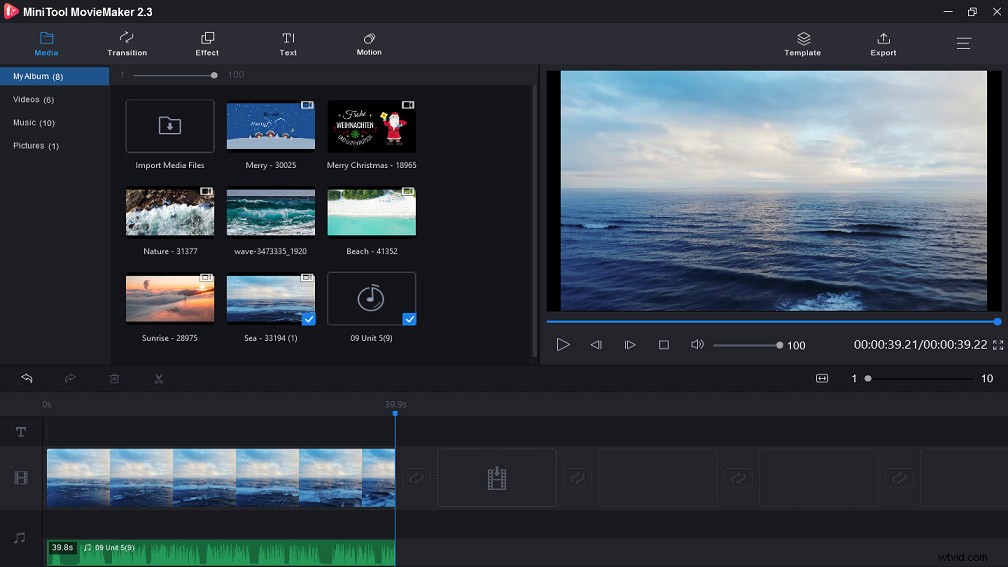
Step 4. Edit your video and music.
Step 5. Export and save the video.
Bottom Line
Do you master the 2 methods to add music to video online? Now, it’s your turn to practice. You can try Clideo or Flexclip to add audio, and you can also choose one tool from the other 6 recommended online video editors.