
Tumblr is a popular microblogging and social networking website that allows users to post images, videos, GIFs, texts, and more. Sometimes users may encounter problems like Tumblr videos won’t play. How to solve this issue? This post will answer the question.
Before learning how to solve the Tumblr videos won’t load issue, let’s take a look at the possible causes of Tumblr videos not working. (Try MiniTool MovieMaker to create Tumblr GIFs!)
- Poor Internet connection: Video playback problems are often the result of slow internet connection.
- Corrupted cache & cookies: Corrupted cache and cookies usually cause issues when you play videos in your browser.
- Browser extension: Using extensions like Adblocker can result in playback issues.
- Outdated browser or Tumblr app: The latest version of the browser or the Tumblr app fixes some bugs that lead to the Tumblr videos not playing problem.
- ……
Now, follow the below solutions to fix “Tumblr videos won’t play”.
Solution 1. Clear Cache & Cookies
First, check the internet speed and restart the router and modem. If it doesn’t solve the Tumblr videos not playing problem, clear your web browser’s cache and cookies.
Step 1. Open your Chrome web browser.
Step 2. Click the three dots and choose More tools > Clear browsing data.
Step 3. Set the time range and check the options Cookies and other site data and Cached images and files. Then click the Clear data button.
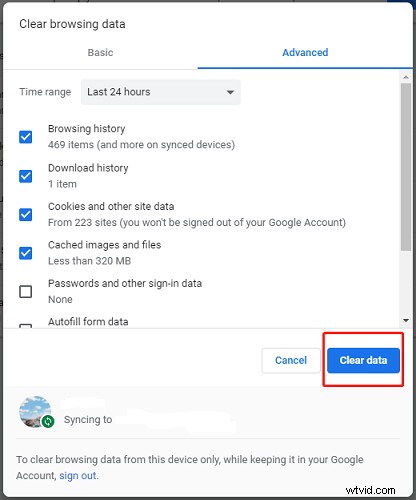
Step 4. Then restart your browser, go to Tumblr and check if the Tumblr videos won’t load issue is solved.
Solution 2. Disable or uninstall Adblocker
Another solution is to disable or uninstall Adblocker.
Step 1. Open Google Chrome.
Step 2. Click the three dots and go to More tools > Extensions.
Step 3. Find the Adblocker extension you need to disable or uninstall.
Step 4. Turn off the Adblocker extension or click the Remove button to uninstall it.
Step 5. Go back to Tumblr and press the F5 key to refresh the web page.
Solution 3. Update Your Browser or Tumblr App
If Tumblr videos won’t play on Android or Chrome, you should check for updates.
On Android
- Go to Google Play Store and find the Tumblr app.
- Click Update if there is any update available.
On Chrome
- Click the three dots in your Chrome web browser.
- Choose Settings from the drop-down menu.
- Click on About Chrome and Chrome will check for updates automatically.
- Update Google Chrome to the latest version.
Related article: Instagram Not Working? Here’re 8 Ways You Can Try!
Solution 4. Download Tumblr Videos
If the above methods are not working, you can save Tumblr videos for offline viewing.
Take these steps to download videos from Tumblr.
Step 1. Right-click on the Tumblr video that you want to download.
Step 2. From the popup menu, choose Save video as to save this Tumblr video.
Step 3. If you can’t save it, choose the option Copy video address. Open an online Tumblr video downloader and paste the copied link. Download and save the Tumblr video.
Conclusion
Try these solutions to fix “Tumblr videos won’t load”! If you want to share other solutions with us, leave a comment below!