
It is increasingly impossible to think of a content strategy that doesn’t utilise video as a strong and effective component. Yet for many people there are still barriers and obstacles stopping them from breaking into the video world.
To get some expert insights into this, we spoke with Andy Crestodina, co-founder and CMO of the award-winning digital agency Orbit Media. Over the past 20 years, Andy’s provided guidance to over a thousand businesses, written hundreds of articles on content strategy, SEO and Analytics, and authored the book Content Chemistry: The Illustrated Handbook for Content Marketing.
[You can watch the video on this topic at the top of this post, to listen to the podcast episode, hit play below, or read on for more…]
What is content marketing?
Content marketing is the opposite of advertising. Advertising is about “push” and content marketing is about “pull”.
Advertising is about distraction and interruption. Every advert you’ve ever seen has distracted you while you were doing something, because that’s the nature of advertising. Andy elaborated “They have bought your attention and as soon as they stop paying for it, they stop getting your attention.”
Content marketing is the opposite. It leverages channels like search and social and email to reach people.
Content marketing is giving people what they want (usually educational, sometimes entertainment) to grow brand awareness, to build loyalty and to grow trust. You can grow massive audiences these days through content. Andy told us his favourite quote on content marketing comes from Jay Bear “advertising is hype and content marketing is help.”
Another way to think of content marketing is that it is a giant test of generosity. The brand that gives away the most helpful advice, earns the largest audience, the most trust and the greatest demand.
Why add video to your content strategy?
Video gives you better access to the human brain, by turning your audience into viewers instead of readers.
Video is accessible and compelling. Seeing someone’s face, tone and body language helps establish a connection and build trust in a short space of time.
Web design is all about a visual hierarchy. Images are more visually prominent than text, and videos are more visually prominent than text or images. “When you use video, you have upgraded your format for content all the way to the max.”
For a more in-depth look at marketing and content strategy, check out Andy’s insightful blog post.
How difficult is it to make videos of value?
The reason why people don’t make more videos is not that the tools are difficult. Andy explained “Camtasia, for example, requires virtually no training, you can just start using it. The barrier has nothing to do with tools, the barrier has everything to do with people’s emotions.”
Essentially, the barrier is being shy or squeamish. The barrier is people not being comfortable making something with their face and voice in it.
Speakers have a natural advantage when making videos, because they can adapt their presentation slides into the visuals for the video. Any company that uses visuals or diagrams in their content strategy has that same advantage because those can all be adapted.
Just look at what the social platforms have all done recently. Facebook, Instagram, LinkedIn, they have all re-built themselves around video content. A video post on any of those platforms has incredible reach compared to a regular text post or an image.
Where is the best place to host your video?
Andy took us through the three different types of video businesses use:
- Social Media Video
- Content Marketing Video
- About Us / Testimonial Video
Social media videos are there to drive traffic. They are, obviously, hosted on social media platforms because you’re not concerned about who has ownership of that video. They’re not videos you expect to have longevity. These videos are used to promote something like an upcoming event, or maybe another piece of content you want people to see.
Content marketing videos are where you’re providing something of value that educates or entertains your audience. Andy explained that this type of video is best hosted on YouTube.
Once this kind of video is on YouTube it can be embedded on your website, so you don’t lose a visitor to your site, but you’re also building up an audience on YouTube as well.
The “About Us / Testimonial” video is your trust building video. This is the one you’ve spent more time and money producing. It’s the video that explains who you are and maybe contains testimonials. This is the video you want hosted on your website so that you have full control and ownership of it.
Traffic driving videos – social media platforms
Content Marketing Video – YouTube & your website
About Us / Testimonial Video – solely on your website
Analyzing the results
Outcomes can be measured in a few different ways. If the video is on your website, you can measure the change to the performance of that page. Or if the video is hosted somewhere like YouTube, you can measure the performance of it on that platform.
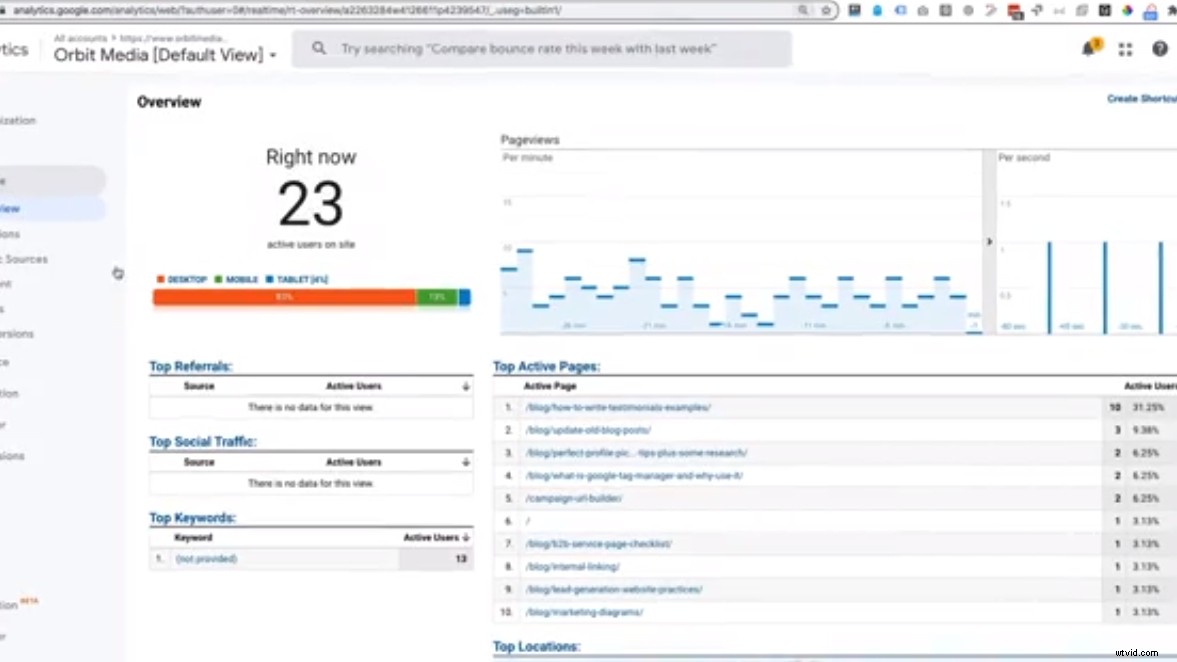
Andy measures his videos through a careful bit of analytics work. Using Google Tag Manager he creates an event to track the video plays, and then in Google Analytics he creates segments to see the differences between the video watches and non-watchers.
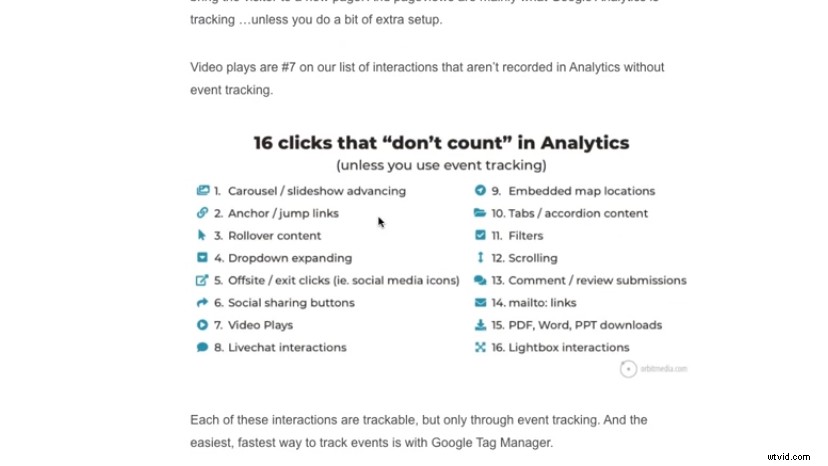
Andy wrote a blog that goes into much more detail but you can see that there are 16 clicks that don’t count in Google Analytics (things like scrolling, dropdown expanding etc.), including video plays. So pressing play on a video isn’t a click that’s counted by Google Analytics, unless you create an event tracking for it.
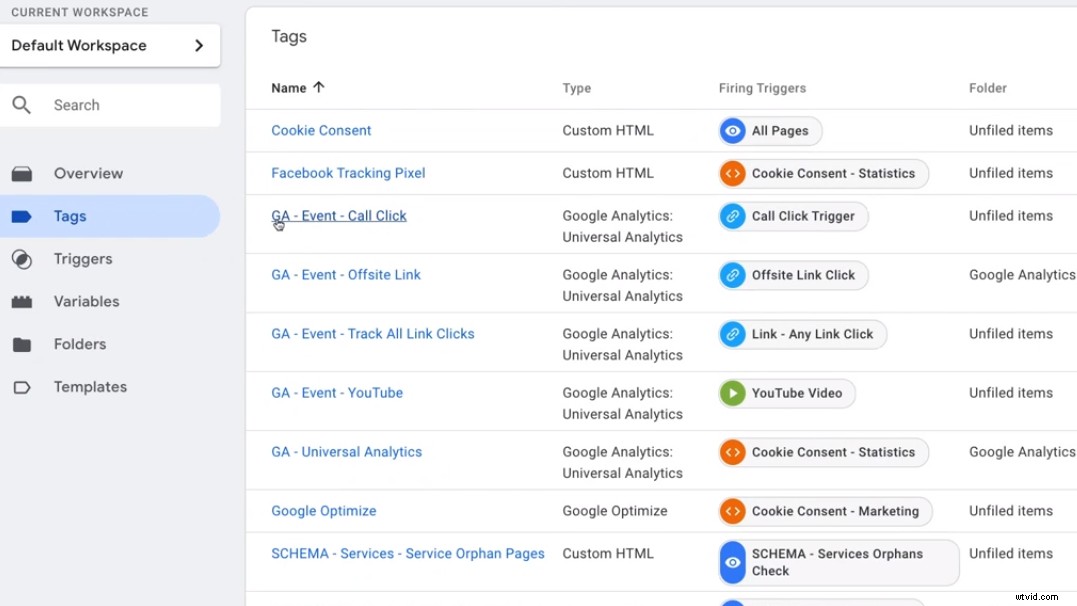
Google Tag Manager acts as a container for all your marketing tracking codes like javascript and Facebook pixels. It can also be used to do some fancy analytic set-up. It’s a free tool and a state-of-the-art way to add and manage marketing tracking codes to websites.
Tag Manager makes the whole process of creating an event very easy, because the variables are already built in. Every event has a category, an action and a firing trigger. Once the trigger is fired, the tag is recorded.
Once the tag is there you’re going to see data flood into these event records. You want to focus on seeing what was the difference to the page before and after you added the video. Did people watch the video? And if so, how did their behaviour vary from people who didn’t want it?
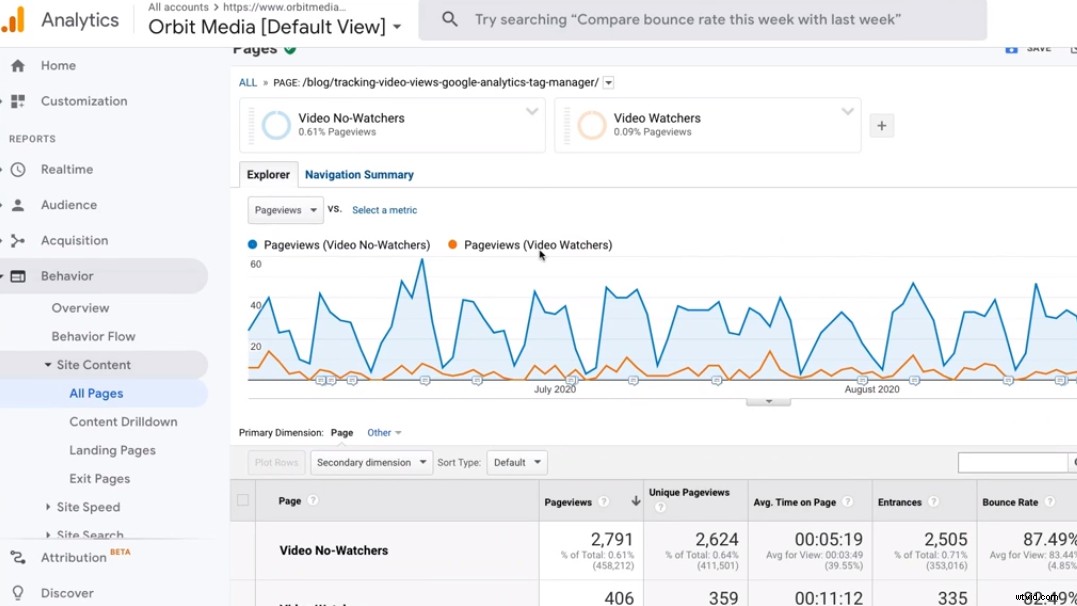
This shows the difference in data from video watchers and non-watchers, comparing the habits of the two. This kind of data can be absolutely invaluable.
Let’s say you need to get a budget increase approved in order to make more content marketing videos. How do you convince your boss or your client that this is a worthy endeavor?
From this comparison you can see the average amount of time spent on the page is doubled by people who watched the video. The comparison shows watching the video reduced the bounce rate, and that viewers were more likely to continue their path through the website than non-viewers.
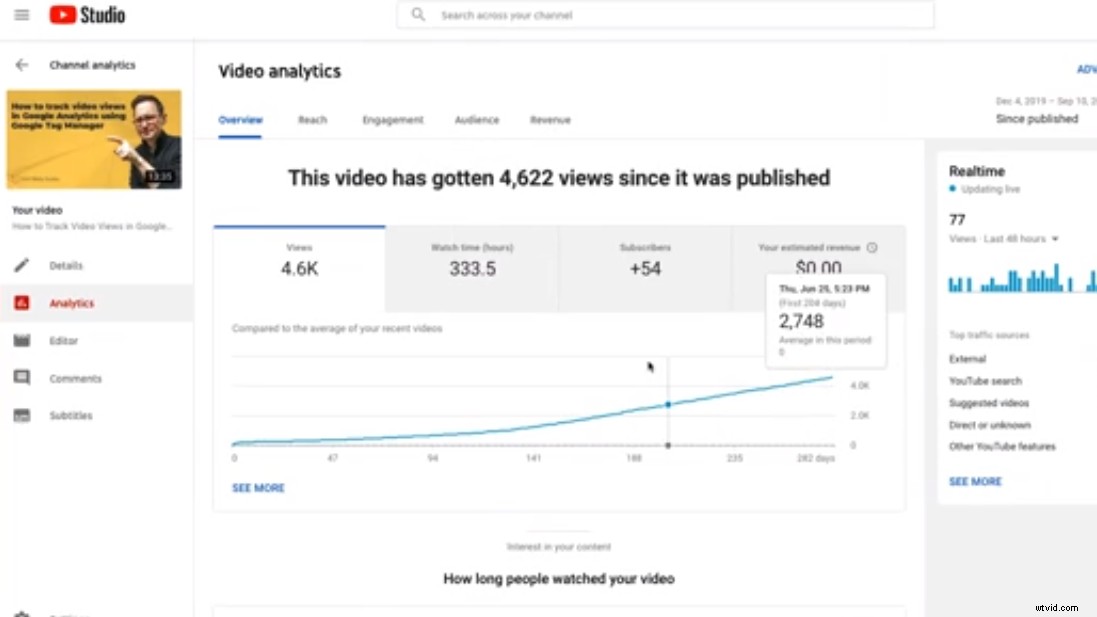
If your video isn’t hosted on your website and is instead on YouTube, YouTube Studio has its own analytics for you to take advantage of.
YouTube Studio also lets you analyse how many viewers watched your video because it was suggested to them by YouTube. This is key in helping you to evaluate the importance of using YouTube as your hosting partner.
Andy’s advice for people starting to make videos
Leverage your strengths
Making videos for any content you have that is consistently performing well over time is an integral part of your content strategy. This is easy to find out using Google Analytics, it sorts all your website pages by number of views.
Once you know which content is already attracting the most traffic, create videos for that content and then add it right to the top of that page.
Andy explained that everyone’s website has a highway flowing through it, and you need to know where that highway is and where the top entry points are. As soon as you know what the most popular URLs are, you know where to add more internal links, more calls-to-action, and where to upload your videos.
Get Camtasia
Do some measurements
Without a scoreboard it’s hard to stay motivated and it’s hard to get excited about what you’re doing. If you’re not measuring your results, then how do you know if you’ve hit a home run? Measurements are fundamental to your content strategy and your success.
Work harder
Yes, you can make a video relatively quickly. But if you put more work into making a video, you will see that pay off a hundred fold with the engagement.
A great example of this is making sure your video has a “Thumb Stopper”, something to make your audience stop scrolling past your video.
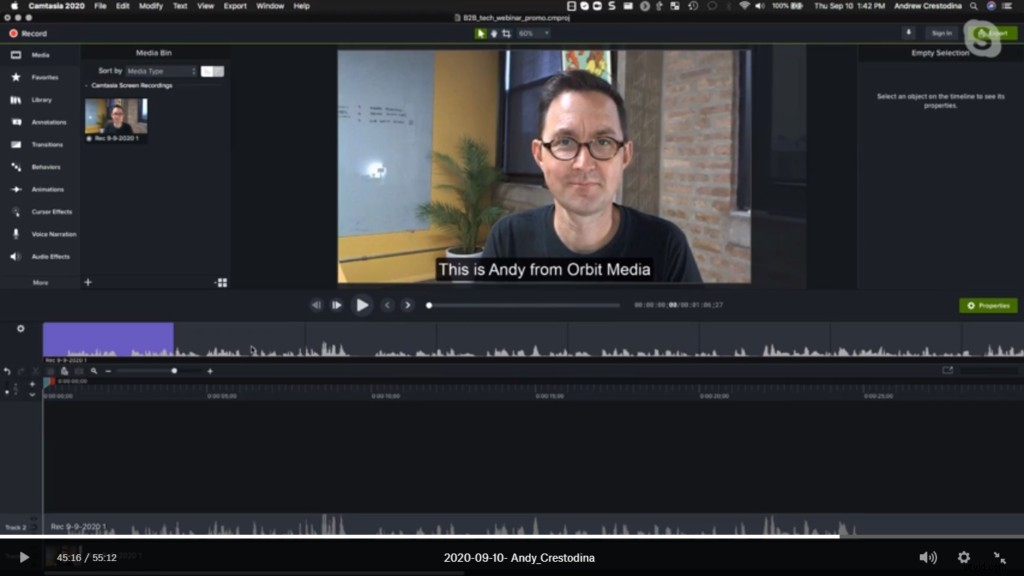
Using a tool like Camtasia, it’s vital to add captions to your social media and YouTube videos. Without a caption you don’t have that “Thumb Stopper” which will make someone stop scrolling through their timeline and actually watch your video.
Content marketing really benefits if you spend more time and more effort in its creation.
Are you ready to add more videos to your content strategy? Do you still feel like there are barriers in place?
For more expert advice and tips visit TechSmith Academy on YouTube or listen to the Podcast.