
REC

Recommended: Video Production, Editing & Gear Maintenance Guide

 WTVID >> WTVID >  >> video >> Video Ideas

Highlight Key Points in Your Videos with Filmora’s Callout Features

Make a Stunning Callout with Filmora

Preparation

Before you start, gather the essentials:

  • A computer running Windows or macOS
  • Your source video footage
  • Filmora video editor installed

Step 1: Launch Filmora

Open Filmora and click “New Project” to create a fresh canvas.
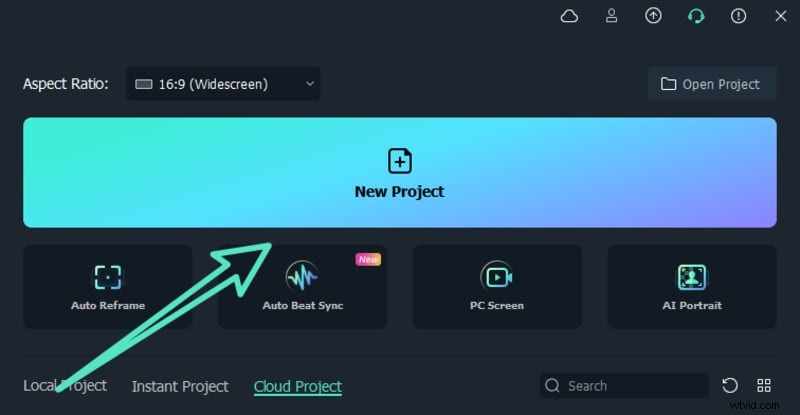
Highlight Key Points in Your Videos with Filmora’s Callout Features

Step 2: Import Your Footage

In the Media Library, click Import Media or drag files directly. Select the clip you want to annotate and hit Open. The video now appears in your library.
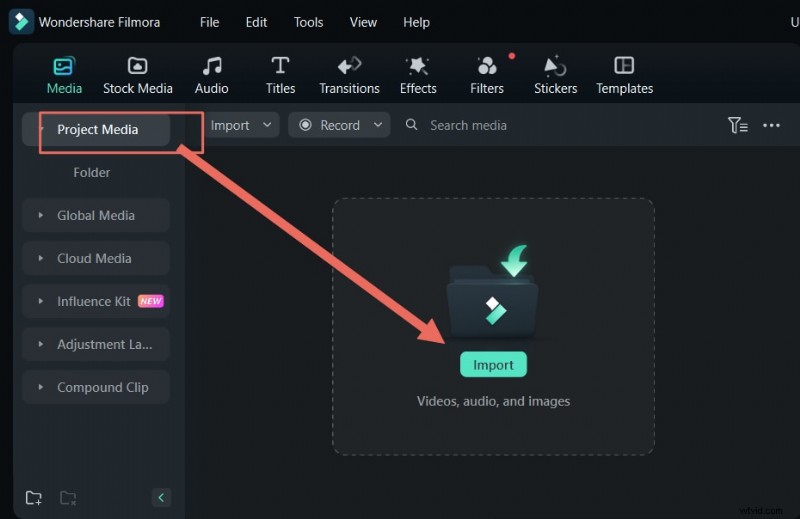
Highlight Key Points in Your Videos with Filmora’s Callout Features

Step 3: Add a Callout Title

Navigate to Titles in the top menu. Choose a style that matches your project’s tone. Drag the chosen title onto the timeline above your clip. Double‑click the title to edit its text and appearance.

Highlight Key Points in Your Videos with Filmora’s Callout Features

Step 4: Export Your Final Video

When your callouts are in place, export the project. Filmora offers a range of formats—MP4, MOV, AVI, and more—so you can share the video wherever you need.

Key Takeaways

  • Filmora’s callout titles let you spotlight critical information effortlessly.
  • Explore the diverse selection under the Titles library to find the perfect visual cue.
  • Use these tools to enhance storytelling and engagement in any video project.

  1. 6 Expert Techniques to Craft a Compelling Short Film Script

  2. Top Experimental Films of All Time: Iconic Avant-Garde Masterpieces

  3. 4 Stunning Music Video Visual Effects: Pro Recreation Guide

  4. 30-Day Creative Photography Challenge: 30 Jaw-Dropping Trick Photography Ideas

  5. Jake Gyllenhaal's Insights: Crafting World-Changing, Character-Driven Cinema

Video Ideas
  1. Mastering Zoom in Microsoft Teams: A Comprehensive Guide

  2. Best 50mm Lenses for Portrait Photography: Top Picks for Every Budget

  3. Overcoming the Video Editing Log Jam: Mastering Logging and Capturing Footage

  4. Master Portrait Retouching with Luminar AI & Neo: Beginner-Friendly Guide

  5. How to Record Skype Calls: Best Tools for Effortless Audio & Video Capture

  6. Capture Stunning Outdoor Portraits Without a Reflector: Expert Techniques

  7. Add TV Static to Video: A Step-by-Step Guide for Engaging Visuals

  8. Ultimate Guide: How to Choose the Best Portrait Lens for Stunning Shots