
Push the envelope to break free of creative chains — even your failures can be winners
By Laurence Chen | Published Dec 13, 2013 8:47 PM EST
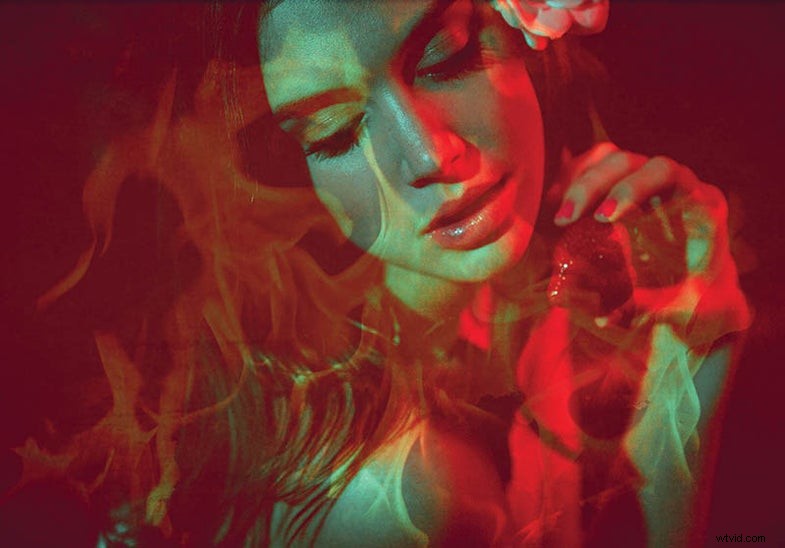
There’s nothing like the freedom of experimenting: nobody to please but yourself, and mistakes are fine. It helps you develop a repertoire of strategies, approaches, and ideas that come together in unexpected ways. And you don’t give up when something goes wildly wrong. That’s just what helped fashion photographer and digital retoucher Julia Kuzmenko McKim create this image for her Flames portrait series. When shooting for clients, she posts a Pinterest “mood-board” to get everyone on the same page. But this personal project required only experimentation. “I really enjoy improvisations where we just get together and play,” she says.
It began one afternoon in McKim’s basement with some red and green cellophane wrap and a few strawberries. Her setup included a Paul C. Buff Einstein monolight with a beauty dish and a Canon Speedlite 580EX as a secondary source. For a dark, mysterious mood, she lit her subject with the monolight’s modeling light.
This made focusing hard, but her Canon EOS 5D was set to activate autofocus from the rear AF button instead of the shutter; she held focus by locking on once, then maintaining a consistent distance from the model.
At first she tried to capture motion blur, but that didn’t work. Then she used a macro lens to isolate the model’s mouth with a strawberry, but that failed, too. After trying a few more variations, McKim finally captured some poses she liked.
But another problem arose: underexposure. She had been shooting in conditions that forced her to set her camera’s LCD brightness higher than normal. Because she had forgotten to reset it when checking the images during the shoot, her exposures came out too dark. As she worked on fixing the images in software after the shoot, she realized she could enhance the pictures with blending modes in Adobe Photoshop. And while she was adding layers, why not add some dramatic interest as well?
In the end she made selective color adjustments and two layers of generic flames, one blended with Overlay and one with Soft Light. She sized and positioned the flames exactly with the Free Transform tool.
“The entire series is an artistic happy accident,” McKim says. “I didn’t know what to do in postproduction, so I tried a little of everything just to see what worked best.”
For more of Julia Kuzmenko McKim’s work, go to www.juliakuzmenko.com.