
Histograms can help you properly expose your projects both in-camera and in post. Find out how with this practical guide.
I almost hate to admit this, but it took me a long time to really warm up to using histograms both in camera and in post. Sure, they seemed helpful, but they also looked a little intimidating and confusing — like an advanced trigonometry illustration floating in the corner of you screen, judging your composition and camera settings.
Yet, when I ventured deeper into the wonderful world of histograms, I discovered that their most important asset is their pure, uninhibited honesty.
Histograms don’t lie, they don’t auto-correct, and they don’t leave anything to the imagination — at least as far as exposure is concerned. So, if you were like me, here’s a quick rundown of everything you need to know about your histograms and how to use their (sometimes brutal) honesty to your advantage.
Basic In-Camera Histograms
This is a great tutorial on how histograms work in your camera. Your basic histogram — which you can find in the majority of DSLR and mirrorless prosumers, as well as most cinema level and above cameras — will at least have a simple black-and-white histogram option that monitors your exposure through your viewfinder in real time.
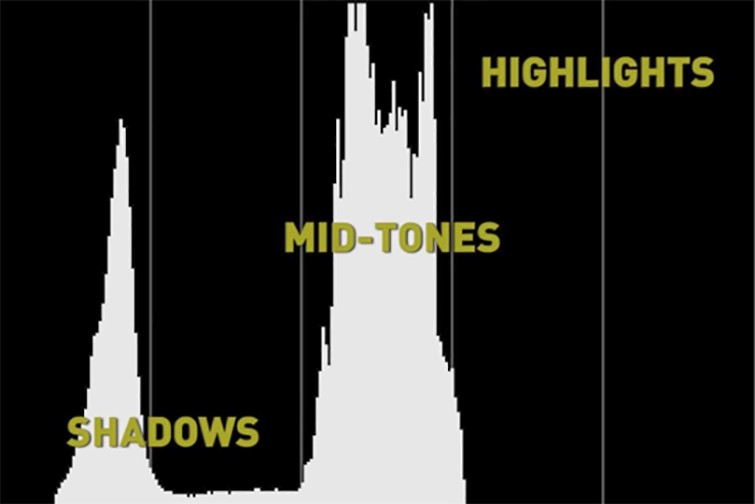
The histogram breaks down your shadow, mid-tone, and highlight levels (as you can see above). Your goal is to keep the levels steady enough that they don’t get underexposed or overexposed (peaking), which is where you lose information. This is where the honesty comes in: while shots may sometimes look well exposed through your viewfinder, they might actually be underexposed or overexposed and you won’t know it — unless of course you check your histogram.
Pro-tip: if you really want to cement your understanding of working with a histogram while filming, try shooting in black-and-white to get a better perspective on the different tones and how far you can push them before they fall off or peak out.
Multi-Color Histograms
Once you understand the basic histogram in your camera settings, you may find that there are other histogram options available. Many cinema-grade cameras include either three separate histograms for the colors red, green, and blue, or they feature a combination histogram that includes all three together on top of each other (pictured below). While this video is more for photography and Photoshop, the concepts of how color histograms work translates to video.
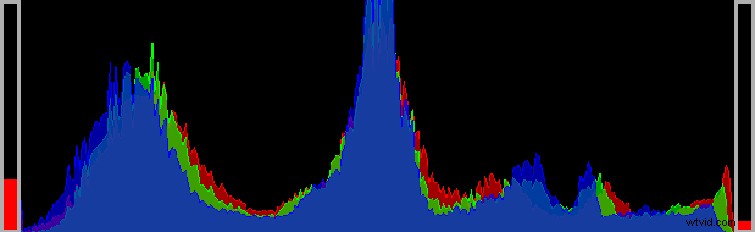
As you can see above, you have your same valleys and hills as a regular histogram but with the RGB color spectrum covered so you can keep track of each color individually.
Histograms in Post
Finally, after you work in-camera with histograms, you can also use them in post to further tinker with your exposure. However, unless you use histograms in-camera while shooting, if you clip or peak your footage, you won’t have the necessary information to fully work with your exposure after the fact. That being said, if you did record correctly, histograms can be a great tool for adding (or subtracting) detail to your shadows, mid-tones, and highlights across your three-color spectrum.