
Dig into the primary differences between Rush and Premiere Pro to help you decide which software fits your projects and workflow.
Every year, NLEs update with new features, plugins, and sometimes, an entirely new function page (see Resolve and the addition of Fairlight & Fusion). Editors already working on the software usually welcome the addition of new features. However, new additions can also make the water that extra bit deeper for new users looking to jump into the world of editing.
That’s why we’ve started to see an increase in friendlier versions of the software, with the Cut Page from DaVinci Resolve and Premiere Elements with Premiere Pro.
However, Adobe also has another offering with Premiere Rush, which serves as Adobe’s go-to desktop and mobile app. It’s designed to be user-friendly to new editors, content creators on-the-go, and a slimmer alternative to Premiere Pro.
If you’re ready to jump into editing and trying to decide which software from the Adobe range is better for you, but are unable to afford the full Creative Cloud subscription, we’ll outline the primary differences between Rush and Premiere Pro.
We’ll also cover which software you should run with, depending on what content you plan on editing.
The Price
While the Adobe Creative Cloud subscription offers you the full array of tools provided by Adobe, by no means is it cheap. There are three price points for the entire cloud subscription.
- Monthly at $52.99
- Annual plan prepaid $599.88
However, if you’ve been researching the benefits of Premiere Rush, you may read that there’s a free version. To some extent, that’s true, but not entirely. You can use Premiere Rush for free for only three exports. After that, you must pay the total amount to use the software and export completed videos.
For a standalone package for Premiere Rush, there are two pricing models.
- Monthly plan: $9.99/mo.
- Annual plan, prepaid: $119.88/yr.
Meanwhile, for Premiere Pro, there are three pricing models.
- Monthly plan: $31.49/mo.
- Annual plan, prepaid: $239.88/yr.
- Annual plan, paid monthly: $20.99/mo.
In the grand scheme of things, an increase of $110 annually or $10 monthly ($120 annually) isn’t a massive sum of money. However, that extra $10 for Premiere Pro could be a significant expenditure for students and those under a strict budget.
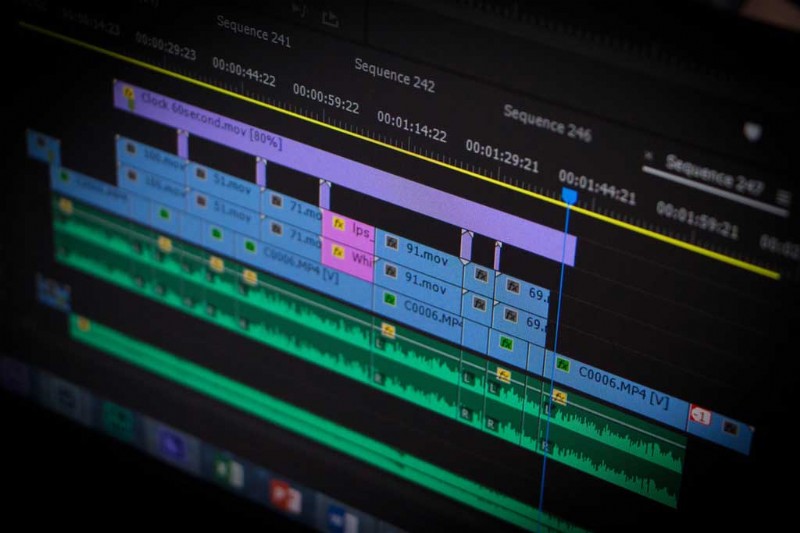
Premiere Pro: Who’s It For?
I think you’d be hard-pressed not to know of a creative who hasn’t heard of Adobe Premiere Pro. One of Adobe’s flagship programs that likely sits just behind Photoshop in terms of popularity.
Premiere Pro is the heavy-duty hitter that can be, and is, used for anything from short films to feature films. This standalone software has all the necessary functions to execute a comprehensive, simple edit.
Initially, many in the industry saw Premiere Pro as a tool for amateur filmmakers. However, it has since developed into an asset capable of editing Hollywood feature films such as David Fincher‘s Gone Girl and 20th Century Fox’s Deadpool.
As such, Premiere Pro is built for the editor who needs it all. From opening multiple projects simultaneously and working over a shared network, to color correction and soft audio mixing, Premiere Pro can do nearly 99% of what’s required for a video project.
That remaining 1% is animation, which is better left to the other Adobe sibling, After Effects. However, there’s a steep learning curve to master all aspects of the software.
Thankfully, we have several tutorials here to help lessen that curve.
Ultimately, Premiere Pro is better suited for a creator already versed in editing. Of course, there’s no objection to a new user starting on the platform, but it can be overwhelming.
Premiere Rush: Who’s It For?
At the start of the previous decade, there was a surge of content creators who wanted to make their videos appear more professional. As such, we saw the birth of many filmmaking channels—like Film Riot—who produced video tutorials on how to improve your production value.
The mid-10s saw new platforms like Vine to Snapchat rise and an increase in YouTube creators vlogging. Suddenly, popular content didn’t need to appear as if a six-man film crew shot it.
Still, most available software platforms were for filmmakers, not content creators. Now, Premiere Rush is here to defeat that dilemma.
Premiere Rush is Adobe’s offering for YouTubers and influencers looking for editing software that has Premiere’s primary functions, but isn’t laid out like an airplane control panel.
Rush simplifies the video editing process with quick tools and automated actions such as Auto Duck—an audio function that automatically lowers the sound of the selected audio clip when other background noises are present.
It also offers color grading presets that editors can apply in the same manner as Instagram filters. Click once and you’re done, but you can also adjust them if you need to.
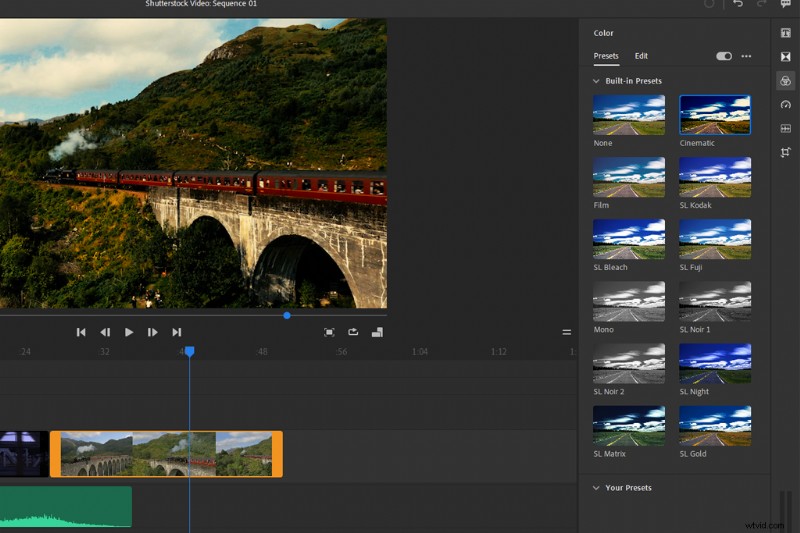
Rush doesn’t offer Premiere’s full range of video editing features, but it’s not supposed to. Rush is instead intended to be a one-job application for short, energetic videos.
Need to change your aspect ratio to fit an Instagram Story? In Premiere Pro, you’d have to go to Menu > Sequence > Sequence Settings and adjust the aspect ratio.
With Rush, you simply hit the corresponding ratio button next to the display monitor, and the job is done.
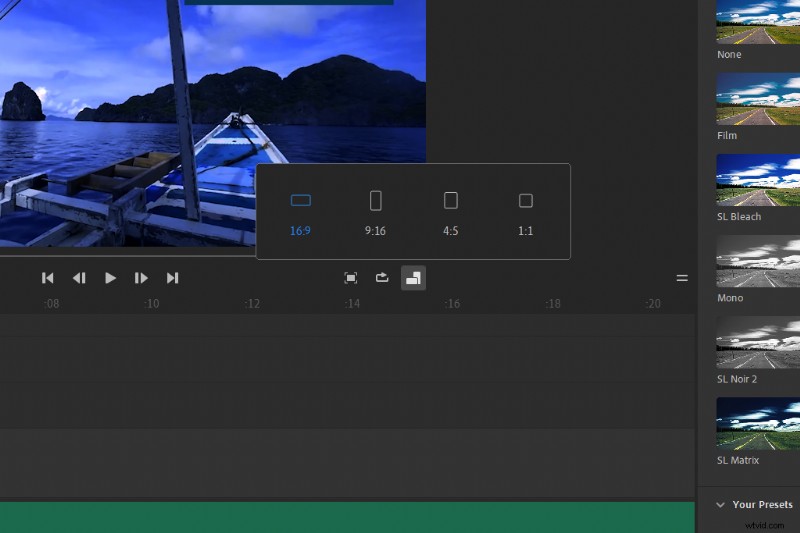
Rush by name, and Rush by nature, Premiere Rush is the software for the creator on-the-go who doesn’t have the time or need for sophisticated software assets.
This brings us to the next significant aspect of Premiere Rush—mobile editing.
Mobile Editing
Of course, one of the primary selling points of Rush is the cross-platform functionalities across mobile and tablets, alike. Quite literally, Rush puts editing processing in the palm of your hand. Adobe has done a great job of integrating the design of the user interface across all platforms and how the software reacts.
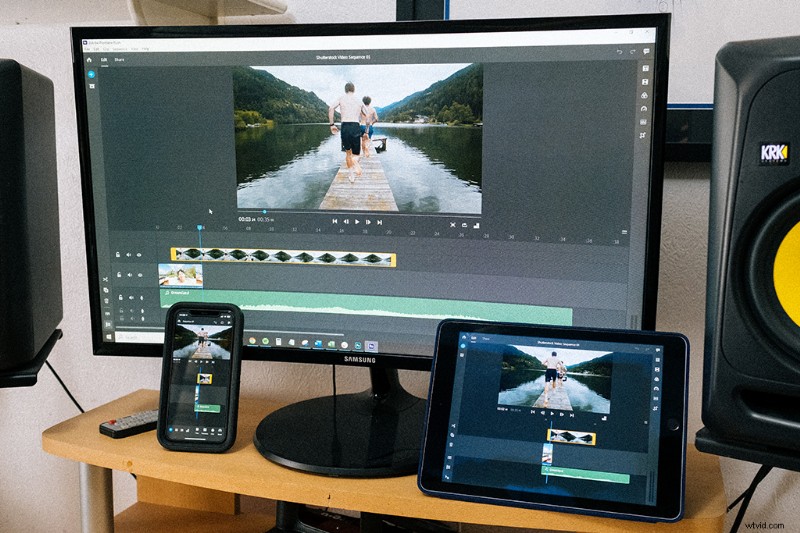
Due to the limitations of screen size, Rush reorganized certain aspects. However, everything works the same as it does on the desktop application.
The Cloud sync is a significant feature. You can open the project file you created on your mobile on your desktop computer and continue editing back at home—all without the need to import the footage from your phone.
If you’ve been editing on-the-go but you’d like to fine-tune your edit before taking it live, Rush works with the Adobe Cloud saving format (which also gives you 100GBs of cloud space).
Alternatively, Rush files also work with Premiere Pro. The software targets YouTubers and influencers, but it’s also an excellent tool for editors who need to create while away from their primary workstation.
You can directly import video files from your phone storage or film through Rush itself. Then, edit and deliver your content straight to a social media platform.
You can add music and utilize built-in text animations while on-the-go. This elevates you over the next creator who may upload to Instagram straight from their phone.
Ease of Use
Premiere Pro can handle a complex edit of multiple tracks compiled from various media extensions. As such, the software’s functionality isn’t exactly straightforward.
On the other hand, editing in Rush is entirely simple on both desktop and mobile.
Rush has a magnetic timeline, which allows the editor to quickly move and shuffle clips without causing gaps within the timeline tracks.
Personally, that would usually seem like a nuisance when I’m trying to edit with precision. But, that’s the thing. This software isn’t meant for precise, sophisticated editing. Rush offers ease and simplicity for creators who want to drop their clips into a timeline, sequentially edit, add music, and upload.
There’s also an additional feature of the magnetic timeline. When you layer clips (meaning you place a second video track or text layer above the primary track), those clips set above attach to the first track. So, why is this useful?
Think about how you select clips on a tablet and move them forward or backward. When using a phone or a tablet, you can choose one clip by firmly pressing your finger over the clip, but not several.
However, this feature of a magnetic timeline makes editing multiple clips on mobile a breeze.
Functionality or Flexibility
Adobe says,
And, that’s really who Rush is for. It’s for the creator who travels often and doesn’t need the full functionality of Premiere Pro. Other than the use of point-and-click, the software is pretty much equal in the way it operates across all platforms. It’s even handy for the professional editor who wants to create a quick rush-edit while on the move.
So, what type of content do you plan on creating? Are you a budding filmmaker who has acquired a camera and set of lights, and now needs to find the perfect software to bring your project to life? If so, you might want to stick with Premiere Pro.
But, say you film your content with a mobile phone, and you’re looking to give your footage an extra bit of love before uploading to Instagram. If you don’t need the full functionality of professional editing software, go with Premiere Rush.

Conclusion: Which Is Right for You?
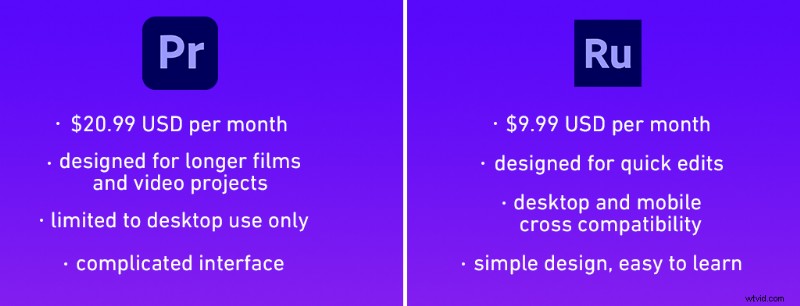
You need to ask yourself what makes sense on a day-to-day basis. Are you the kind of video editor that requires long, extensive deliverables that might have additional motion graphics and additional outside input? If that’s more your situation, I think you already know which one is best.
But, if you’re in the business of lightning-fast edits for social accounts or your TikTok/Instagram Reels, then it seems like Rush is the clear winner.
But, these are just simple scenarios to consider, so maybe we should get a little more in-depth with the clear winner.
As seen in the image above, Rush is $9.99/month, a whole $10 cheaper than Premiere Pro. So, there’s a reason why Rush has slowly become a more appealing option, as people tire of their monthly Creative Cloud and Premiere Pro payments.
Another important distinction to make is what your computer can handle and the initial investment in a computer that can comfortably handle big projects inside Premiere Pro. If you’re more inclined to lean toward Rush, your computer doesn’t need to be as stacked on the backend. You can shoot for the cheaper laptops and desktops out there because the editing you’ll be doing won’t require a big, unnecessary editing rig.
On a month-to-month basis, what’s your budget? How much of your budget from clients is factored into what you’re actually using. Do you need access to the entire Creative Cloud? Could you get by with one app across the board?
Ultimately, it’s up to you.
Cover image via Disobey Art.