
Here’s everything you need to know about YouTube timestamps, how to use them, and how they can improve your viewer retention and engagement.
YouTube has awesome features centered around usability and user-friendly interactions. Timestamps are important in getting viewers to the right place within a video quickly, and helping them navigate important info present within a video with the use of Chapters. Here’s everything you need to know . . .
What Are Timestamps?
Within YouTube, timestamps tell the video player exactly where to start the video when clicked. Timestamps are either included in a video’s URL or within the YouTube platform itself. Clicking a timestamp will take you directly to the time listed in the link, skipping everything before it and getting the viewer right to the relevant point in the video. This eliminates your viewers from scrubbing through your video searching for the information they need. Instead they can get right to the point.
How Are Timestamps Useful?
Timestamps can be useful in pretty much any type of video. Here are a few examples of how you can use timestamps in a few different video formats.
Tutorials

Each step within a tutorial or guide can be segmented with timestamps. This will help the viewer know how far they are along the way and keep track of the steps in case they have to return in the future.
Videogame Gameplay
While each game is different, timestamps can be useful to designate either the level the player is on, where interesting points in the videogame happen, or even warn the viewer of potential spoilers ahead.
Live Music and Concerts
We’ve all looked up our favorite bands on YouTube to see what their set was like at a recent concert. If you’re only interested in listening to a specific song within their setlist, timestamps can take you right to the goods, bypassing the tracks you’re not interested in.
News

Within a news program, each segment or story can be designated with a specific timestamp. This will take the viewer right to the story they’re interested in.
Timestamps Within a URL
You can include timestamps in the shareable URL of a video from YouTube. When a viewer opens the URL, the video will begin playing right from the time desired. The easiest way to create a URL with a specific timestamp is to use YouTube’s built-in “Share” button from the video’s page. This is often located just below the video, above the Subscribe button. This will open a little sharing options box, with a “Start at:” option. The time listed will default to the time in the video when you click the “Share” button, but can be changed to the exact time desired.
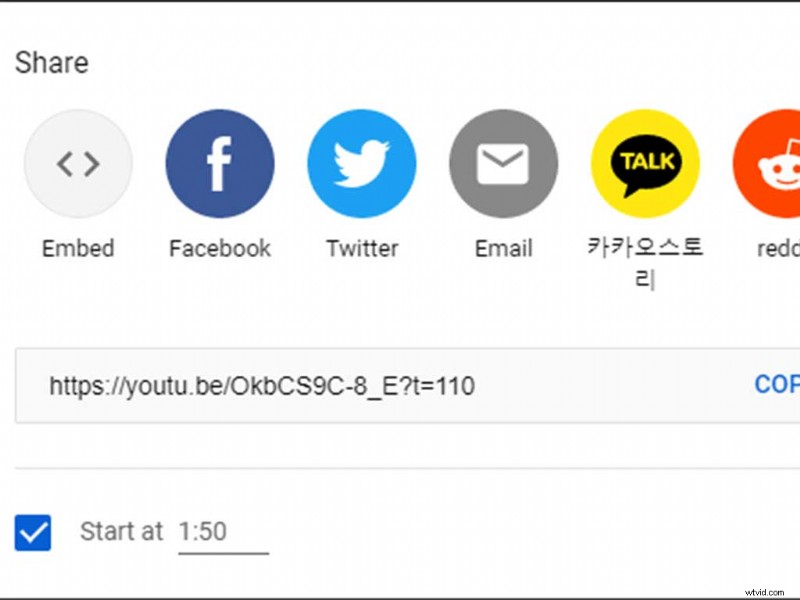
Once you click the “Start at:” option, you’ll notice the shareable URL adds a piece of text to the end. The “?t=110” dictates the time where the video will begin in seconds. As it stands, the video will begin at the 1 minute 50-second mark or 110 seconds. You can also manually add the “?t=XX” to any YouTube URL to begin a video wherever you’d like.
Timestamps Within the YouTube Platform
You may want to include timestamps within a video description or comment on YouTube. This is incredibly simple. All you have to do is type out the minute and seconds you want the timestamps to be in the format “MM:SS”—or as an example, “1:50.” This will automatically make the text a timestamp for the video it’s associated with and jump to that portion of the video when clicked.


Chapters
This takes us to the next level of timestamping videos—Chapters. Chapters divide your video into separate parts and show the viewer where specific segments (or pieces of information) can be found within the video player itself. Chapters show up within the video player, segmenting the timeline with small titles just when hovering over the specific chapter.
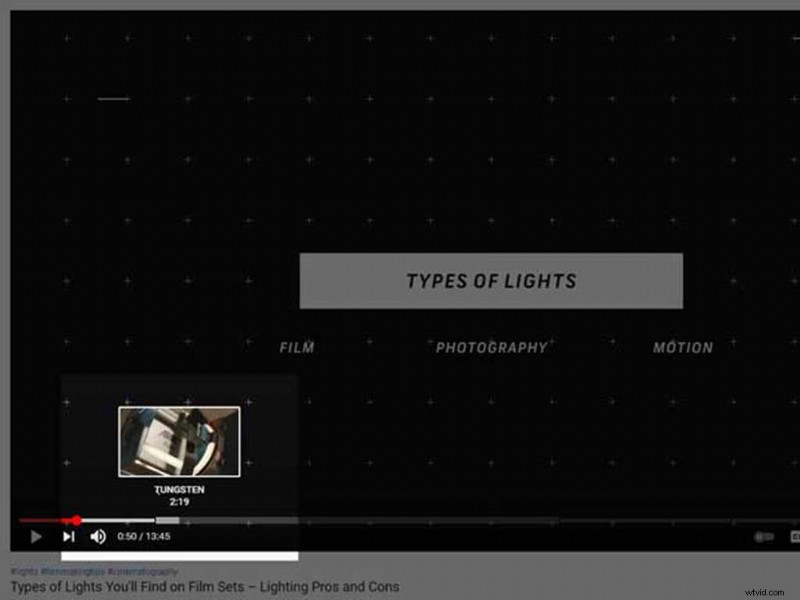
Additionally, adding chapters to your videos helps Google display your clips as suggestions for possible searches. Chapters will show up on searches and take visitors straight to the piece of information they searched for. Chapters are a smart way to improve your channel’s reach, plus you can optimize them for SEO.
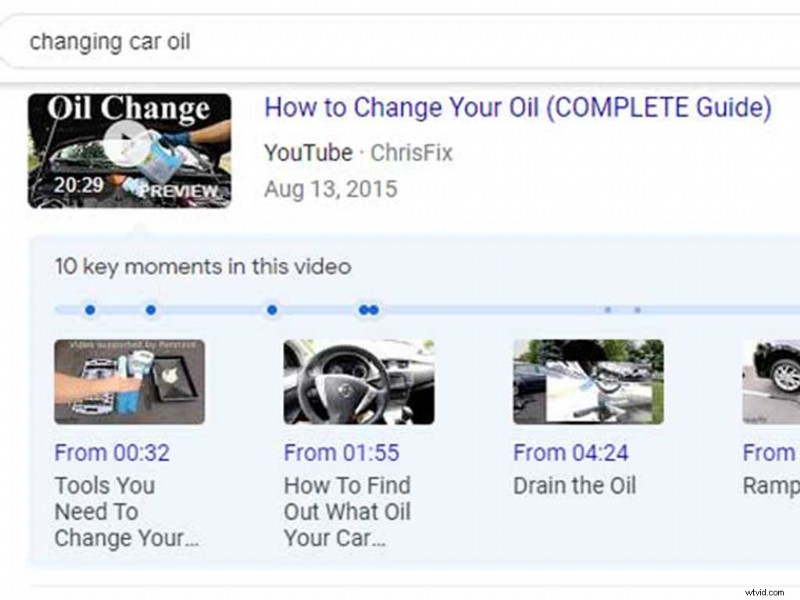
Adding Chapters to your video is incredibly simple. Simply go to your channel’s content page and enter the “Edit Details” option for the specific video you’d like to add chapters to. Within the video’s description, simply type the time in “MM:SS” format where you’d like the chapter to begin, followed by the chapter’s title. Example: “01:50 – Step 1.” Click save and check the formatting by opening the video’s link and scrubbing through the player’s timeline.
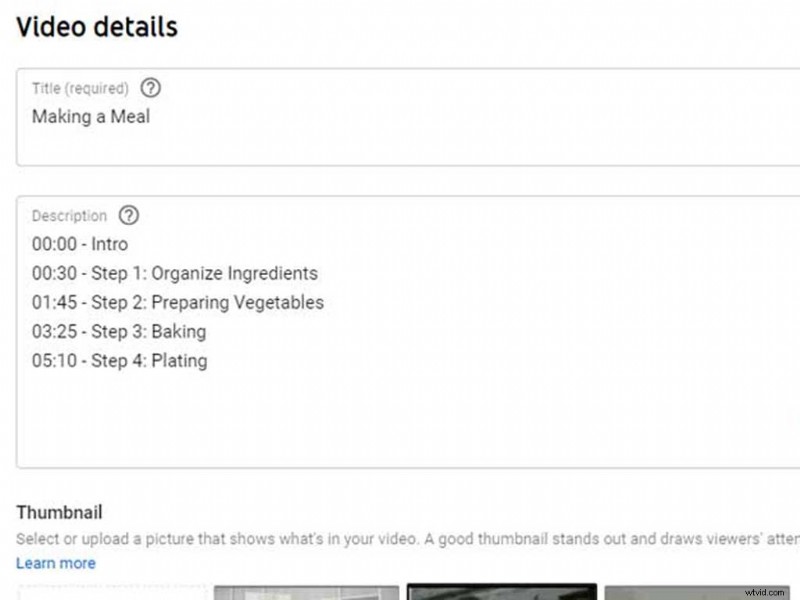
There are a couple of requirements for chapters. The video will need to be at least thirty seconds in total length, each chapter must be at least ten seconds, and you must have at least three timestamps listed in ascending order.
This is everything you’ll need to know about timestamps on YouTube. Start incorporating them into your own videos and channel today. Create a better experience for your viewers, keep them engaged, and help them navigate your videos with ease.
Improve Viewer Engagement A Complete Guide to YouTube TimestampsNeed more YouTube inspiration? Check out these articles:
- How to Start a YouTube Channel – Everything You Need
- How to Add Subtitles to YouTube Videos
- The 10 Best YouTube Channels for Photographers in 2021
- 7 YouTube Channels on Filmmaking, Camera Reviews, and Gear
- Design Unique and Stylish End Screens for Your YouTube Channel
Cover image by Kostenko Maxim.