
Crossfading audio is a vital technique that smooths transitions between clips, eliminates abrupt cuts, and creates a professional listening experience. While it may seem daunting at first, this guide demystifies the concept, explains why it matters, and showcases the top tools available in 2026.
Table of Contents
- What Is Crossfade and Audio Fade?
- Benefits of Crossfading Audio
- Top 4 Tools to Crossfade Music
- How to Choose the Right Tool
- Conclusion
What Is Crossfade and Audio Fade?
In audio editing, crossfade refers to an overlapping transition between two adjacent clips on the same track, while an audio fade applies to the start or end of a single clip.
| Name | Definition | Number of Clips | Typical Usage |
|---|---|---|---|
| Crossfade | Creates a gradual overlap between two adjacent clips. | Two or more | Smooth transitions across tracks. |
| Audio Fade | Fades in or out at the beginning or end of a single clip. | One | Softens abrupt starts or stops. |
Benefits of Crossfading Audio
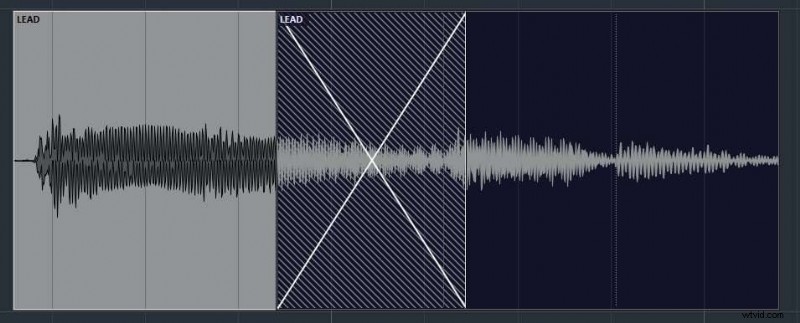
- Seamless Flow: Keeps your audio journey uninterrupted and natural.
- Consistency: Enhances overall quality, making your projects feel polished.
- Listener Engagement: A smooth transition retains audience interest and avoids jarring moments.
- Correction Tool: Allows you to mask imperfections by blending clips.
Embracing crossfade elevates every audio piece—whether it’s a podcast, music mix, or video soundtrack.
Top 4 Tools to Crossfade Music
Choosing the right software accelerates your workflow and yields professional results. Below, we break down the most popular options.
Wondershare Filmora
Primarily a video editor, Filmora also offers a robust audio suite. It supports four distinct audio transitions, including an exponential fade, and features AI‑driven tools like noise removal and vocal isolation.
How to Crossfade Audio with Wondershare Filmora
- Launch Filmora and select New Project.
- Import your audio files.
- Drag the files onto the timeline.
- Navigate to Transitions > Audio Transitions and apply the Exponential Fade to the desired clip junctions.
- Adjust the transition duration and choose Overlap mode in the right‑hand panel.
- Fine‑tune the fade length to match your creative vision.
With an intuitive interface and AI enhancements, Filmora is ideal for both newcomers and seasoned editors.
- Intuitive, drag‑and‑drop workflow.
- AI‑powered audio editing features.
- Four built‑in audio transition styles.
Cons
- Large projects may experience slower processing times.
Pricing
Plans start at $9.99/month, with options for annual subscriptions. Prices vary by feature set.
Final Cut Pro
Apple’s flagship video editor is packed with advanced audio tools, including manual crossfading. While it offers deep customization, its interface can be dense, requiring a learning curve.
- Extensive audio feature set.
- High customizability for professional output.
- Free trial available, with crossfade accessible in the trial.
Cons
- Steep learning curve for beginners.
- Mac‑only platform.
Pricing
Final Cut Pro costs $299.99, a one‑time purchase. The free trial lets you test the crossfade function before committing.
Descript
Descript combines video editing with powerful audio tools, offering a four‑step crossfade workflow: zoom into the track, locate the edit point, apply the fade, and adjust duration. Though more manual than Filmora, it remains budget‑friendly.
- Cost‑effective, starting at $1/month.
- Highly customizable fade settings.
- Additional audio features such as noise reduction and voice‑over editing.
Cons
- Interface complexity can slow new users.
Pricing
Descript offers a free tier limited to 1 hour of content. Paid plans include:
- Hobbyist – $1/month
- Creator – $2/month
Audacity
Audacity is an open‑source audio editor that delivers all the essential mixing tools, including crossfading. Its clean interface and zero cost make it perfect for budget‑conscious creators.
- Free, no‑cost solution.
- Well‑organized UI for quick learning.
- Comprehensive audio analysis and editing capabilities.
Cons
- Can lag with very large files or complex projects.
Pricing
Audacity remains entirely free.
How to Choose the Right Tool to Crossfade Audio
With so many options, selecting the best tool depends on several key factors:
- Ease of Use: Choose a platform that feels intuitive for your skill level.
- Customization: Look for software that lets you fine‑tune fade curves and durations.
- Feature Set: If you plan to grow into audio production, opt for all‑in‑one solutions.
- Budget: Match the tool’s cost to your financial constraints.
- Reputation: Favor platforms with positive reviews and community support.
Weighing these criteria will help you land the ideal crossfading solution and accelerate your audio projects.
Conclusion
Crossfading is more than a technical trick—it’s an artistic touch that transforms raw audio into a polished listening experience. This guide clarified the difference between fades and crossfades, highlighted the leading tools for 2026, and offered practical tips for selection.
If you’re looking for an all‑in‑one platform that balances ease, power, and affordability, Wondershare Filmora stands out as the most accessible choice. Download it from the official site and start crafting seamless audio today.