
Every Zoom workshop, coaching call, or live session demands real time and effort. Yet most creators leave those recordings untapped. 80% of all views on your content actually come from on‑demand replay, not the live event itself. That gap holds the true revenue opportunity.
Unlock More Value from Your Zoom Recordings
You probably have dozens of recordings stored in cloud folders, waiting to be shared. The content exists, but without a central hub or a clear revenue strategy it remains scattered and unmonetized. The missing link is turning what you already have into something people can find, access, and pay for.
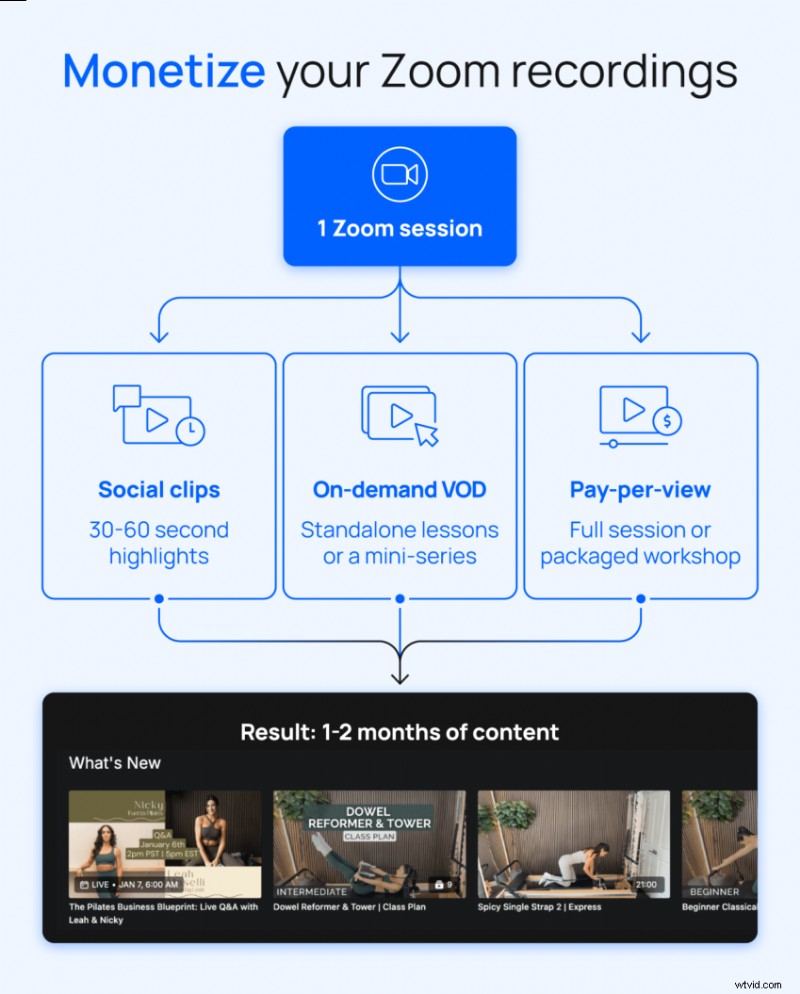
Start by highlighting evergreen topics, high‑engagement sessions, and training that answers the questions you receive repeatedly. Then match the content to the right format:
- Strong tips and quotable moments → social clips
- Full workshops with standalone value → pay‑per‑view or VOD
- Multi‑session topics with natural progression → courses or mini‑series
How to Monetize Zoom Recordings
Turn your existing library into a recurring revenue stream with this four‑step workflow:
- Organize your existing recordings
- Package them into compelling offers
- Publish on a platform that centralizes hosting, access, and payments
- Monetize through memberships, VOD, or pay‑per‑view
Step 1: Audit and Organize Your Existing Recordings
View each recording as a potential product, not just an event archive. Ask whether a paying member would find value in it and if it can stand alone.
Sort your library into three buckets:
- Ready to publish: evergreen, high‑value sessions that need little or no editing
- Needs light editing: solid content that requires trimming or cleanup before publishing
- Not worth keeping: outdated, low‑quality, or redundant sessions to archive or discard
Step 2: Package Your Content Into Offers
Consider how your audience prefers to learn. A two‑hour workshop may suit some, while others prefer focused 10‑minute lessons. Group content around outcomes, not just topics. For example, “Build a consistent morning routine in 30 days” is more compelling than “morning routine videos.”
Offer types:
- Courses: a start‑to‑finish path built from related sessions
- Collections: themed groups members can explore at their own pace
- Memberships: ongoing access to your full library with new recordings added continuously
Step 3: Centralize Everything Into a Single Content Hub
Scattered storage—Google Drive, Dropbox, Zoom cloud—hampers discovery and monetization. Choose one video‑selling platform and:
- Organize content with custom categories, tags, and descriptions
- Structure the library so members browse by topic, skill level, or outcome
- Ensure intuitive search so members find what they need quickly
Uscreen provides a reliable home where members can watch on mobile, TV, or web and stay connected through built‑in community tools.
Shift from One‑Time Sales to Recurring Revenue
Think of your organized, packaged recordings as a revenue system, not isolated products:
- Rent or sell individual recordings: give new audiences a low‑risk way to experience your content
- Package sessions into courses: showcase the depth of your expertise
- Build a membership around your library: provide subscribers ongoing access to everything you create, with new content added continuously
Each offer serves a different stage of your audience’s journey and naturally leads them toward a membership. As you add new Zoom sessions, your library grows in value, giving members a continuous reason to stay subscribed. That compounding effect turns a content library into a reliable recurring revenue stream.
How to Optimize Zoom Recordings for On‑Demand Use
Raw Zoom recordings were designed for live audiences. Editing them for on‑demand viewing involves a few intentional adjustments.
Improve Structure and Clarity
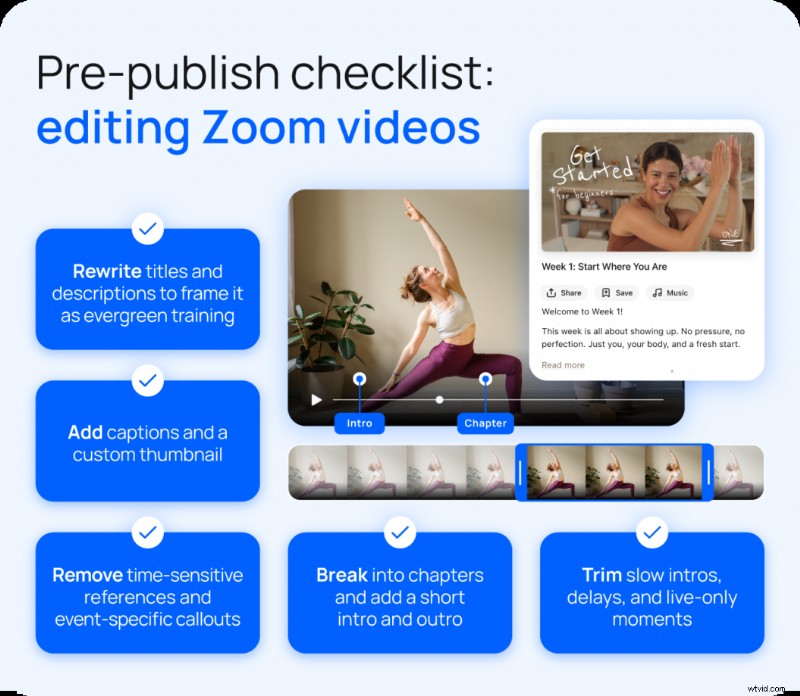
The biggest watchability issue is pacing. Live sessions often have slow intros, technical delays, and transitions that work in real time but lose viewers on replay. Targeted edits can make a huge difference:
- Trim slow openings, technical delays, and moments that only made sense live
- Break longer recordings into chapters or sections with clear titles
- Record a short intro and outro for each session so viewers have context and a clear ending
Takeaway: Use transitions or title cards to bridge gaps when live context is missing, so on‑demand viewers never feel they missed anything.
Reframe Content for Evergreen Value
Time‑sensitive references like “this week’s challenge” or “as I mentioned in last Tuesday’s call” signal that viewers missed something. Edit out or replace those references to keep the content evergreen.
- Remove or edit time‑sensitive references, event‑specific callouts, and anything that assumes live context
- Rewrite titles and descriptions to position sessions as training or education, not replays
- Ensure each session can stand on its own so new members can start anywhere in your library
Takeaway: Before publishing, ask: Would someone watching this six months from now still get full value? If not, it needs a light edit.
How Repurposed Content Increases Recurring Revenue
Marnie Alton, founder of M/Body, built a $40K‑per‑month fitness membership by following this exact workflow. After moving her Los Angeles studio online, she streamed 95% of her content live and let Uscreen automatically add each session to her on‑demand library.
That single workflow repurposes every live class into two revenue streams:
- Income from members who attended the live event
- Ongoing value for subscribers who watch on demand
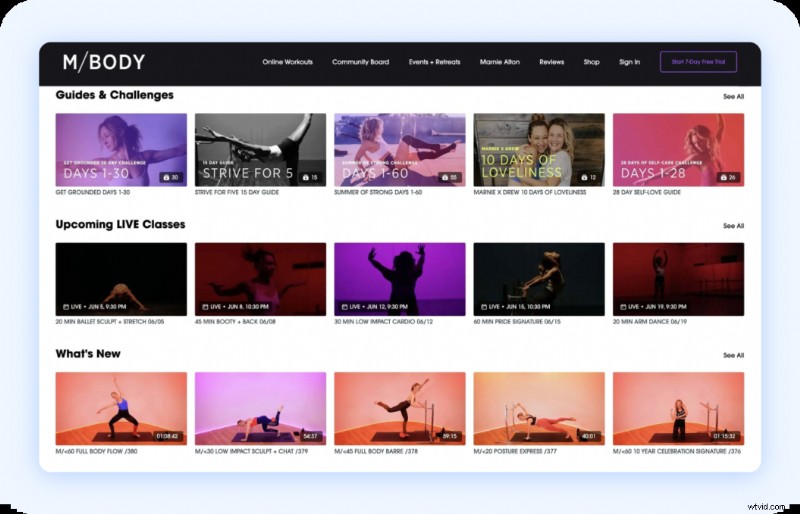
With 62% of her members watching through the app on their own schedules, each new session increases library value and gives her 1,200 members more reasons to stay subscribed. The live energy brings people in; the on‑demand library keeps them there.

“I’ve been really happy with the app because you can work out offline. That’s a huge plus for me, and it works well for our global community too. Members in areas with spotty Wi‑Fi, or those taking us along on vacation or a road trip, can still access everything they need.” – Marnie Alton, Founder of M/Body
Why Membership Platforms Unlock Recurring Revenue
Selling recordings individually caps earnings at the number of transactions you drive. A membership platform turns your library into a subscription that grows in value each time you add a new session.
With Uscreen, your Zoom recordings stop being isolated assets and start working together as a system. Beyond hosting, Uscreen gives you everything you need to drive engagement and retention:
- Branded mobile and TV apps so members watch wherever they prefer
- Live streaming that feeds directly into your on‑demand library after each session
- Community tools that keep members connected between sessions
- Marketing and membership tools to manage subscribers, run promotions, and reduce churn
- Built‑in analytics to track what content performs and where members drop off
Get More from Your Zoom Recordings with Uscreen
Monetizing digital content from Zoom recordings takes the right support to turn what you already have into a powerful recurring revenue source. Uscreen lets you upload your existing recordings, organize your library, and launch a membership—all in one place. Build offers, sell videos online, and watch your revenue grow with each new session you add.
FAQs
Can you monetize Zoom recordings you already have?
Yes. Upload your existing recordings to a platform like Uscreen, organize them into courses or a membership library, and start charging for access. No new content is required to get started.
What is the best way to monetize Zoom recordings?
Building a membership around your library outperforms selling recordings individually. Membership gives subscribers ongoing access, propelling recurring revenue every month. Complement with pay‑per‑view and standalone courses for multiple entry points.
How does a membership site help with Zoom recordings?
It gives your recordings a permanent, organized home where members can discover and access content on demand. Payments, access control, and subscriber management are all handled in one place, transforming a scattered library into a structured revenue system.
Can Zoom recordings generate passive income?
Once uploaded and published, they generate income without additional effort. Each new subscriber gets access to your existing library, making past work a compounding asset over time.