
Key Takeaways
- Seedance 2.0 is ByteDance’s flagship AI video model, engineered for creators demanding fine‑tuned control over consistency, motion, and audio.
- Its signature strength is multimodal generation, letting creators blend text, image, video, and audio references in a single, streamlined workflow.
- Core features include role‑based asset tagging, enhanced character consistency, reference‑guided motion, native audio generation, and beat‑aware sync.
- Compared with other leading models, Seedance 2.0 excels when reference fidelity and audio‑visual alignment outweigh peak resolution.
- Within InVideo, creators can move seamlessly from generation to editing and export, keeping the entire production loop in one interface.
AI video tools have matured beyond generating short, visually striking clips. What now distinguishes the truly valuable ones is the level of control they provide. Creators need more than cinematic aesthetics; they require a system that follows references, maintains character consistency, responds to motion cues, and integrates smoothly into a real production workflow.
Seedance 2.0 rises to this challenge. Below we explore what it is, the features that matter most, how it stacks against other industry leaders, and practical ways to deploy it inside InVideo.
What Is Seedance 2.0?
On February 10th, 2026, ByteDance’s Seed research team launched Seedance 2.0, a model that delivers true directorial control over AI‑generated clips. Built on a unified multimodal audio‑video generation system, it accepts text, images, audio, and video as inputs, enabling advanced reference handling and post‑generation editing workflows.
Seedance 2.0 produces clips ranging from 4 to 15 seconds, supports up to 1080p resolution, and accommodates multiple aspect ratios—including 16:9, 9:16, 4:3, 3:4, 21:9, and 1:1.
The real game‑changer is how the model processes input. Rather than relying solely on textual prompts, creators can feed visual direction, movement cues, and sound references directly, transforming Seedance 2.0 from a one‑shot generator into a controllable creative system.
Seedance 2.0 Features That Matter Most for Creators
1. Multimodal Prompting—Like Directing a Crew
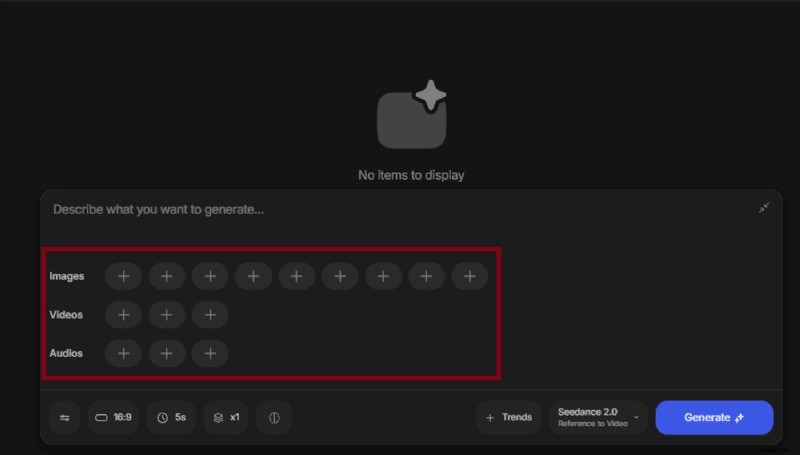
Seedance 2.0’s multimodal input system is its core competitive advantage. Creators can combine text, images, video, and audio in a single generation workflow.
It accepts up to:
- 9 image references
- 3 video references
- 3 audio references
Each reference can be assigned a role, guiding the model’s understanding of what the asset is meant to control:
- A product image defines the subject.
- A motion clip directs camera behavior.
- An audio file shapes pacing or rhythm.
The result feels more like directing than guessing, making Seedance 2.0 ideal for AI films, brand videos, promos, and any workflow where consistency matters as much as style.
2. Enhanced Character Consistency
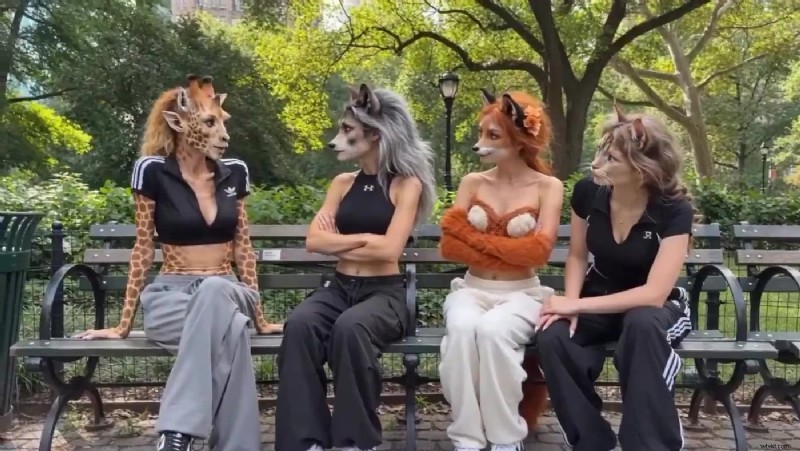
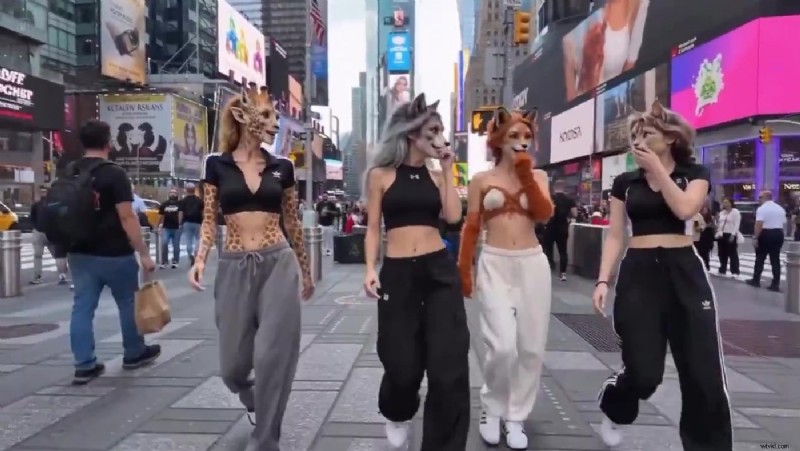
Maintaining identity across frames remains a major hurdle in AI video generation. Seedance 2.0 is engineered to preserve faces, clothing, accessories, and subtle details throughout a clip, enabling story‑led scenes, branded character content, and repeatable creative formats.
Visual continuity problems often stop AI video from moving beyond experimental clips; Seedance 2.0 addresses this directly.
Source
3. Reference‑Based Motion Replication
Upload a clip with the desired camera path or movement style and use it as a guiding reference for new generations. This is invaluable for action‑driven scenes, showcase reels, orbit shots, and cinematic sequences where movement defines the idea.
4. Native Audio Generation and Beat‑Sync
Audio and video are generated together, eliminating the need to patch sound in post‑production. The model can align visual output with dialogue, sound effects, and rhythm from the start, which is a must‑have for music‑driven edits, promos, trailers, or short‑form branded content.
Beat‑aware synchronization means fewer manual fixes later and a stronger first output for performance‑oriented content.
5. In‑Video Editing and Extension Workflows
Seedance 2.0 supports iterative workflows. Creators can edit existing clips selectively instead of fully regenerating them, and can extend shorter clips into longer ones while preserving style and visual identity. This is crucial because most creators iterate rather than aim for perfection in one attempt.
How Seedance 2.0 Differs from Earlier AI Video Models
Previous AI video models produced visually appealing clips in isolation but often faltered on continuity, direction, or repeatability. Seedance 2.0 closes that gap by:
- Working with references to maintain visual identity across camera shifts.
- Preserving fidelity in motion‑rich product shots.
- Integrating audio and motion from the outset, reducing manual syncing.
It is a more production‑aware model, offering deeper multimodal control and tighter audio‑visual alignment. The real value lies in reducing the friction between idea and finished asset.
Seedance 2.0 vs Kling 3.0 vs VEO 3.1
Each model targets a slightly different niche. Seedance 2.0 shines when reference‑based control, motion guidance, and beat‑aware workflows are paramount. Kling 3.0 excels for high‑resolution output, especially for 4K delivery or recurring character systems. VEO 3.1 is best for extending short clips into longer sequences.
| Capability | Seedance 2.0 | Kling 3.0 | VEO 3.1 |
|---|---|---|---|
| Max clip duration | 15 seconds | 15 seconds | 8 seconds, extendable |
| Max resolution | 1080p | Up to 4K | Up to 4K |
| Native audio | Yes, same render pass | Yes, workflow dependent | Standard model only |
| Reference inputs | Up to 9 images, 3 videos, 3 audio files, plus text | Images and video references, plus text | Up to 3 images, plus text |
| Asset control | @ mentions with role assignment | Elements for character locking | Ingredients‑based reference |
| Motion replication | Yes, extracts and applies motion signatures | More limited | Start and end frame control |
| Beat sync | Yes, native | No | No |
| Multi‑shot generation | Yes, multi‑scene in one output | Yes, up to 6 cuts per clip | Via scene extension |
| Element swapping | Yes, non‑destructive | Yes, with editing tools | Limited |
| Aspect ratios | 16:9, 9:16, 4:3, 3:4, 21:9, 1:1 | Multiple including 16:9 and 9:16 | 16:9, 9:16 |
In short, Seedance 2.0 may not be the highest‑resolution option, but it offers the most practical control for creators who prioritize reference fidelity and synchronization.
How Creators Can Use Seedance 2.0 on InVideo
Seedance 2.0 lives side‑by‑side with other leading AI video models inside InVideo. This lets creators keep the entire pipeline—from generation to refinement to export—in one workspace.
To get started:
- Open your InVideo workspace → Agents & Models → Video category.
- Select Seedance 2.0 or Seedance 2.0 Fast, depending on whether you are brainstorming ideas or finalizing a high‑quality result.
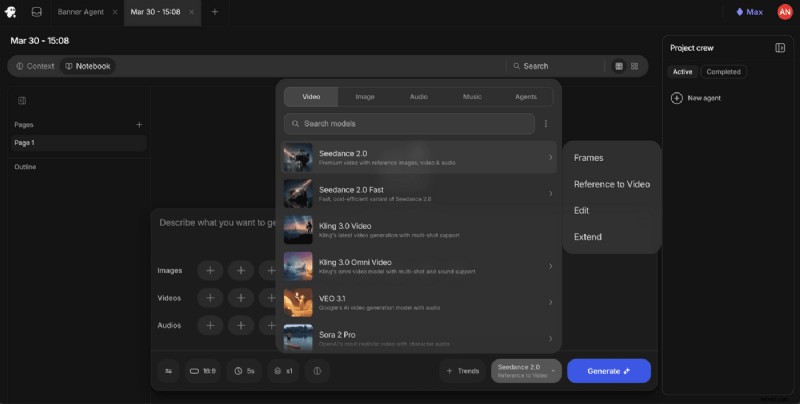
After choosing the model, pick a workflow that matches your task:
- Frames: Precise control over specific visual moments.
- Reference to Video: Full multimodal generation flow.
- Edit: Refine an existing clip.
- Extend: Expand a strong short generation into a longer one.
Because the entire workflow stays inside InVideo, creators can generate, trim, format, caption, layer, and export without switching tools—an essential advantage for ad creatives, social assets, explainers, and campaign videos on tight timelines.
Seedance 2.0 vs Seedance 2.0 Fast
The two variants serve distinct purposes. The full Seedance 2.0 model delivers the highest quality when a final asset is required, while Seedance 2.0 Fast is tailored for ideation, testing, and prompt exploration at a lower credit cost.
Typical workflow: experiment with the Fast version to lock down references, motion, and prompts, then switch to the full model for the final render.
Seedance 2.0 in a Real‑World Creator Workflow
Seedance 2.0 brings AI video closer to a directorial tool. By allowing visual references, motion cues, and audio structure to guide generation, it turns abstract ideas into tangible assets.
When combined with InVideo’s integrated editing and export capabilities, it becomes a seamless pipeline that transforms experiments into finished content.
Ready to explore a more controllable AI video workflow? Try Seedance 2.0 on InVideo today.
FAQs
-
What is Seedance 2.0?
Seedance 2.0 is ByteDance’s latest AI video generation model, designed for creators who need more control over references, character consistency, motion, and audio in short‑form AI video workflows.
-
What are the most important Seedance 2.0 features?
Key features include multimodal input support, role‑based asset tagging, character consistency, reference‑guided motion, native audio generation, beat sync, editing, and clip extension.
-
How does Seedance 2.0 differ from other AI video generators?
It offers deeper multimodal control, allowing text, image, video, and audio references to work together in the same generation flow, rather than relying mostly on text prompts.
-
Is Seedance 2.0 better than Kling 3.0?
It depends on the project. Seedance 2.0 excels in reference‑based control, motion guidance, and beat‑aware workflows; Kling 3.0 is stronger when high‑resolution output is the priority.
-
Can Seedance 2.0 generate audio and video together?
Yes. It generates audio and video in a single render, reducing post‑production syncing work and enabling music‑aware or dialogue‑aware clips from the start.
-
How do creators use Seedance 2.0 on InVideo?
Creators access it via Agents & Models under the Video category, upload references, choose a workflow type, and generate directly inside the same workspace they use for editing and export.