
When a webinar platform determines the success of your content strategy, choosing the right tool can elevate engagement, streamline workflows, and deliver measurable ROI. Wistia and ON24 are both respected names, but they cater to distinct audiences and operational needs.
Who Are They Built For?
| Wistia | ON24 | |
|---|---|---|
| Target Audience | Marketers & SMBs seeking a full‑stack video & webinar solution. | Enterprise demand‑gen teams running high‑volume, data‑intensive programs. |
| Ease of Use | Intuitive, no‑code setup with embedded pages and automatic integrations. | Feature‑rich but requires multi‑step configuration; often needs dedicated ops staff. |
| Branding Flexibility | Fully custom registration pages, event rooms, and a complete video library. | Enterprise‑grade branding, but customization is tier‑dependent and can be costly. |
| SEO & Repurposing | Webinars automatically become searchable video assets; AI‑driven clips and remix tools. | Content stays on the platform; manual export is required for SEO or repurposing. |
| Analytics Depth | Granular pre‑ and post‑event insights, heatmaps, and direct sync with HubSpot, Pardot, etc. | First‑party data feeds Salesforce/Marketo; ideal for revenue‑attribution at scale. |
| Event Capabilities | Live streams, chats, polls, and pre‑recorded webinars—all on a single, embeddable page. | Robust live features and up to 20 engagement tools; best for large audiences. |
| Pricing | $350/mo for 500 attendees, $750/mo for 1,000, custom for larger. | Opaque tiered pricing; per‑minute overage charges and integration add‑ons. |
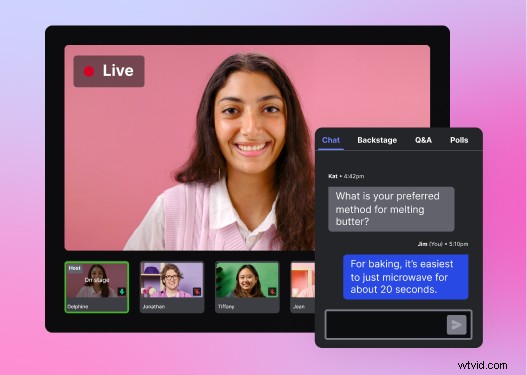
Registration & Event Management
Wistia
Build a branded registration page in minutes—no developer required. The page can host the live stream or embed a pre‑recorded webinar, providing a single link for registration, viewing, and replay. Data flows straight into your chosen marketing automation platform, enabling one‑click registration for repeat visitors and automated reminders.
ON24
Offers deep personalization of registration pages and audience‑segmented CTAs, but many advanced features are locked behind premium tiers. Custom templates and up to 20 engagement tools become available only at higher price points.
Why Wistia Wins Here
Wistia delivers a fully branded experience out of the box, while ON24’s customization lives behind enterprise‑grade plans. For most marketing teams, the out‑of‑the‑box value and lower cost make Wistia the practical choice.
Going Live or Going Pre‑Recorded?
Wistia
Run a webinar without a producer: manage speakers, share screens, drop in slides or pre‑recorded videos, and engage with live chat, Q&A, and polls—all from a clean, intuitive interface. Closed captions and one‑click simulcasts to LinkedIn or other social platforms expand reach instantly. Backstage chat and “whisper” features let hosts make real‑time adjustments.
ON24
Offers extensive live features, including up to 20 engagement tools and a console builder. However, the complexity often necessitates dedicated event production staff to ensure smooth execution.
Why Wistia Wins Here
Wistia’s streamlined workflow eliminates the need for a dedicated production team, reducing lead time and risk while maintaining a polished live experience.
Post‑Webinar Editing & Repurposing
Wistia
Recorded content lands directly in your Wistia library, where you can trim, polish, and extract social clips without leaving the platform. The Remix editor turns a webinar into a sales cutdown or email highlight reel. AI‑generated clips surface the most engaging moments with captions and auto‑framing, keeping the content on‑brand and ready for distribution.
ON24
On‑demand replay is available, but editing is limited. Content must be exported manually, archived for a set period, and may incur additional charges to retrieve.
Why Wistia Wins Here
Wistia treats a webinar as a reusable content asset, giving teams immediate editorial control and continuous value beyond the live event.
Analytics & Audience Insights
Wistia
Pre‑event: track registration sources (email, social, partners) to refine acquisition tactics. Post‑event: heatmaps reveal engagement depth, duration, and drop‑off points. All data feeds directly into HubSpot, Pardot, or any preferred MAP.
ON24
Captures rich first‑party data—poll answers, downloads, CTA clicks—and integrates seamlessly with Salesforce and Marketo for pipeline attribution. Ideal for high‑volume, revenue‑linked programs.
Why Wistia Wins Here
For the majority of marketing teams, Wistia’s clear, actionable insights require no data team to interpret, enabling rapid decision‑making.
Which Platform Suits Your Business?
If your organization runs a high‑volume enterprise program with a dedicated events team, deep Salesforce integration, and a sizable budget, ON24’s enterprise capabilities align with that scale.
Conversely, if you’re a startup, mid‑market grower, or any team seeking ease of use, lower cost, and content that lives beyond the live event, Wistia delivers a compelling, all‑in‑one solution.
Ultimately, the decision hinges on which platform streamlines the entire webinar lifecycle—from registration to analytics—while aligning with your team’s resources and goals.