
Key Takeaways
- Lemonlight’s AI video production workflow runs 5 structured phases, from brief through final delivery, in approximately 2-3 weeks.
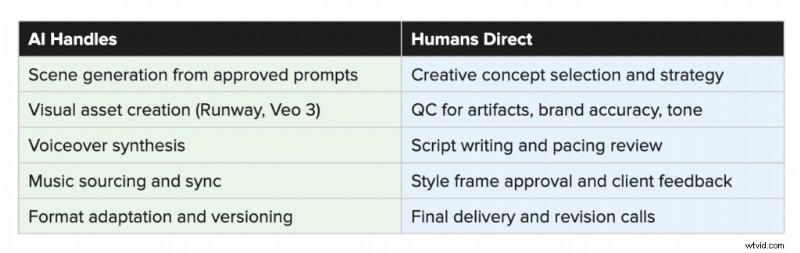
- Script writing, concept strategy, and quality control are human-led at every stage. AI accelerates production, but it does not replace creative direction.
- Style frames are built and client-approved before a single scene is generated, which is the checkpoint that prevents costly revisions later.
- Tool selection is project-specific. Runway, Veo 3, Hero 2.0, and Nano Banana Pro each serve different roles depending on what a project requires.
- The process detailed here is the reason our AI video output looks like a brand video rather than a generative experiment.
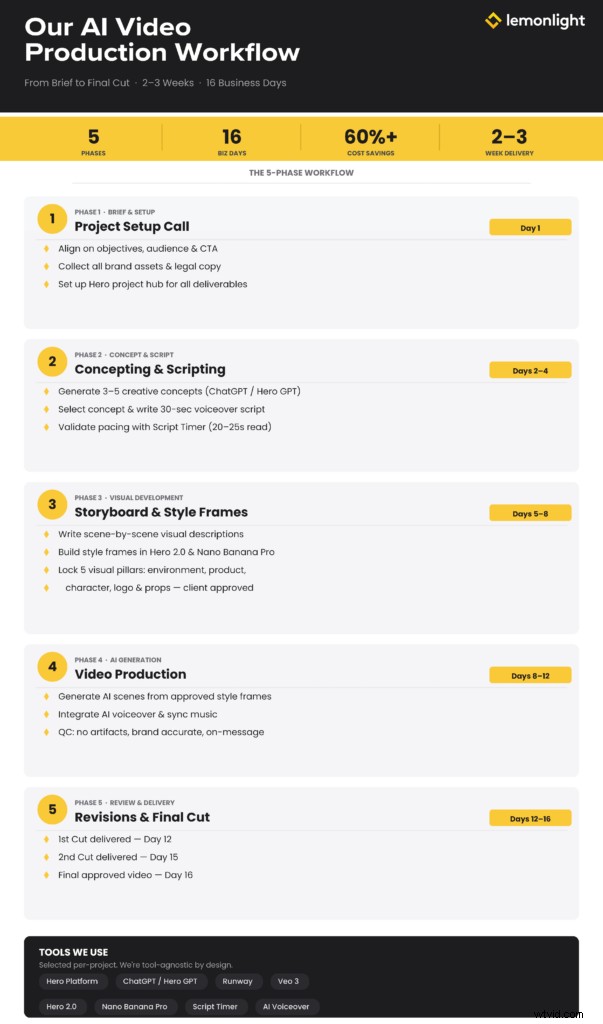
When brands ask about AI video production, they usually start with the same question: what actually happens once we say yes? Capability claims are everywhere right now. What’s harder to find is a straight answer about the work itself.
This post walks through our process from first call to final delivery, including the specific tools we use at each stage and the places where human judgment drives the outcome. We’re not sharing this to be transparent for its own sake. We’re sharing it because the workflow is the product. A brand-quality AI video doesn’t happen because you have access to the right software. It happens because you run a disciplined process around that software.
Here’s how ours works.
The 5 Phases at a Glance
| Phase | Timeline | Key Deliverable |
| Phase 1: Brief & Setup | Day 1 | PSU call complete, all brand assets confirmed in Hero |
| Phase 2: Concept & Script | Days 2-4 | V1 creative deck with concept, script, and storyboard |
| Phase 3: Style Frames | Days 5-8 | Approved visual world: environment, product, characters, logo |
| Phase 4: AI Generation | Days 8-12 | 1st cut delivered |
| Phase 5: Review & Delivery | Days 12-16 | 2nd cut (Day 15) + Final video (Day 16) |
Phase 1: Brief and Creative Setup
Every project starts with a Project Setup Call (PSU). Before anything is built or written, we get on a call with the client to lock in the fundamentals: project objectives, key messages, the target audience, any mandatory legal copy or disclaimers, and a CTA.
From there, our producer reviews every asset the client has provided, confirming the brand visuals, logo files, product imagery, and reference examples are all in place. This step sounds administrative, and in one sense it is. But gaps at this stage create problems downstream. An unclear product reference, a missing logo file, or a vague message hierarchy all show up as revision cycles later. Catching them on Day 1 protects everyone’s timeline.
Everything, including assets, notes, and next steps, lives in Hero, our central project hub. Hero is where clients review and approve deliverables at every stage, and where all production documentation is kept throughout the engagement. Using one platform eliminates version confusion and keeps feedback consolidated and actionable.
Phase 2: Concepting and Scripting
With the brief confirmed, concepting begins. We generate 3-5 distinct creative directions, each with a defined theme, tone, visual approach, and message focus. A concept might be product-driven with a premium, aspirational feel, or it might lean into a problem-solution structure with an urgent, direct tone. Tone and structure are evaluated alongside each other, because a concept that works emotionally but doesn’t translate cleanly to AI visual generation will cause problems later.
We use ChatGPT and a proprietary Hero GPT script generator to accelerate the concepting and drafting process. But selecting the right direction from those options is a human call, informed by what we know about the brand, the audience, and what tends to perform at each stage of the funnel.
Once a concept is selected, the script follows. For a standard 30-second AI video, we write to a specific structure:
| Timing | Section | Purpose |
| 0-6s | Brand Intro | Establish who you are and set the tone |
| 6-20s | Key Selling Points (2-3) | Deliver the core value proposition |
| 20-26s | Offer or Proof Point | Build credibility, add urgency |
| 26-30s | Call to Action | Direct the viewer to the next step |
Pacing matters more than most clients expect. A script that reads in 25 seconds on paper might clock 32 seconds with natural delivery. We use a script timer during drafting to validate the read time before anything moves forward. A script that runs long isn’t just a minor inconvenience; it means the visual pacing breaks down and the edit becomes significantly harder.
The approved script is then uploaded into Hero, where clients can review and mark revisions before we move to visuals. This is also where we do an internal quality check on messaging, brand tone, and CTA clarity.
Phase 3: Storyboarding and Style Frame Development
This phase is where most workflows cut corners, and where those shortcuts later show up as AI videos that feel generic or inconsistent. We treat visual development as a structured pre-production step, not a byproduct of the script.
Storyboarding
Using the approved script, we write scene-by-scene visual descriptions that are purpose-built for AI generation. Each scene description includes environment details, lighting tone, emotional register, and what the viewer’s attention should be on. We maintain a montage structure throughout, meaning no recurring characters carry across scenes. This isn’t a creative limitation; it’s a practical decision based on how current AI video tools perform. Continuity across scenes is still a challenge for AI generation, so designing around it from the start produces a more consistent final product.
Elements and Style Frames
Before any AI scene generation begins, we build and present a set of style frames: fully composed, static visual examples that define the look and feel of the video. Style frames are created using Hero 2.0 and Nano Banana Pro, and they cover five visual pillars that must be locked before production proceeds:
- Environment: Location, lighting direction, time of day, and the emotional tone of the space.
- Product Integration: Realism level, accurate scale and texture, and physical grounding within the scene.
- Character Direction: If characters appear, we define age range, wardrobe, expression, and whether the treatment is photoreal or stylized.
- Logo Integration: Placement, treatment (flat, dimensional, overlay), color accuracy, and proportion.
- Supporting Props: Any objects that appear alongside the product, confirmed for proper scale, texture, and placement.
The client approves these style frames before we proceed. That approval is a meaningful checkpoint, not a formality. Once the visual world is locked, significant directional changes require regeneration and may affect scope. Treating style frame review seriously up front is what allows us to execute the production phase efficiently.
All prompts from this phase are captured in a dedicated Prompt Sheet and linked to the project in Hero. That documentation supports the generation phase and creates a reproducible reference for any future versioning.
Phase 4: AI Video Generation
With approved style frames and a complete prompt sheet in hand, the editor begins AI scene generation. The approved visual prompts drive the output, which is why the discipline in Phase 3 matters so much here.
The tools used at this stage depend on what the project requires. We use Runway and Veo 3 for video generation, among others, selecting based on the visual style, motion complexity, and quality standard the project calls for. Lemonlight is tool-agnostic by design. Our value is knowing which tool is right for a given job, not having a loyalty to any particular platform.
Once the scenes are generated, an AI voiceover is integrated and music is added and synced to the pacing of the edit. The rough cut is then run through our internal QC checklist before anything goes to the client.
QC Checklist (Pre-Client Delivery)
- Script runs under 30 seconds
- Brand elements and any required legal copy are present
- Visuals are clean of AI artifacts (distorted hands, faces, edges, text)
- Tone and messaging match the approved brief
The reason AI video editing still requires a specialist is precisely this QC layer. Generative tools can produce convincing-looking output that still fails on brand accuracy, visual continuity, or message delivery. Catching those failures before they reach a client is the job.
What AI Handles vs. What Humans Direct
Phase 5: Review, Revisions, and Delivery
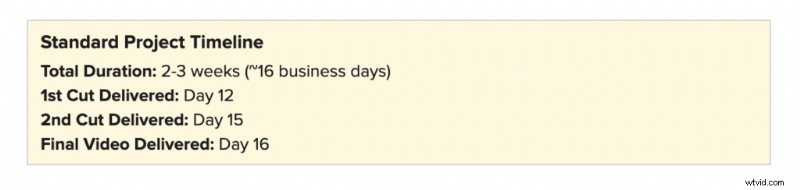
The production phase follows a three-cut delivery structure. The 1st Cut arrives on Day 12, the 2nd Cut on Day 15, and the Final Video on Day 16. Client feedback is collected and managed through Hero, keeping revision notes centralized and preventing the back-and-forth that tends to stall production.
Revision scope at this stage is bounded by the approvals from Phase 3. Because the visual world, character direction, and product treatment were locked before generation began, feedback cycles are focused on refinements rather than directional changes. A revision request that falls outside the approved scope, asking for a completely different environment or a new product look, requires regeneration and a scope conversation.
That boundary isn’t rigidity for its own sake. It’s what makes the 16-day timeline reliable.
Why the Process Is the Product
Most problems in AI video production don’t start in the generation phase. They start upstream: a brief that wasn’t tight enough, a storyboard that didn’t account for how AI handles continuity, a style frame review that was treated as optional. By the time the editor is working in Runway, those upstream gaps are already shaping the output.
The workflow described here is a direct response to that reality. Each phase has a clear purpose and a defined deliverable. Each transition point involves a client approval that locks what comes next. That structure is what allows AI tools to do what they’re actually good at, which is executing clearly defined creative direction at speed, rather than compensating for ambiguity.
The other thing worth saying: this workflow continues to evolve. AI capabilities are advancing quickly. The tools and handoffs described here reflect how we work today. Tasks that require human oversight in our current process may be handled differently six months from now. Our commitment isn’t to a fixed division of labor. It’s to knowing, at any given moment, what the right process looks like and executing it well.
For brands weighing when AI video is the right choice versus traditional production, the answer depends on more than just budget. We’ve written about that decision in depth, including how AI and traditional video production compare for brands making this call.
See the Work in Action
This process is built to produce brand-quality AI video at a fraction of the traditional cost and timeline. The best way to evaluate whether it’s right for your brand is to see what it produces. Explore Lemonlight’s AI Video Portfolio or schedule a call below and let’s discuss if AI is right to your next project.
Frequently Asked Questions
What is Lemonlight’s AI video production workflow?
Lemonlight’s workflow runs five phases: brief and creative setup, concepting and scripting, storyboarding and style frame development, AI video generation, and review and delivery. The full process takes approximately 2-3 weeks (roughly 16 business days) from kickoff call to final video.
What tools do you use to produce AI videos?
Tool selection depends on the project. For video generation, we primarily work with Runway and Veo 3. Style frames and visual development happen in Hero 2.0 and Nano Banana Pro. Scripting is assisted by ChatGPT and a proprietary Hero GPT generator. All project management, client approvals, and deliverables live in our Hero platform. We’re tool-agnostic, meaning we select based on what a specific project needs, not a fixed stack.
How long does AI video production take?
A standard AI video project runs approximately 16 business days from the initial project setup call through final delivery. That includes two revision cycles and three distinct cut deliveries. Compare that to a traditional production timeline of 6-8 weeks for a comparable scope.
What is a style frame and why does it matter?
A style frame is a fully composed, static visual that defines the look of a scene before AI generation begins. It locks the environment, product treatment, character direction (if applicable), logo placement, and overall visual tone. Client approval of style frames is a required checkpoint before production proceeds. Skipping this step is the most common reason AI video projects require expensive regeneration later.
How much human involvement is there in an AI video?
Significant human involvement throughout. Creative concept selection, script writing, storyboarding, style frame direction, QC review, and client communication are all human-led. AI accelerates the asset generation and editing process, but the decisions that determine whether a video actually works for a brand are made by people.
Can revisions be made after video generation begins?
Yes, within the scope of what was approved during style frames and pre-production. Refinements to pacing, music, text overlays, and minor visual adjustments are handled through our standard two-revision-round structure. Major directional changes after generation has begun, such as a different environment, product look, or character direction, require regeneration and may affect both timeline and scope.
What types of brand videos work best with AI production?
AI video production is particularly well-suited for performance ads (Meta, YouTube, CTV), product demos and explainers, AI spokesperson and avatar videos, ecommerce lifestyle content, and multi-language localized campaigns. It’s most effective for high-volume, format-flexible content where iteration speed and cost efficiency are priorities. For flagship brand films or content requiring authentic human performance, traditional production is often still the better call.
Will AI video content hurt our SEO or brand reputation?
Not when it’s produced to a professional standard. Platform policies and search engines evaluate content quality, not production method. The risks that do exist, generic outputs, visible AI artifacts, inconsistent brand representation, are workflow problems, not inherent limitations of AI. A structured production process with proper QC at each stage produces content that performs and represents a brand accurately. For more on navigating platform rules and legal considerations, our guide on AI video safety and platform compliance covers the landscape in detail.