
Nobody wants to live stream video using flaky equipment.
We stream the Live @ Epiphan show from our studio each week covering topics related to live streaming. Being able to eliminate our video production equipment as a source of failure during our weekly live show is huge.
Many topics on the show are technical and we often change our studio setup to demonstrate how to live stream video – and change means risk. Apart from testing our setup before each show, we rely on professional grade, reliable equipment to help manage that risk. It’s really important to know that our equipment isn’t at fault when “stuff” happens.
As one of the show’s producers, my goal is a trouble-free live stream. It’s crucial to eliminate our production equipment as a point of failure. We rely on Pearl-2 to stream our live show to both YouTube and Facebook simultaneously. It really is the production backbone of the show. In a single box, we have a rock-solid video encoder, switcher, and recorder. Plus there are plenty of video inputs to handle the demands of a weekly show, including: multiple HDMI cameras and laptops, USB and SDI inputs, chroma key, pro-level external audio sources, and more.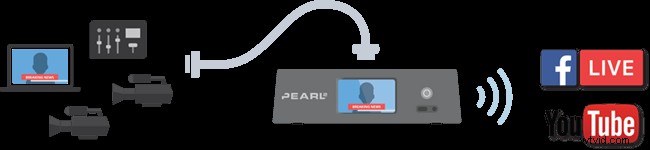 Pearl-2 really helps us reduce the risk for potential mishaps when we live stream video. We share our studio space with other productions and demo teams. Using Pearl-2, I can save the configuration setup I’ve made for the live show. That way I don’t have to worry if someone else uses the studio and changes the setup on Pearl-2. I simply apply the configuration setup I saved and we’re ready to go!
When you’re producing a live 15-20 minute show every week, anywhere you can save some time is a good thing. Having pre-configuration setups helps streamline the workflow. I have a basic configuration setup that I apply as a starting point. From there, I make adjustments for that week’s show and save the new setup. When it’s show time, I can quickly apply the configuration setup I want.
We also record separate ISOs of our YouTube and Facebook Live streaming channels right on Pearl-2, which we download after the show in case we want to investigate an incident. We can compare the recordings with the VODs of the live streams on YouTube and Facebook. Human error or a glitch on either the uplink network or the streaming endpoint (YouTube or Facebook) are usual suspects. We can easily figure that out and apply what we learn to the next week’s show.
Other products out there
When you click that “go live” button there’s really no turning back. You’re live and people are watching. I don’t want my equipment to be the cause of the next gag reel of bloopers.
What I like about using Pearl-2 is the confidence I get that it won’t be a pain point for my live production. Even as people on the production crew head out for summer vacation, Pearl-2 is so easy to use that it’s not a concern. Someone who’s never used the touch screen switcher before to live stream video can be up and running in no time. Sure there are other solutions, but most are harder to setup and need a lot of training to use. Compared to Pearl-2, other solutions are either way less reliable or way more expensive.
If you’re in the market for a robust, all-in-one hardware solution for live streaming your important events, Pearl-2 or original Pearl can do the job right.