
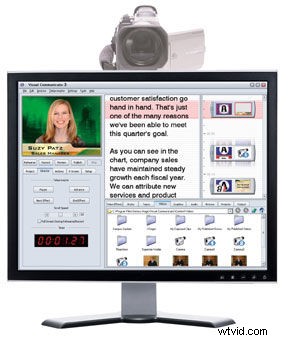
Whenever a very large company buys a small company, there's reason to fear. In the case of Adobe buying Serious Magic, we worried that something would be lost in translation. Our conversations with Michelle Gallina, a long time marketer for Serious Magic, have confirmed otherwise. Last week, Michelle walked us through the latest Adobe Visual Communicator 3 software. We're excited to see that Adobe has let the ol' Serious Magic team continue to work their magic with exciting video-centric applications. In fact, we think that this acquisition has been a very good thing. Let's take a closer look at Adobe Visual Communicator 3. Visual Communicator 3 will benefit video bloggers, producers of closed circuit broadcasts (e.g., school broadcasts) and video professionals who need a quick and dirty way to mix live video for the web. It's interface looks easy enough for beginners and more advanced users can quickly create professional looking webcasts with little effort. Visual Communicator 3 can mix up to three live camcorders, key backgrounds, superimpose animated graphics, cue video and audio on the fly and it does so in synchronization with your dialog/script much like a teleprompter. That's a lot of heavy lifting for such a simple looking software package. It doesn't stop here, however, as Visual Communicator 3 exports in a variety of formats, most notably Adobe Flash for live video Internet broadcasting. Of course, you'll need a relatively expensive Flash server to stream live video, but at least it's a possibility. For the majority of us, we'll just take the Flash file at the end of the "broadcast" and host it somewhere. With this latest version we're very pleased to see a run-time clock (see image). Everyone will benefit from this, including your viewers. We also found the non-traditional, vertical scrolling "timeline" to be a very functional and innovative idea. This is an especially helpful feature as it doubles as a teleprompter. We can't wait to dive into this application a little more. Keep an eye out for our review and in the meantime you can download a preview of the software from Adobe Labs. Visual Communicator 3 will be available in the Fall for $399 or upgrade for $149. Qualifying educators can purchase VC 3 for $169.