You might have heard the advice: create more engaging videos to connect with your audience. But what does it mean exactly – to make a video “engaging”? Sounds like it’s easier said than done.
Fret not! One of the surefire ways to make your videos funnier, catchier, in other words, better, is to add animation to them.
And what can be better than an animated GIF on your video?

Why are GIFs so powerful?
Ever since they were first invented in 1980, GIFs have become a powerful marketing instrument. Marketers are not only using them on social media, where the tone is more relaxed and informal, but also in emails, blog posts, and even in support tickets.
There are several reasons why we as human beings love GIFs so much. And another couple of reasons why adding GIFs to your videos should be part of your video making strategy.
1. GIFs convey emotions just oh so well. Most of us probably use GIFs in our day-to-day life. Have you noticed how all the platforms that allow sending messages (including Instagram) now have an option to send a GIF to recipients? It has to do with the fact that GIFs are great for explaining our ideas and adding an emotional touch to any conversation.
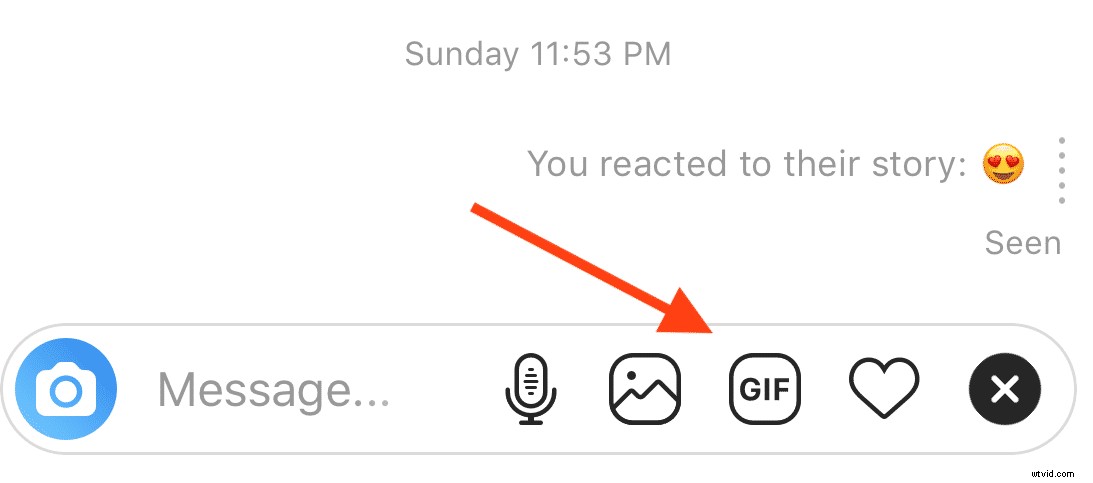
Now you can exchange GIFs in the Instagram messenger. Radical!
2. GIFs attract attention. Show a person a static image, and they will pay attention. Show them a static image with an added GIF, and they will be interested in watching more.

Now imagine marrying video and GIFs. Combined, these two powerful media create an element of surprise and excitement. It’s like we always want to see what the video creator has come up with.
3. GIFs add an extra sense to your video. When you add GIFs or stickers to your videos, they can explain your idea better, adding an extra “layer” of sense to your videos. Think of it as augmented reality, of a sort.
4. GIFs make your videos more fun to watch. We love being entertained. Perhaps that’s why we love watching videos so much in the first place. With a GIF added to your video, even the most conventional video clip can become a fun watching experience.
Add stickers and GIFs to your videos
Make your videos more engaging by adding GIFs and stickers with Wave.video.6 powerful ways to use GIFs and stickers on your videos
Now, you might agree that GIFs are omnipotent and shouldn’t be overlooked by marketers and video makers. A whole different story is how to use GIFs on videos effectively and in place? Just like with anything else, you don’t want to overdo or add GIFs to video where it’s completely inappropriate.
Here are 6 ways how you can enhance your videos with GIFs and stickers without seeming too juvenile or obsessed.
1. Attract a viewer’s attention to a specific feature
GIFs are not only used for giving videos a fun and emotional touch. They are also helpful when it comes to attracting attention and pointing it in the right direction.
This is especially useful when you are creating a product demo or explainer video. In this sense, use different types of arrows and circles to show users what you want them to notice.
Example of using a sticker in a product demonstration
Possible usage: add GIFs and stickers to your support videos to make them easily digestible and understandable. Arrows, pointers, and circles all help you show exactly what you want your viewers to see. Combine it with a voiceover, and your tutorial or product demo is bound to be as clear as it can get.
2. Structure the information
Imagine you are creating a video based on your latest blog post. You list out all the major ideas in your video, encouraging the viewers to read more on your blog. And your video turns out looking something like this…
Now, try using stickers or GIFs instead of bullet points on your video, and notice how it becomes more attractive.
3. Add a pinch of emotions to the text
As we have already mentioned, GIFs and animated stickers are a powerful instrument that can easily help you add an emotional touch to your videos. Use a sticker instead of a letter or word in your videos, and you’ll instantly see how your video gets a different hue of emotions.
In this sense, you can rely on the power of allegories and metaphors. For instance, in this video, notice how I substituted the word “love” with a heart. And the whole video looks more fun.
You can even try substituting parts of words with a GIF or sticker. The easiest one would probably be the letter O, as there are so many things you can substitute it with, from sun to donuts.
4. Make the text less boring
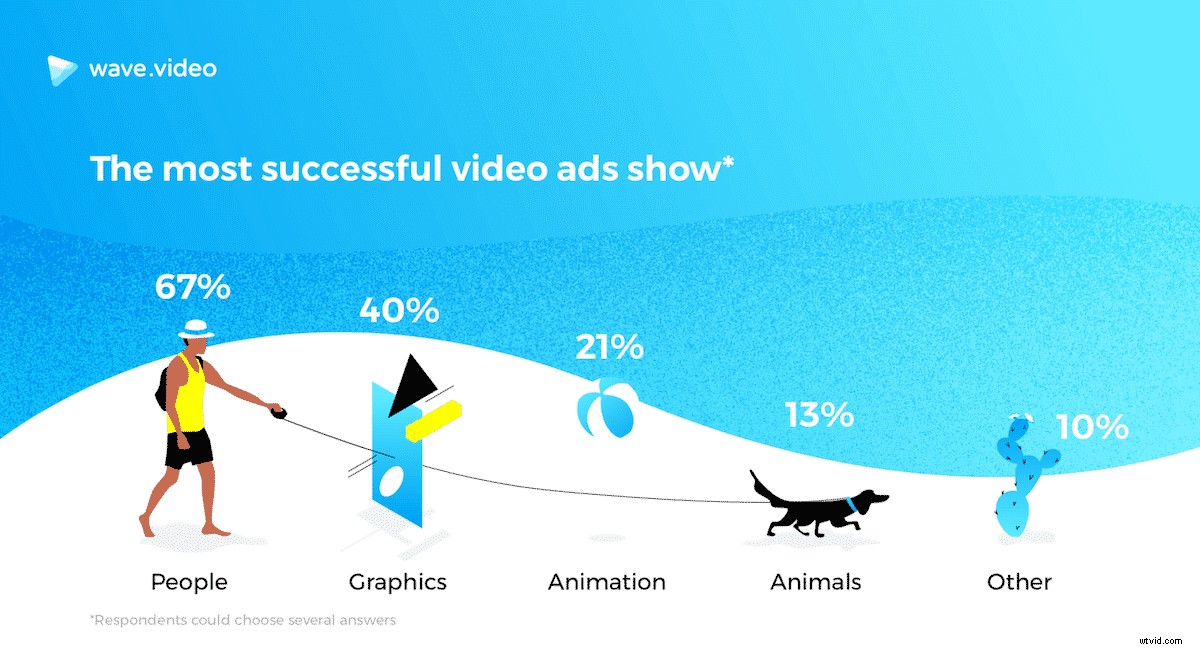
When you are simply showing a text message in your video, it might not be very exciting to read. We as human beings are more attracted to people and graphics rather than just text. In fact, our research on the state of social video ads revealed that 67% of the most successful video ads showed people.
If you do need to show a bunch of text in your video, make it a bit more entertaining by adding animated GIFs and videos. This way, you can also visualize some of the ideas described in the text.
5. Customize stock videos
When you create a video for social media, blog post, or any other purpose, you don’t always have your own footage at hand. In this case, it’s convenient to use stock footage, especially since there are tons of free stock videos available out there on the Internet.
However, there’s one major problem that comes with free stock footage: how do you customize it and make it truly “yours”? The last thing you want is the same video being used by dozens of people out there. Which could easily happen, given that everyone has access to the same stock libraries.
In this sense, adding GIFs and animated stickers help you customize the video, giving it a personal, your own touch. You can even create your own branded GIFs or stickers.
6. Make your video more universal
People around the globe often use similar emojis, stickers, and GIFs to express themselves. With the introduction of platforms like Instagram and Snapchat, it has become natural to communicate with emojis.
Adding stickers and GIFs to your videos can not only make your video unique but also universalize your message, making it understandable for people from any culture and background.
How to add stickers and GIFs to your videos
Adding GIFs and animated stickers to your videos is truly a powerful instrument that can add a new sense to your videos and make them fun, cute, and shareable. But how can you actually do it?
Let’s look at some ways and tool that can help you out.
1. Add GIFs and stickers via Instagram
From a photo-sharing platform that it used to be when it first launched in 2010, Instagram has become the third most popular social media network (after Facebook and YouTube). Naturally, the Instagram team keep adding new awesome features that will lure people back to the platform and help them create more engaging content.
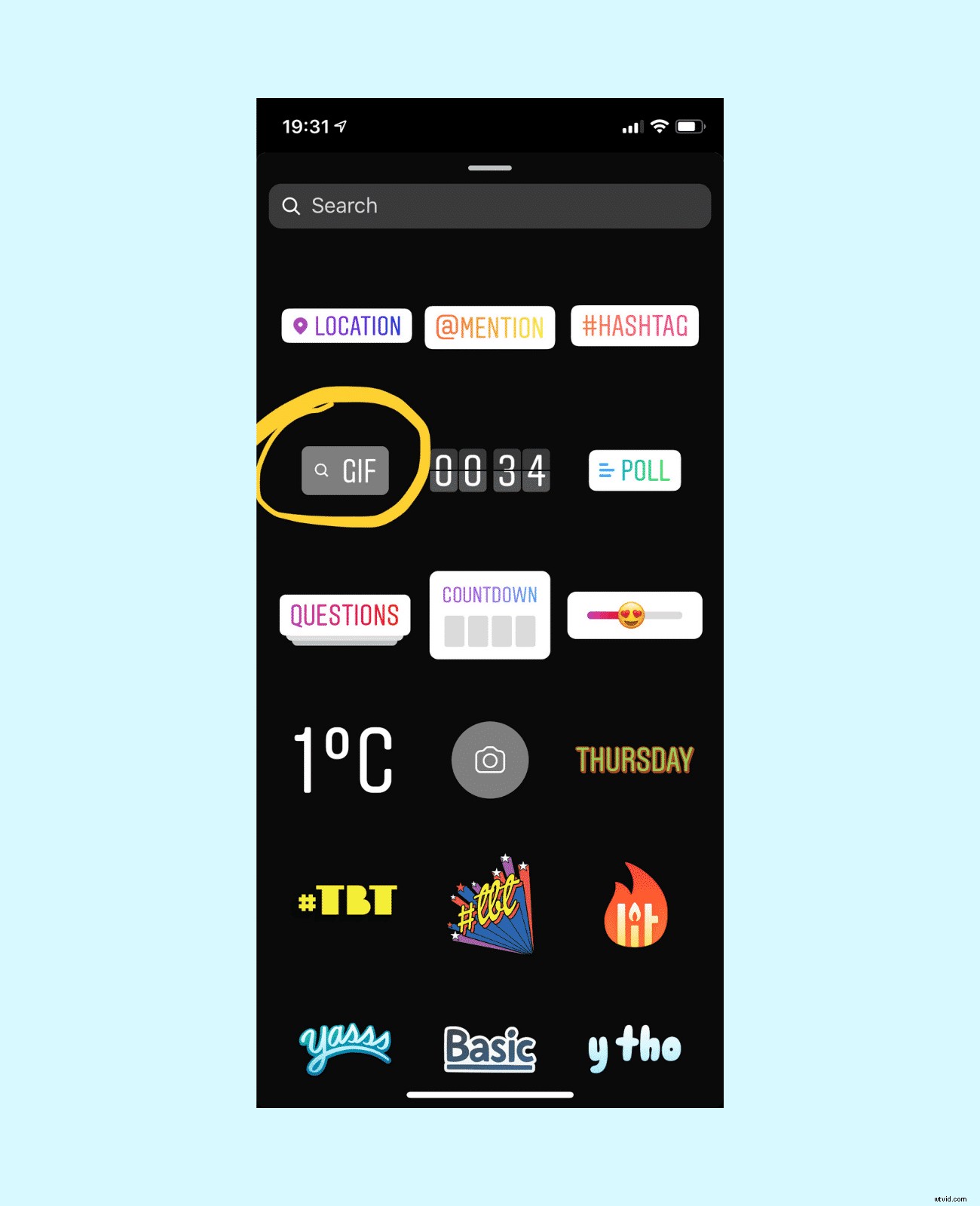
If you post your videos directly to Instagram Stories, you can simply search for a GIF in the built-in Giphy library. You can also add different stickers that come with Instagram itself.
This solution is very simple and intuitive. However, it has its own drawbacks. For instance, this way, you can only share a video with GIFs or stickers on Instagram. It’s also going to come in the vertical format only.
2. Add GIFs and stickers to your videos with Wave.video
Another way to add GIFs to your videos is by using Wave.video. Similarly to Instagram, this video maker comes with the built-in Giphy library. So you can upload your video and simply search for a GIF you want.
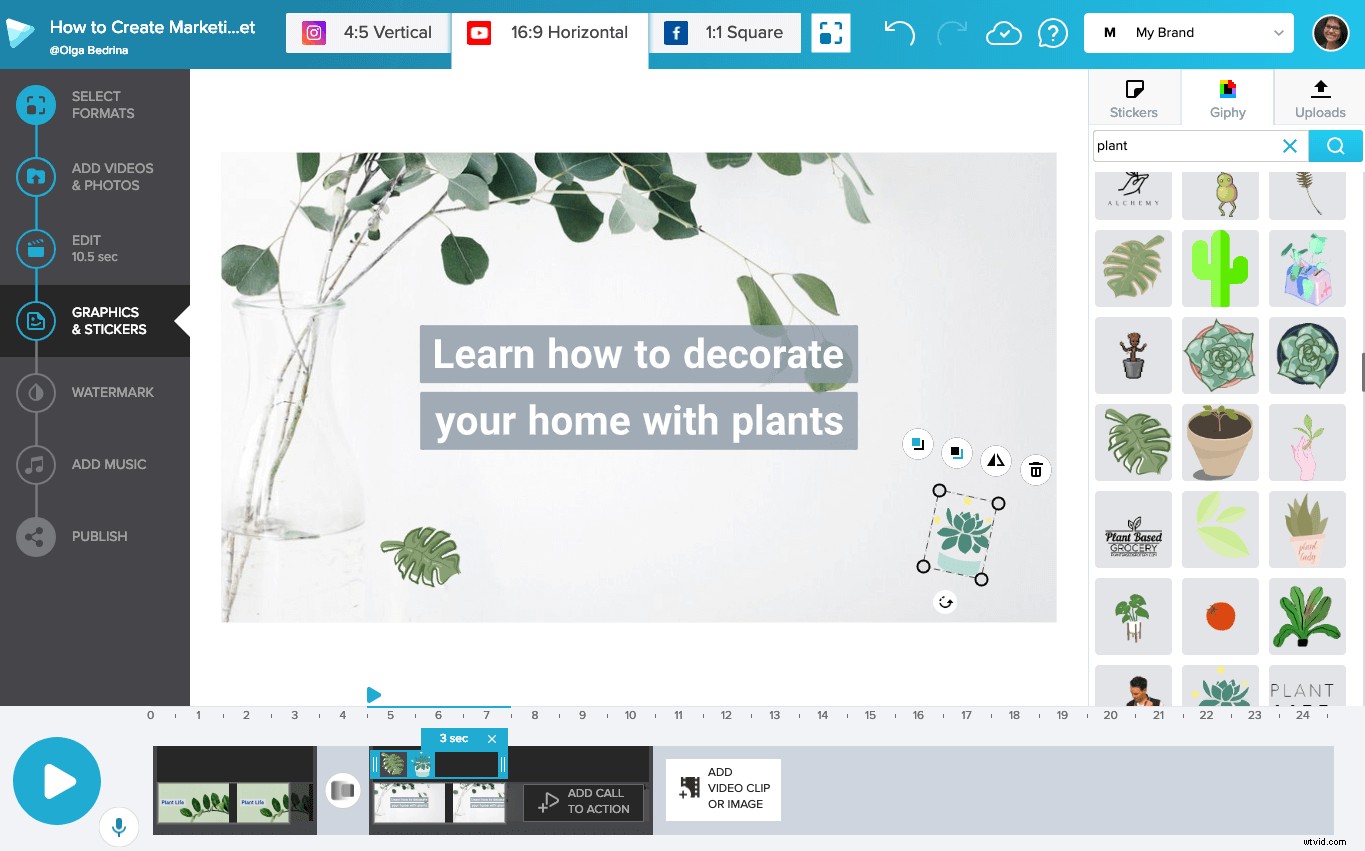
This way, you can create videos with GIFs and stickers in any format, not just vertical. This comes in handy when you want to make a vertical video for your blog or a square video for Twitter or Facebook.
3. Use Camtasia for adding your own GIFs and stickers to your videos
Camtasia is a powerful video editor that allows you to do a bunch of cool stuff with your videos. I mostly use it for creating and annotating screencasts but you can also upload your own media assets and put them on your videos.
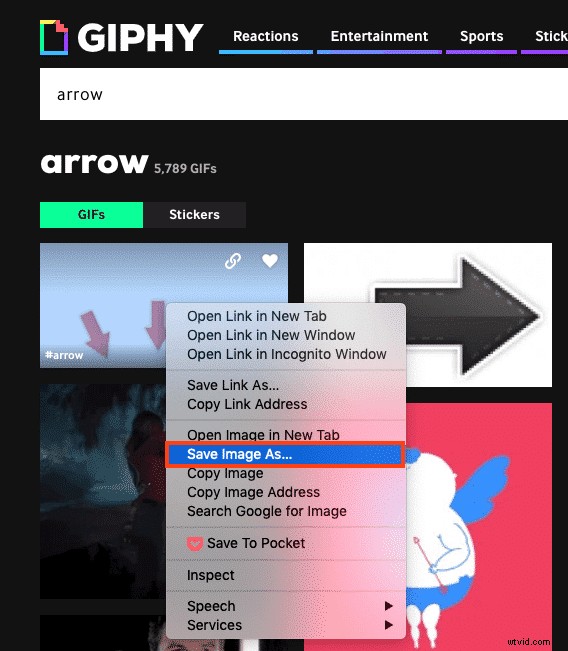
For instance, you can download a GIF you like from Giphy and upload it to Camtasia. In order to download a GIF from Giphy, simply search for a GIF you need, right-click on the image and choose the option “Save Image As…”
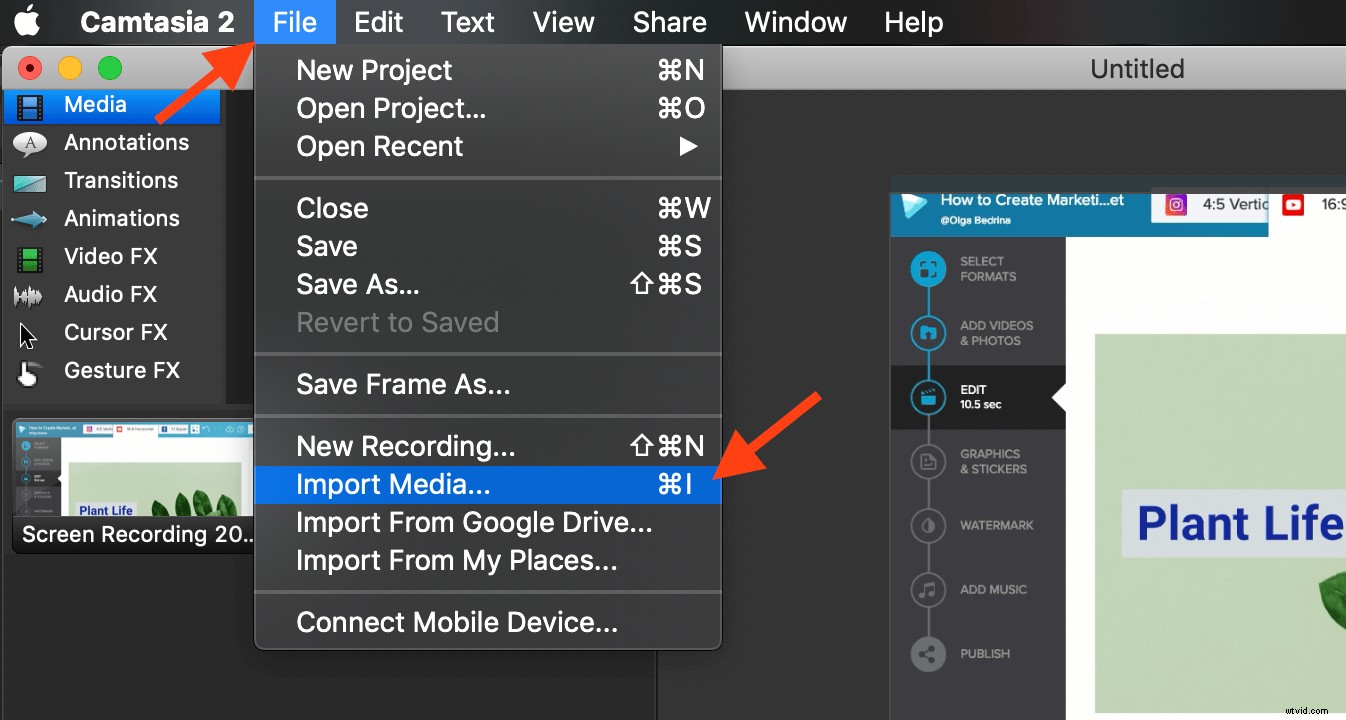
Then head over to Camtasia and upload the GIF. To do that, click File >> Import Media
Over to you
Adding GIFs and stickers to your videos make them more personal, understandable, and universal. What is your favorite way of using GIFs in your videos? Share in the comments below!