
Have you been wanting to start video editing but find yourself overwhelmed by the process? In this quick video learn the three most common mistakes beginner video editors make and how to fix them.
When sitting down to start editing a project, the process can seem intimidating and at times overwhelming. It is also a process that is prone to many mistakes that can make or break your video. In this video released by one of my favorite filmmaking channels on YouTube, This Guy Edits, Sven Pape lays out the three of the most common fundamental mistakes he sees editors making and the ways to fix them.
The Three Mistakes
1. Having a Sloppy Workflow
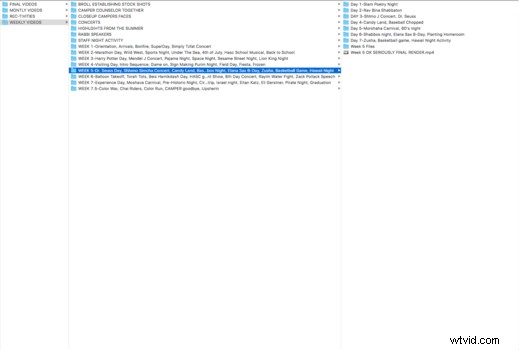
A good edit all starts with the workflow. If you don't have an efficient workflow established from the very beginning, it is very hard to make a polished and cohesive edit. The workflow for every person is going to be different, but for me, my process is very streamlined and consistent throughout each project I do. In the screenshot below, this is my workflow for my time as the head videographer at a summer camp. Each week was broken down into the days, and their activities. Within that folder, it consisted of the activity, and then into raws and selects and the different cameras that were used. That folder then got imported into Adobe Premiere where I would start to piece together the story of the week. Having this workflow made my life so much easier and gave me the time and energy to focus on making a great video each week.
2. Cutting Too Early
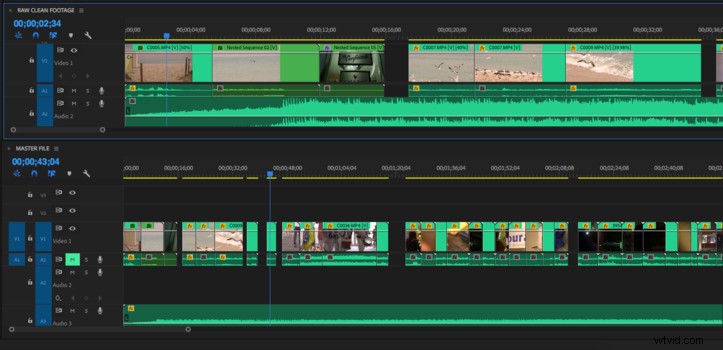
Being an editor for seven years now, I am extremely guilty of this one, but I have learned my lesson the hard way. It may seem tempting when you get home from an amazing shoot to immediately start cutting your footage. However, it's important that you know what you have first before diving deep into an edit. When I begin editing any project, the first thing I'll do is skim through all my raw footage and simply take it all in. Next, I watch through the footage again but this time I use the pancake timeline technique. I make two timelines: one for my raw footage, and one for my selects. If I like any shots from my raw bin, I simply drag it down to my master timeline. This way by the time I start actually cutting, I am familiar with the footage and can move forward in the process.
3. Using Hard Cuts
When cutting dialogue, it is very easy to mess up the flow of a conversation with a bad cut. The most common error I see in beginner edits is the use of hard cuts. A hard cut in a dialogue scene is when you chop up the audio right as the actor starts talking so there is no overlap. When cutting dialogue, you don't want to be able to hear the cut. This can be solved by using a "J" cut. A J cut means that the audio comes in before the visuals do. When doing this, the cut disappears and the shots blend seamlessly together. Another way fix the problem of hearing a cut is by laying a constant ambient sound below all the tracks. This is called room tone. This way, when you cut the audio from shot to shot you wont hear the abrupt ending, instead you will hear the subtle hint of room tone.
Are you guilty of any of these three mistakes? What other common mistakes have you seen when looking at an editor's work? Leave your thoughts in the comments below.