
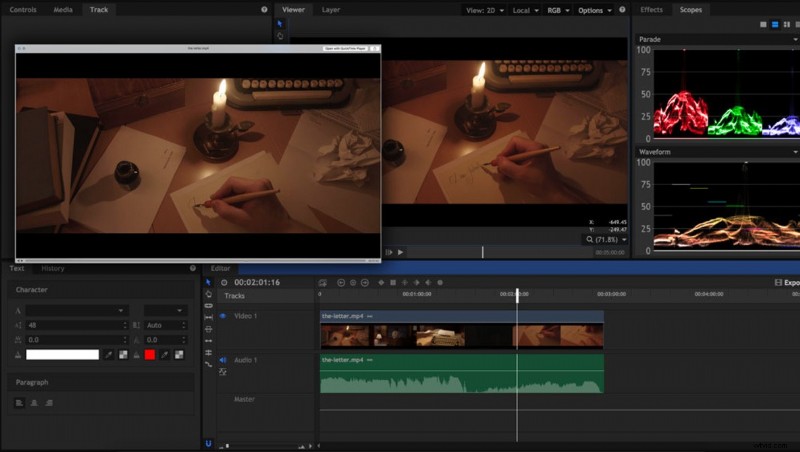
I had to deal with a problem, when the video editor's processed footage looked great, but once exported and uploaded on YouTube, it looked dull and desaturated.
My Workflow and Environment
In photography, you can have such a problem when your images are uploaded with a different color profile. Most browsers and photo viewers rely on the "fact" your image is saved with an sRGB embedded profile. I had a similar issue with video.
I'm using Mac OS X as my operating system. My currently preferred browser is Firefox, but I sometimes use Chrome. For video editing, I'm currently using HitFilm, where I do all the cutting, compositing, and color grading. When I export the edited footage, I go into Finder and press the space bar to review the result, and then, I upload it on YouTube with Google Chrome. Most of the time, I use an H.264 codec and an sRGB color profile.
Investigation
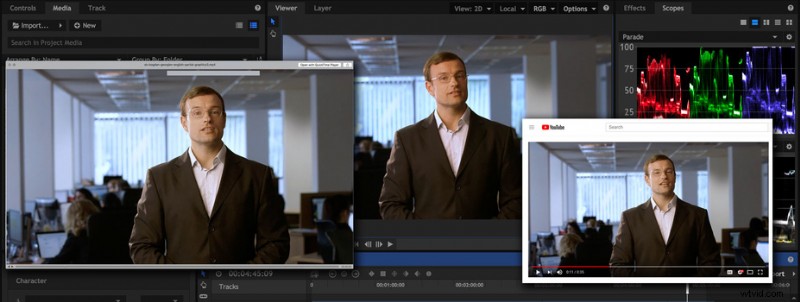
What was my first thought? It was a problem with the editor. For me, it was unacceptable to color grade by eye without any waveforms monitoring and export to see if it was correct. This would be quite inaccurate and very time-consuming. At that time, I tried editing with DaVinci Resolve, but I had the same problem. I did a test in Avid Media Composer. The same. The exported video looked bad: no contrast, lack of saturation, wrong colors, especially if I was working with skin tones. Then, I tried a different video player. The default one was Quick Time. I installed VLC and voila! The video looked the same as in my editor. I tried viewing the uploaded video in Firefox instead of in Google Chrome. There it had the correct contrast and colors.
The Verdict
The problem with the video review turned out to be in the QuickTime ecosystem, which seems to be notorious for its funky color management. To my understanding, it mixed the color profile with the color profile of the calibrated monitor, which has a wider gamut than sRGB and thus created a strange combination that was utterly unacceptable. Unfortunately, the quick video preview in Finder uses QuickTime for rendering the video and always shows it badly. That's true for stills too. This can happen for those of you who use QuickTime on Windows and have a calibrated monitor.
What about the uploaded video on YouTube? Chrome was having the same problem: low saturation and contrast of all uploaded videos. Fortunately, I found a workaround by turning off any hardware graphics acceleration from the browser settings.

Conclusion
It's good to have confidence in the video applications you are using. After all, you use them as tools to process your video footage. Always keep in mind those pieces of software can have flaws no matter how mature they seem. Has anyone experienced such problems before? Did you find a different solution?
If you'd like to learn how to make your own videos and don't know where to start, check out our filming and editing tutorial, Introduction to Video. If you purchase it now, you can save a 15% by using "ARTICLE" at checkout. Save even more with the purchase of any other tutorial in our store.