
Did you know that there are 6 aspect ratios for images and videos that creators and marketers use? These aspect ratios are 16:9, 9:16, 1:1, 4:3, 3:2, 21:9. The first way to select the right aspect ratio for your video is whether the video needs to be horizontal or vertical.
A video that's vertical or in portrait mode is taller than it is wide. In a vertical video, the entire screen is devoted to the video, capturing the viewer's attention.
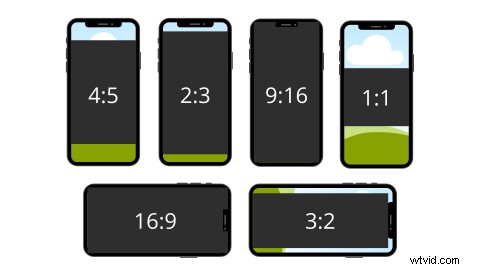
Smartphones are designed to be held vertically and though media can always be viewed horizontally, it’s far easier for watchers to consume media while holding their phone upright.
If you're looking for ideas and best practices for filming vertical videos correctly, read on!
Best practices for creating a vertical video
1. Film in the right aspect ratio
Any video that is taller than the aspect ratio of 1:1 is vertical video.
Any of the following ratios work for social media or for being viewed vertically on mobile devices and tablets. They are 4:5, 2:3, and 1:1.77.
There’s also a 9:16, which is a fully vertical ratio. In 9:16 FV, a vertical video will take up the entire screen, which makes it the most immersive viewing experience.

Source
The video on the homepage of Earlybird is an example of user-generated content shot in a combination of vertical and horizontal. On the homepage, the video compilation can be viewed in vertical mode, making it more viewer-friendly.
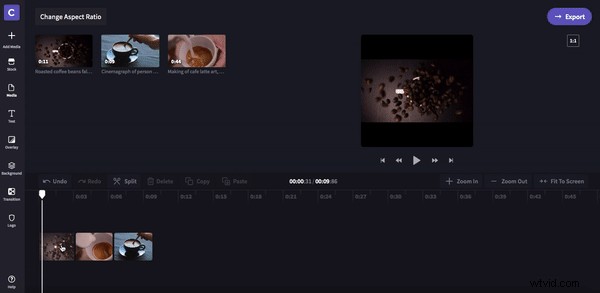
It’s possible to produce vertical videos either by framing a camera in portrait mode or by rendering it vertically by scaling or cropping the video. You can use Clipchamp's free online video editor to change the aspect ratio of your video.
2. Split the screen
You can use the vertical frame's tall height to stack horizontal clips on top of each other creatively.
Clips can be related in content and appearance or can appear to blend into one another. Some great music videos have used this technique.
You can also try combining multiple clips or diagonal lines for a unique look.
3. Fill the vertical space
By getting closer to your subject, you can fill vacant space in the frame automatically. There are some other creative ways to fill vertical space in situations where the subject can't be seen up-close.
When the camera is raised high and angled down, you get a deep frame for filming long shots that automatically fill space.
The above-the-head perspective offers a new and interesting POV that also serves the same purpose.

4. Try not to shake (or use a selfie stick or gimbal)
When watching a video, shaking camera movements are almost always annoying and distracting. You must avoid moving the camera quickly from side to side when producing vertical videos because the sides don’t have a lot of space.
While a normal pan or 360-degree rotation is perfectly fine (and even essential), cameras cannot handle the amount of data they have to process once they start to move too fast.
When in doubt, slow down. That will help, especially if you're learning how to vlog.

5. Remember to resize as per the platform
When you shoot vertically, you don’t necessarily have to shoot everything at eye level or at arm's length.
Changing your shot lengths and angles will make your videos more interesting, and you can create something unique within the video frame.
Screen recordings are generally horizontal recordings, but they will be viewed vertically when you upload them to Instagram. For example, this video explaining how to use Frevvo’s sharepoint form builder was recorded horizontally but is viewed vertically on Instagram. They made sure the edges did not get cut off when uploading the video and the writing is still legible.

Source
6. Add fun text, graphics, GIFs, or stickers
Use text that complements visuals. Make sure your text isn’t covering your subject. Any graphics you plan on using, such as emojis or stickers, should follow this same check.
Line them up where they'll enhance your video and scale them up as needed.
Pro tip: Create targeted vertical videos using research
You can also use SEO tools to analyze your website and know what your customers are looking for. This information can help you create better videos.
Source Once you have a good idea of what your audience is looking for, you can adjust your videos accordingly. Also, having a solid idea of who your target audience is can be a great advantage.
Tell your story with vertical videos!
Videos are so effective in building your brand and getting more engagement on social media. By adjusting your storytelling to fit the vertical constraints of mobile video, you can find a new visual style that will broaden your skills and generate interest and interactions online.
Express your creativity with vertical videos.