
Quality audio is the key to any interview. Here’s how you can clean up your interview soundbites and make them sound clear, natural, and professional.
When you’re filming interviews, whether for documentaries, corporate videos, or anything in between, it’s always a challenge to work with soundbites, which can be full of pauses, interruptions, and awkward phrasing.
However, with the right editing tools (and things like B-roll to cover your edits), a creative editor can work with awkward interview audio and turn it into clear, natural, and professional soundbites, which will impress clients and audiences alike. Check out these five simple (and essential) tips to help you clean up your interview soundbites in post.
Distinguishing Good Soundbites from Bad Ones

When you’re starting off, your goal (more often than not), is to look for crisp, concise, and insightful soundbites to work with. However, while there may be a few home run quotes you find right off the bat, you’re much more likely to find staggered soundbites here and there. I’d recommend going through, marking the obviously good ones for later, then finding the best bits and pieces that you may need to fill gaps or help finish thoughts later. Go ahead and delete any parts where the audio is beyond repair (for any reason) to clear space for later.
Remove “Umms” and Pauses

Once you have your solid soundbites, you may want to start doctoring them right away. We’ll assume you either have B-roll to use in your video (or something else to cover, like a second camera angle, stock images, etc.). This will help you hide your cuts. Watch your footage and listen to the soundbites a few times to catch all the “hmmms” and “ummms” and long pauses that your subject might deliver during the interview. It’s hard work talking on camera, so people usually speak a little out of their natural cadence. A few short pauses are okay if you’re looking for conversational or thoughtful soundbites, but you should be able to tell what sounds unnatural or unflattering. Find these segments, delete the awkward beats, and ripple edit everything back together.
Refining the Soundbites

After you remove all the blips and pauses, you’ll have a full set of soundbites. If you were asking one-off questions, the soundbites should all be pretty coherent from start to finish, but that doesn’t mean people don’t tend to ramble or repeat themselves. Listen to the soundbite all the way through a few times again to see what information they’re really conveying. If you like to look at text, you can transcribe here (or if it’s for a client, you may have to). From here, you can mark any parts that seem superfluous.
Look for Valleys
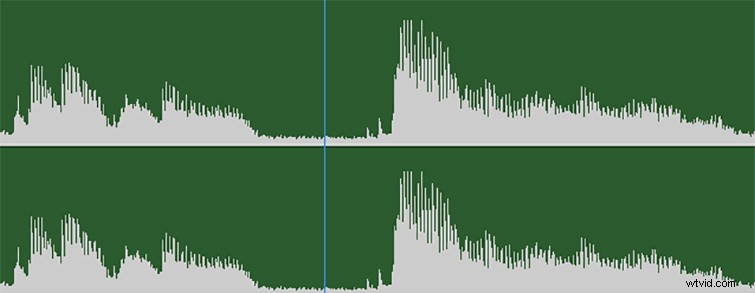
When picking your points to cut soundbites, the first place to look is for natural valleys in the audio files. The best valleys are obviously ones that include full pauses. However, if you’re looking to make some tricky cuts in the middle of sentences, you may find some valleys between words (or sometimes even syllables) where there is still some sound, but it’s much quieter and deeper in the valley. The trick then is finding a comparable valley to connect it to to create the sound of a natural speech pattern.
Find Similar Syllable Peaks
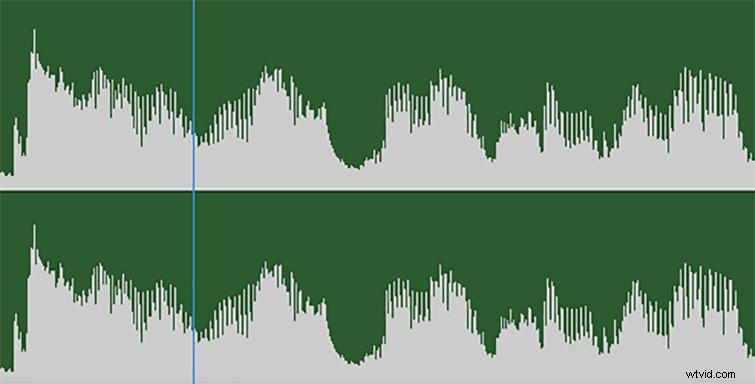
Which brings us to our next trick. If you cannot find suitable valleys to cut on, you can try to match syllable sounds to create natural transitions in dialogue and soundbites when a person starts to say a word. This one is a little trickier, but if you mess with the timing, it can be pretty effective.
This is all to say that soundbite editing requires a great deal of creativity and problem-solving skills — as well as technical tips and tricks. Your goal is always to reflect what your subject intended to say — just a little cleaned up and more professional. And while there may come a day where soundbite editing can be completely synthesized (and that day may already be here), it’s important to never use these doctoring techniques for disingenuous purposes or, for lack of a better expression, to put words in peoples’ mouths.
If you’d like to learn more about soundbite and audio editing, check out some of these great resources below.
- Organize Your Interviews Using Subclips in Premiere Pro
- Production Tips: Making Interviewees Comfortable
- Sound Editing vs. Sound Mixing: What’s the Difference?
- 12 Video Editing Tips for Cutting a Documentary
- Three Ways to Sync Audio to Video