
Adobe offers a sneaks peek at its new Cloak technology to intelligently erase and replace content in your film or video edit.
All images via Adobe.
Adobe Max is here, and the film and video production world is trying to keep up with all the new announcements and updates to the cloud. However, for those in film and video production, one feature teased during Adobe Max’s Sneak Peek presentation stands out for its future-minded possibilities.
Adobe Cloak promises to change how we edit with its “content aware fill” capabilities. If you’ve ever been working on an edit and become annoyed to find a boom mic hanging in a shot or a logo on a shirt you don’t want, this technology is for you.
Content Aware Fill

With Adobe Cloak, you can highlight specific elements in a shot and use the content-aware fill to remove and replace them by using the information around the elements to fill in what you’d see if the elements weren’t there. It’s essentially guessing and creating new information based on the footage around it — which it does quite superbly.
Precise Tracking
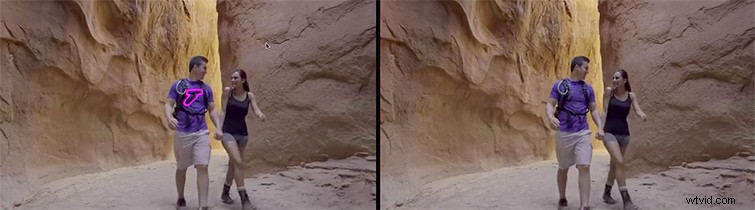
Technically, this technology is nothing too new to working with images in say, Photoshop. You can always go frame by frame and replace elements you don’t like. However, until Cloak came along, there was no technology in place to help seam each individual frames’ corrections together with precise tracking of camera and subject movements.
Replacing Unwanted Aspects
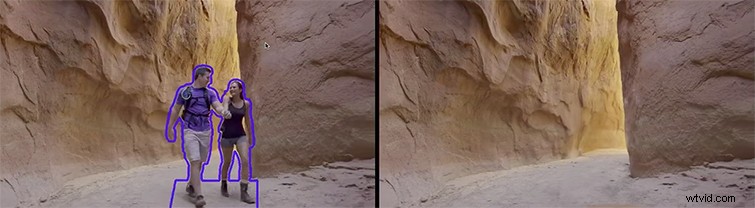
For the filmmaker, videographer, and content creator, this is truly a valuable tool that can help save a huge amount of time — or even entire shots and scenes. Based on some examples shared by Adobe’s research engineer Geoff Oxholm and discussed with Kumail Nanjiani, Cloak can pull off a variety of replacements.
- Brand logos or emblems.
- Boom mics.
- Dust on the lens.
- Light poles or other obstructions.
- Entire people or characters.
Cloak is also perfect for 360-video when you have a tripod in all the shots — or even covering shadows from your drone. You can read more about Adobe Sneak Peeks on their website here, or check out our full coverage of the new updates to the cloud here.