
Syncing audio can be a real pain. For DSLR videographers and filmmakers, capturing audio in camera for professional jobs in not an option. DSLR’s lack XLR connections, good pre-amps and high-bit rate recording options. So, filmmakers have to resort to recording audio the proper way via an external audio field recorder such as the Tascam DR-70D or the 60D, or other external recorders with professional XLR inputs and professional grade audio recording capabilities.
However even after you capture your audio separately, you still have to sync it with your video. Many do it manually – just by syncing via a slate, or use software solutions such as PluralEyes to do the syncing for you. German cameramen duo Maximilian Kaiser and Ulrich Esser decided to change that and give us – Tentacle Sync – a professional timecode generator for video shooters. They have launched an IndieGoGo campaign to help them get this necessary device into shooters’ hands.
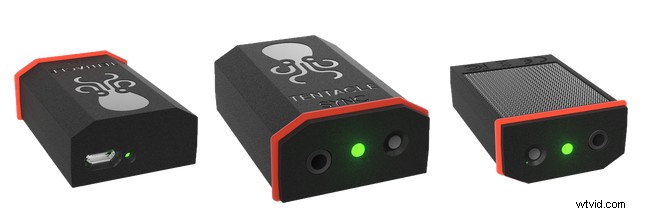
Tentacle Sync is a small, lightweight and portable timecode generator that can be used for pretty much every camera. Use one Tentacle to connect to your camera, and one to your sound recorder. You can use one of the Tentacles as a master clock and sync to other to it, this way they will stay frame accurate for more than 24 hours thanks to the internal battery which will last up to 40 hours.
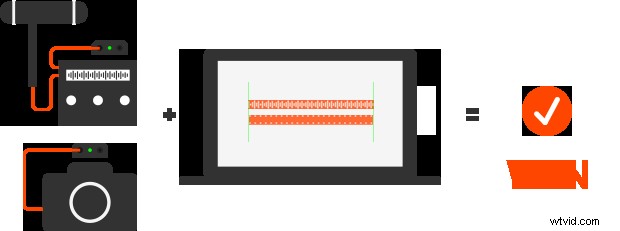
The Tentacle Sync devices basically send an audio tone timecode to both the camera and the sound recorder, and via their software both can be easily synced in post. The benefit of using a timecode based timecode generator like this over a sync software like PluralEyes for example is that software relies on waveforms and reference audio, and as your camera is further away from the auction, this can cause some issues for the software to correctly identify sync points.
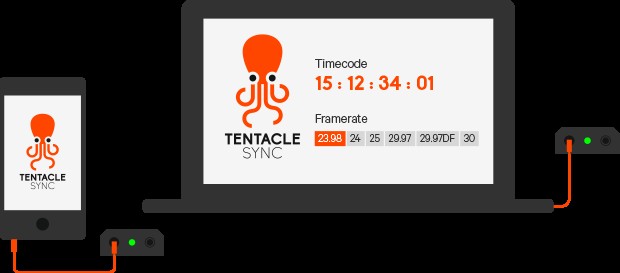
The Tentacle Sync can be easily setup via a smart phone or a laptop.
Tentacle Sync rely on timecode, which as accurate as you’d get, and a fully professional tool using the same workflow used by TV stations, and professional film productions. Tentacle Sync also features a built-in microphone for reference sound for those who want to have an extra piece of mind. Also, audio can be synced via almost any timecode compatible software, so you’re not restricted to their own proprietary software.
Tentacle Sync Hardware:
- Super small (34 x 50 x 16 mm) and lightweight (30 g)
- Super simple usage:
– DIP-Switchless operation (no screwdriver needed)
– Just one button and LED
– Frame rate and TC output level setup via software (OSX & Windows) - DSLR-ready: Switchable mic/line output + build-in microphone for reference sound
- Generates all SMPTE timecode rates: 23.98, 24, 25, 29.97, 29.97DF and 30 FPS
- Compatible with all professional equipment: Uses LTC timecode according to SMPTE-12M standard
- High precision TCXO:
– Inaccuracy less than 1 frame in 24 hours
– Temperature range -30°C to +85°C - Can act as master clock (Green Mode) or jam-sync to any external timecode source (Red Mode)
- Automatically detects and takes over incoming frame rate on jam-sync
- Built-in rechargeable lithium polymer battery
– Lasts for up to 40 hrs
– Fast charging via USB (1.5 hrs)
– More than 3 years of battery life (depends on usage)
– Will be replaceable - Integrated hook surface on back for easy mounting
- Made in Germany
Tentacle Sync Software:
- Drag and Drop functionality: Just throw your media folders in and view your synced dailies instantly
- Analyzes timecode of Quicktime and Broadcast Wave Files (BWF)
- Reads and analyzes any timecode recorded on audio tracks, even from competitor’s products
- Supported import formats: Quicktime, AVCHD, MP4, BWF, WAVE (MXF will be supported in the future)
- Supported export formats: Quicktime, XML. AAF Export will be available in the future
- Simultaneously sync and transcode your material on export to more editing-friendly codecs like ProRes
- Multicam support
- System requirements: Mac OSX 10.9
You can pre-order you Tentacle Sync through their IndieGoGo campaign.
[via Cinema5D]