
While single‑camera video has long been the norm, recording from two lenses simultaneously—known as dual‑camera or "double‑take"—offers a powerful creative edge. With the right app, you can capture front‑ and rear‑camera footage at once, edit them side‑by‑side, or even stream live in split‑screen or picture‑in‑picture mode.
All of the featured apps support the iPhone’s wide, ultra‑wide, telephoto, and front cameras. They record in 1080p at 24 fps, 30 fps, or 60 fps, and allow you to choose how the feeds appear before you hit record.
1. Wondershare Filmora for iPhone (formerly FilmoraGo) – Pioneer of Dual‑Camera Recording
Founded in 2003, Wondershare has built a reputation for intuitive video editing tools. Filmora for iPhone extends that legacy by letting users record from the front and rear cameras simultaneously. The app offers split‑screen preview, picture‑in‑picture editing, and a vast library of filters, effects, and stickers.
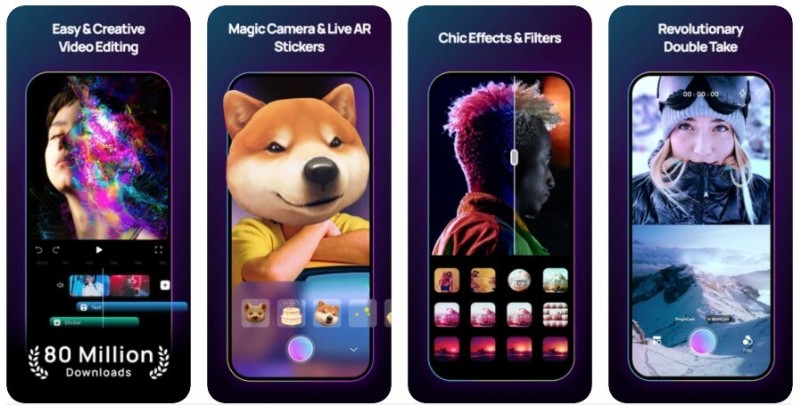
After recording, you can edit each clip in the app’s robust PiP mode, then merge them into a single finished video. The built‑in royalty‑free music library and easy iTunes import make post‑production a breeze.
Pros:
• Dual‑camera capture (front + rear) on compatible iPhones
• Hundreds of creative effects and stickers
• Live split‑screen preview
• Built‑in music & sound effects library
Cons:
• Dual‑camera mode supports only iPhone XR and newer models
2. SlingStudio Capture
Designed for live events—sports, worship, education, weddings, or broadcasting—SlingStudio lets you stream multiple camera angles with a single device. The app adds standard editing tools, zoom controls, and native flash support.
Pros:
• Simultaneous use of front and rear cameras
• Adjustable zoom
• Native iPhone flash integration
Cons:
• Minor display blur can appear when both cameras are active
3. SwitcherStudio
SwitcherStudio turns your iPhone into a wireless multi‑cam production hub. Stream directly to social media while switching between feeds in real time. Its on‑the‑fly editing features reduce the need for post‑production work.
Pros:
• Live production on iOS
• Supports multiple video sources
• Unlimited graphics and multimedia overlays
Cons:
• Can cause occasional app lag on lower‑spec devices
4. RecoStudio MultiCam
RecoStudio turns your device into a production switcher that displays up to four cameras simultaneously. Connect up to three external cameras via Wi‑Fi, and stream live to social platforms while previewing all feeds.
Pros:
• Supports up to 4 simultaneous cameras
• Live social media streaming
• Unified view of all sources
Cons:
• Image quality may suffer from occasional blur
5. CollabraCam
CollabraCam supports up to six cameras, recording every angle simultaneously while an Edit Decision List (EDL) is generated in real time. The app simplifies live editing and allows a single audio source for the entire session.
Pros:
• User‑friendly interface
• Wide range of effects
• All cameras record the full session
Cons:
• App stability can be an issue under heavy load
6. Director Multicam Studio
Mandated for broadcast‑style live production, Director Multicam Studio lets you manage up to four video sources—including IP cameras, HDMI/SDI encoders, and RTSP streams—directly from your iPhone. The free version offers unlimited runtime without watermarks.
Pros:
• Supports 4 video sources (IP, iPhone, HDMI/SDI, RTSP)
• Live streaming to social media
• Real‑time editing during capture and post‑production
Cons:
• Lacks a built‑in royalty‑free music library
Among these options, Wondershare Filmora consistently receives the highest praise from professional editors for its ease of use and feature depth. Try it today and unlock the full potential of your iPhone’s dual‑camera capability.