
In contemporary video production, filters are essential tools that elevate raw footage into polished, visually striking material.
By manipulating color, contrast, and tone, filters infuse scenes with mood and creative nuance.
Applying a filter is straightforward—choose a preset and apply it with a single click.
Wondershare Filmora offers an extensive library of professionally crafted filters that are both user‑friendly and high‑impact.
These filters are designed for quick application and dramatic visual improvement.
Using Filmora’s filter collection can dramatically enhance color balance and overall atmosphere.
This article explores why filters are essential, offers a detailed tutorial on adding them with Filmora, and shares expert tips for achieving professional results.
In this article
- Why Should You Add a Filter to a Video?
- How to Put a Filter on a Video Using Wondershare Filmora?
- Tips on How to Add Filters to Video Content Like a Pro
Why Should You Add a Filter to a Video?
Filters are often perceived solely as aesthetic enhancers, but their benefits extend far beyond surface polish. In professional editing, filters help convey tone, support storytelling, and streamline post‑production workflows.
Social Media Content
First impressions on platforms like Instagram, TikTok, and YouTube are critical. Filmora’s Dreamy Glow and Vibrant Pop filters add a subtle sheen that captures viewers’ attention and boosts engagement.
Vlogs and Personal Video Diaries
Raw footage can feel flat; a cinematic color grade transforms everyday moments into compelling narratives. Filmora’s Film Grain, Teal, and Orange filters emulate Hollywood‑style grading, adding depth and warmth.
Travel Videos
Travel content demands clarity and vibrancy while preserving authenticity. Filters such as Film Stock and Sunset Boost accentuate natural landscapes without over‑processing, maintaining a nostalgic yet professional look.

Vintage‑Style Videos
To evoke nostalgia, Filmora’s Old Film and Sepia Tone filters simulate aging film stock, allowing creators to craft retro aesthetics effortlessly.
Beauty Enhancement
For interviews, documentaries, and portrait‑focused footage, subtle skin smoothing and soft focus can improve on‑screen presence without compromising authenticity. Filmora’s Soft Focus and Skin Smoother filters provide these enhancements with minimal user input.

Quick Fixes
When time is limited, Filmora’s Brighten and Color Correction filters auto‑adjust exposure and color balance, enabling rapid, high‑quality corrections.
How to Put a Filter on a Video Using Wondershare Filmora?
Ready to apply a filter? Follow these simple steps to transform your footage.
Step 1: In Filmora’s main dashboard, navigate to the Elements Panel, click Import under the Media tab, and upload your media files. Drag each clip onto the Editor Timeline for editing.
Step 2: Switch the Elements Panel tab from Media to Filters. Browse categories or search by keyword, then click Download on the desired filter.
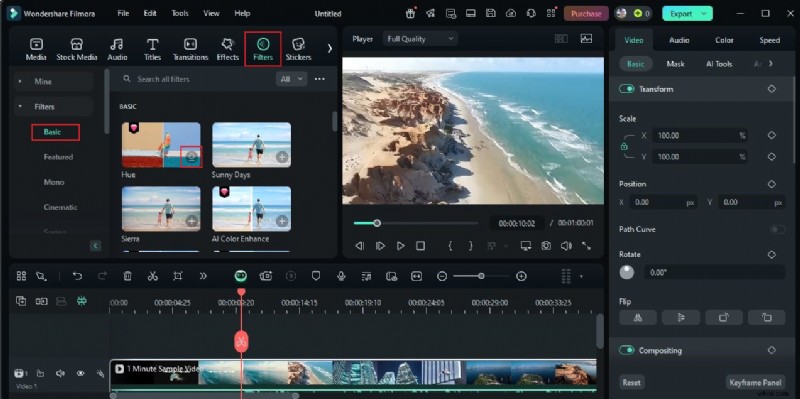
Step 3: Drag the downloaded filter onto the Editor Timeline. Place it directly above the video track or onto the specific clip you wish to enhance.
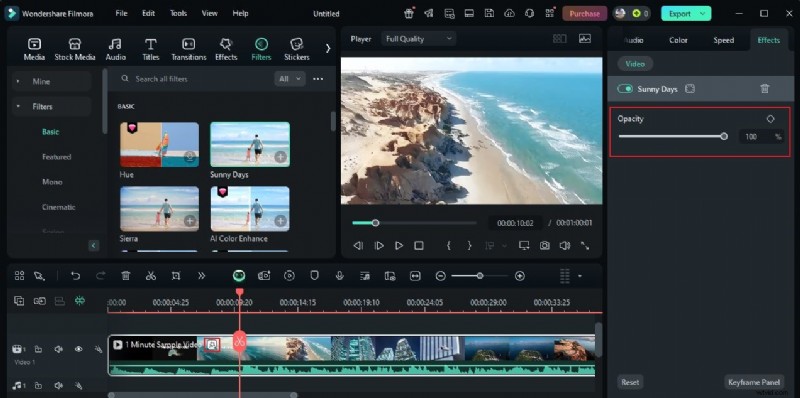
Step 4: Filters in Filmora are fully adjustable. Click the filter on the timeline to open the right‑hand panel, then tweak the Opacity slider (and other parameters) to fine‑tune the effect.
Step 5: Preview your edits. If satisfied, click Export to render the final video. If not, adjust parameters until the desired look is achieved.
Tips on How to Add Filters to Video Content Like a Pro
Filters define your visual voice. Use these expert strategies to ensure your choices reinforce your narrative.
- Experiment with multiple filters and blending modes; layering can yield sophisticated looks.
- Select filters that complement your video’s theme—warm tones for family events, cool tones for tech reviews.
- Preview each filter individually before finalizing; this prevents costly re‑editing.
- Customize every applied filter; small adjustments can make a significant difference.
Conclusion
Custom filters are more than decorative; they’re powerful tools that elevate visual quality and storytelling efficiency. Don’t overlook this critical step—Filmora makes adding filters quick and intuitive, whether you’re a beginner or seasoned editor.
Choose a filter from Filmora’s library, drag it onto your footage, and watch your video transform. Start experimenting today and see the impact on your next project.

Filmora
⭐⭐⭐⭐⭐
The Best AI‑powered Video Editing Software and App