
"Is there any way that allows me to crop videos with no watermark?" -Quora
Yes! You've got it. We've compiled some of the best online and offline video croppers according to our research; before diving into the exact tools, let's get a brief idea of why some video croppers leave a watermark.
In this article
-
- Echowave Online Video Cropper
- Abraia.me
- Aiseesoft Video Cropper
- AnyMP4 Online Video Cropper
Why Do Some Video Croppers Leave a Watermark?
When looking up any type of video editing tool, you'll find that most leave watermarks on your content. Why is that, and why should you avoid such tools?
Most commonly, it's a marketing tactic you'll find with virtually all free solutions (and many paid ones as well). A simple watermark lets anyone who sees a video know which software was used to create the content. Some of those who see it might be interested enough to check out the software and start using it for themselves.
While it's common practice for tools to leave a watermark, that doesn't mean you should just leave random software watermarks in your videos. It's a distraction for the audience, and it might even make them believe that you were sponsored by the tool to create that content or that your video is nothing more than an ad.
Your content will look much cleaner and more professional without it.
So, when looking up editing tools, let's look for a video cropper with no watermark.
Best 4 Video Croppers Without Watermark
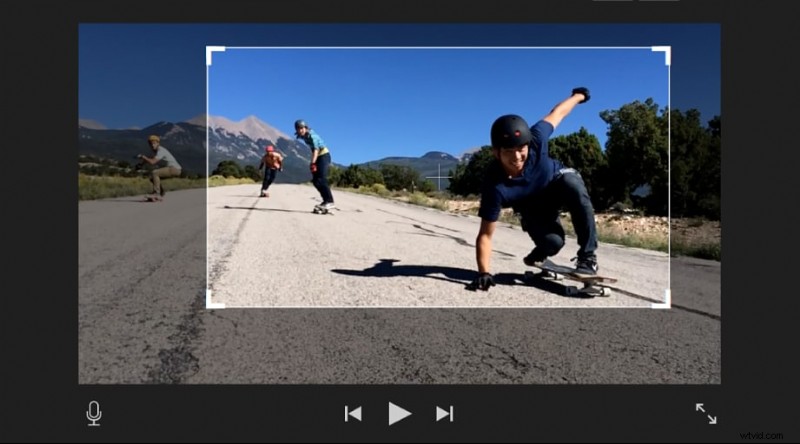
Finding a good online video cropper without a watermark can be a bit of a challenge. The following tools will be your best options that retain excellent video quality and enable you to crop your videos without advertising to everyone what software you used to do it.
Echowave Online Video Cropper
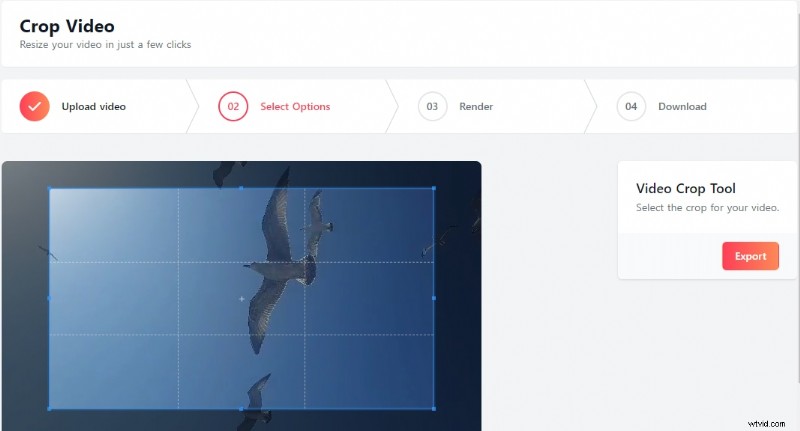
Echowave is a convenient platform with many available free tools for creating and editing both audio and video content. Its video cropper online with no watermark offers excellent functionality and is completely free.
Suitable for social media platforms like Facebook, Instagram, TikTok, and even YouTube, it lets you crop your video to any size you'd like with minimal impact on the overall quality. It's compatible with all devices and browsers and requires no downloads.
Key Features:
- Drag to crop – drag the corners of your video to crop it to your preferred custom dimensions;
- Crop horizontal to vertical – crop landscape videos to a portrait format, making them suitable for social media platforms;
- Accessible via any browser – use any device or browser to crop your videos for free without a watermark.
- User-friendly and easy to navigate
- Minimal impact on video quality
- Requires no sign-ups or log-ins
- Occasional issues with customizing the crop area
- No cropping presets
Abraia.me
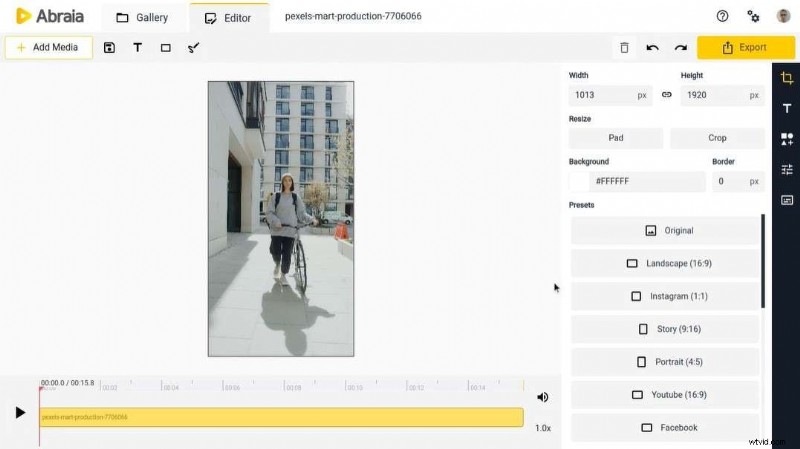
Abraia.me is a bulk image and video editor mainly used by marketers and online content creators. You can crop videos online for free without any watermarks at once.
It offers complete control over the video size and full flexibility. With 12 different crop templates suitable for diverse platforms, it makes cropping videos a breeze for social media platforms.
Key Features:
- 12 crop presets – choose the ideal video size based on the platform you'll be posting it to, from Facebook to LinkedIn, Pinterest, and more;
- Bulk processing – upload several videos at once and crop them in a couple of clicks;
- Adjustable height and width – specify the exact height and width dimensions to crop your video.
- Up to 500MB per file
- Convenient presets
- High-quality videos
- Requires users to log in
- Slow video upload and download
Aiseesoft Video Cropper
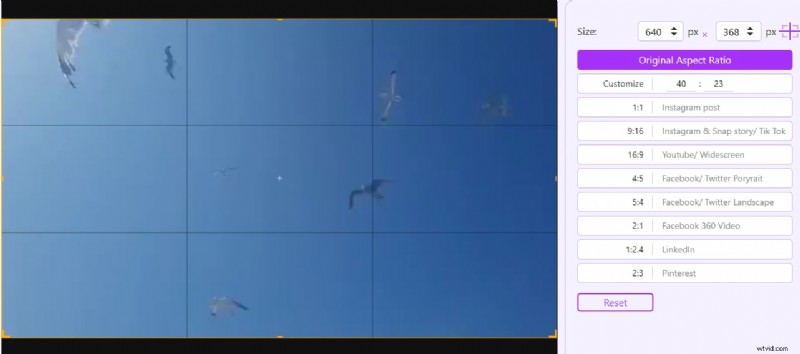
Similarly to Media.io mentioned above, Aiseesoft is primarily an online video converter that supports a wide range of file formats. However, it also offers a wide array of free and paid-for tools that enable you to better manage your videos.
Among its free tools is the online video cropper. Simple and easy to use, it gives you access to convenient presets that help immediately prepare your videos for popular social media platforms. Choose your preferred aspect ratio or manually create a video of the perfect size.
Key Features:
- Compatible with multiple social media platforms – use presets to make your video suitable for Instagram posts and stories, TikTok, Facebook, Facebook 360 video, and more;
- Customizable aspect ratio – keep the original aspect ratio or customize it how you see fit;
- Preview – preview your videos before downloading them.
- Full-screen mode
- Batch processing
- Supports many video file formats
- Slow video processing
- Could affect video quality
AnyMP4 Online Video Cropper
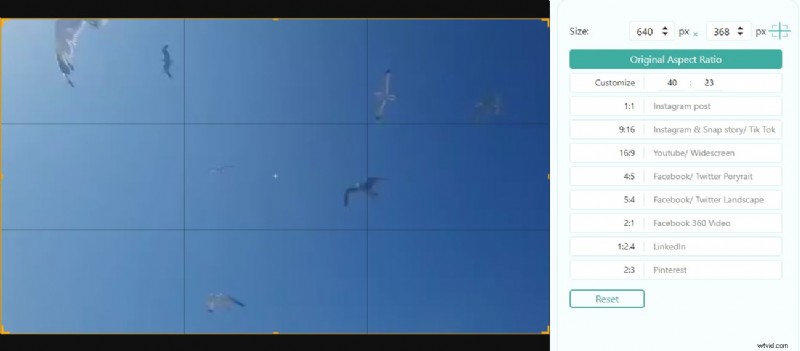
The final free video cropper with no watermark accessible via any browser is AnyMP4. It has a basic cropper with several presets designed to match your chosen platform where you'll post your content. And you can crop video size to any dimension.
It's easy to use and has nice video processing speeds, allowing for seamless uploads and downloads. It retains excellent video quality and works with all the most popular file formats.
Key Features:
- Support for various video file formats – despite its name, AnyMP4 doesn't support MP4 files only. You can also use it for cropping MOV, WMV, AVI, MKV, and M4V, among many different file formats;
- Data safety – all videos you upload are deleted from the platform after 24 hours, ensuring the utmost data safety;
- Compatible with Windows and Mac – access the platform using any browser on your Windows or Mac device.
- Intuitive and easy to use
- No log-ins required
- Supports many video formats
- Occasionally slow processing
- Laggy with larger files
Best Offline Video Cropper
Although free online video croppers can be convenient for occasional use, they're unsuitable for content creators, marketers, and businesses. They're not even all that suitable for non-professional frequent users. Let's see the normal limitation of online video croppers with no watermark.


- Limited file size
- Light on video editing features
- Requires stable internet connection
- Laggy and long process time
Keeping these limitations in mind, you may also look into offline video cropper. Today, on our recommend list, is Wondershare Filmora.
As an all-encompassing video editing suite suitable for personal and professional use, Wondershare Filmora comes with all the basic capabilities – enabling you to crop, rotate, trim, split videos, and more. However, it can do so much more.
With dozens of features like screen recording, AI copywriting, text-to-speech and voice cloning, speed ramping, and keyframing, among many others, it gives you full creative freedom to deliver content that astounds your audience.
You can test out Filmora for free, but if you want to crop your videos and enhance them without a watermark, you'll need to choose one of its available subscription plans.
Here are the steps to crop videos in Filmora:
- Download, install, and launch Wondershare Filmora.
 Security Verified. 3,591,664 people have downloaded it.
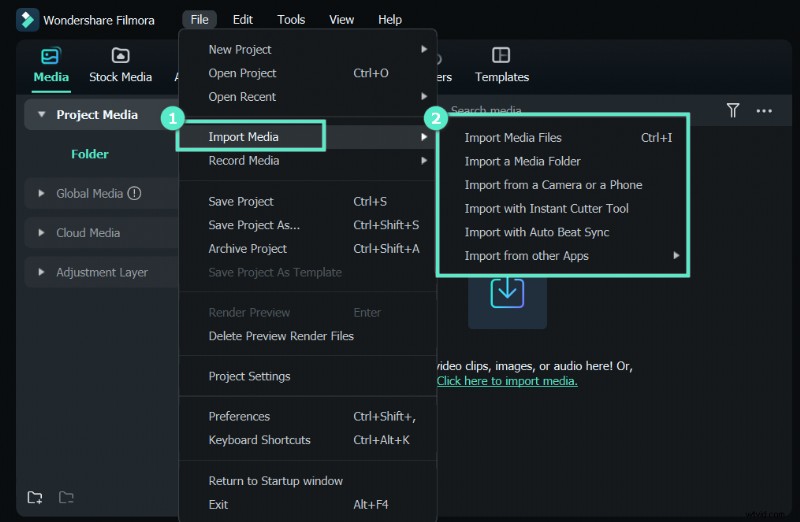
 - Import your video and drag it to the timeline.
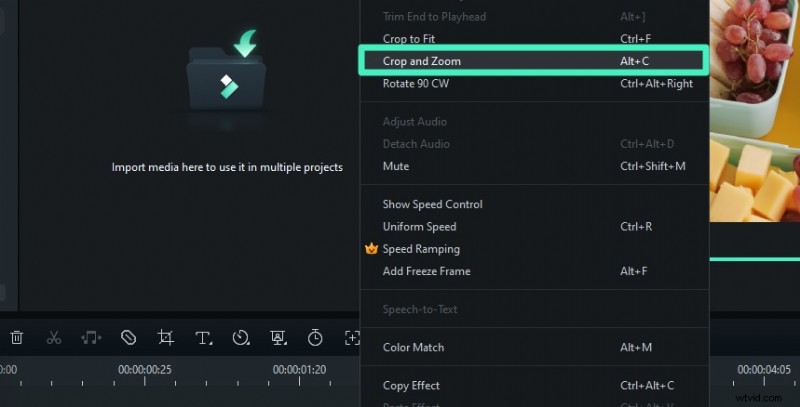
- Right-click the video > choose Crop and Zoom.
- Select the aspect ratio from the pre-set droplist, or customize it according to your requirements.
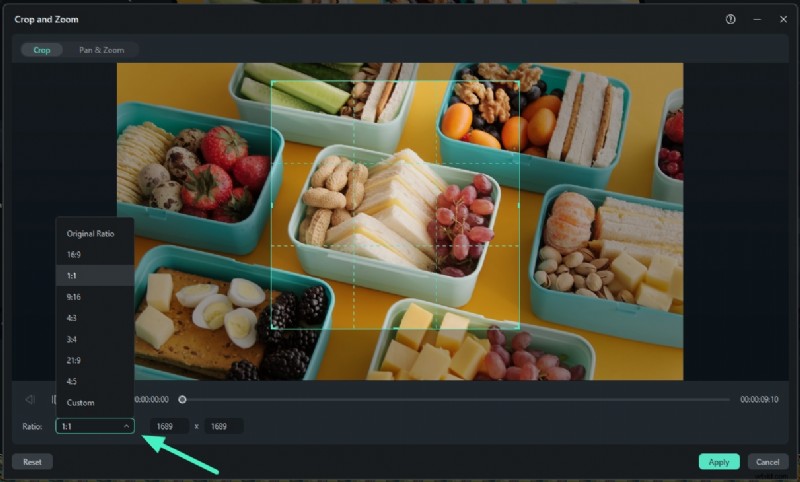
- Click Apply to finish cropping.
Edit Videos with Wondershare Filmora
- 100+ advanced video editing features.
- Vast video/audio effects and creative assets.
- Powerful AI for effortless content creation.
- Intuitive, professional yet beginner-friendly.
- Works on Mac, Windows, iOS, and Android.

Bonus Tip: How to Remove Watermarks from Cropped Videos?
If you've already used an online video cropper that leaves a watermark on your content, don't worry – it's not too late to get rid of it. With Filmora's AI object remover, you can quickly and easily get rid of any unwanted object – including watermarks – in just a few steps:
- Download and install Filmora, then click Login to sign in to your account;
- Select New Project from the main window, go to File > Import Media, and choose the video to import;
- Drag and drop your video to the timeline;
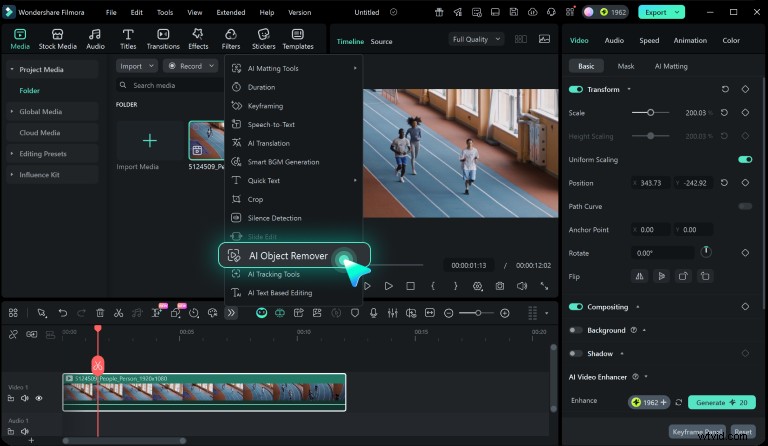
- Select the clip in the timeline and go to Toolbar > AI Object Remover;
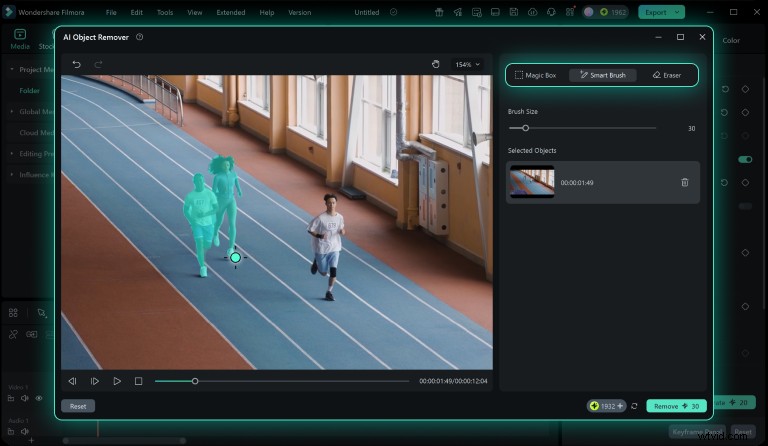
- Adjust brush size and click to paint over the watermark (or other objects) you want to remove;
- When done, click Remove.
From there, you can click the Export button to save your video to your device or upload it directly to a platform like TikTok or YouTube. Alternatively, you can continue editing and enhancing your video using Filmora.
Conclusion
A process as simple as cropping a video can become unnecessarily challenging without the right tools. Fortunately, any of the online tools we've mentioned in the list can help you seamlessly adjust the size of your videos and make them perfectly suitable for any platform.
However, if you want to get more from a video cropper with no watermark and enhance every aspect of your content, Filmora will be the tool for you.
Security Verified. 3,591,664 people have downloaded it.