
If you’re looking for a free, feature‑rich video editor that’s also intuitive, Kdenlive may become your go‑to tool. Open‑source and cross‑platform, it’s praised for everything from basic trimming to advanced effects like green‑screen compositing and slow‑motion.
What Is Kdenlive?
Kdenlive (KDE Non‑Linear Video Editor) is a completely free, open‑source application that runs on Linux, Windows, macOS, and BSD. Although it’s most popular on Linux—thanks to its native integration—it also works well on Windows, and macOS users can install the x86‑64 build. There is no mobile version yet, so it’s a desktop‑only solution.
Because it ships without a subscription model or hidden fees, Kdenlive is a budget‑friendly choice for hobbyists, educators, and indie creators. Its community of contributors continually adds new features, making it a living, evolving platform.
Typical Use Cases
- Social‑media clips for YouTube, Instagram, or Facebook
- Educational tutorials, lectures, and explainer videos
- Promotional material for products, events, or services
- Music videos and short films
- Documentary or vlogging projects
Who Should Use Kdenlive?
Beginners and casual creators who need straightforward editing—cutting, cropping, speed‑adjustment, and basic color correction—will find Kdenlive welcoming. It also suits intermediate users who want to experiment with multi‑track timelines and keyframed effects without a steep learning curve.
Key Features That Set Kdenlive Apart
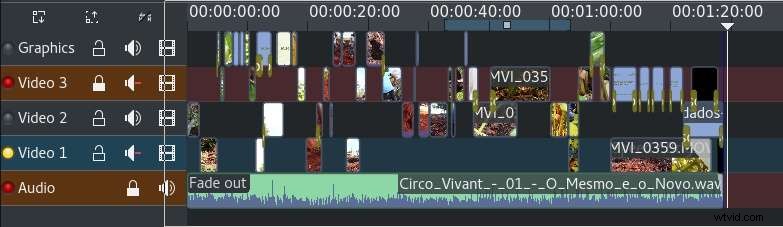
Multi‑Track Timeline
Combine up to eight video and audio tracks. Each track can be locked, muted, or isolated for precise control, making layered storytelling effortless.
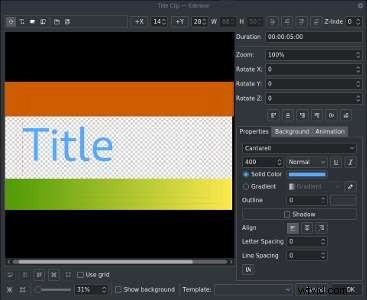
2D Title and Text Layers
Add customizable text overlays with a variety of fonts, colors, and animation presets. Ideal for intros, lower‑thirds, and credits.
From color grading and noise reduction to creative filters, Kdenlive offers a wide range of built‑in effects. The library is continually expanded via community plugins.

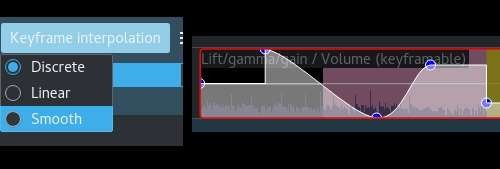
Animate any effect over time—zoom, opacity, position, or color—using keyframes. This capability unlocks smooth transitions and dynamic motion graphics.
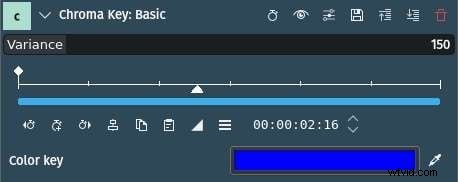
Replace a single color to composite your footage onto new backgrounds. Tutorials on Kdenlive’s official learning page walk you through each step.
Pros of Kdenlive
- Free & Open‑Source: No license costs, and source code is available for customization.
- Auto‑Backup: Projects auto‑save every few minutes and keep previous revisions.
- Seamless Integration: Works well with GIMP, Blender, and other creative tools.
- Proxy Editing: Low‑res proxies ensure smooth playback on less powerful machines.
Cons to Consider
- Limited Advanced Features: Lacks native motion tracking, multi‑camera sync, and professional audio editing suites.
- No Built‑in AI Tools: No automated cutting, color suggestion, or AI‑powered asset generation.
- No Project Templates: Projects must be built from scratch, which can slow down quick workflows.
When to Look Beyond Kdenlive
If your workflow demands advanced editing—multi‑camera setups, AI‑driven enhancements, or ready‑made templates—consider a commercial solution like Wondershare Filmora. Filmora blends ease of use with powerful, AI‑augmented features that elevate professional content.
Filmora Highlights
- Advanced Editing: Multi‑camera, panel tracking, split‑screen, and AI Smart Cutout.
- AI Assistance: Video enhancer, denoiser, color palette, music generator, voice cloning, and AI copywriting.
- Short‑Form Focus: Smart Short Clips for TikTok, Instagram, and other social platforms.
- Translation & Captions: Speech‑to‑text, AI translation, automatic subtitles.
- Built‑in Library: Thousands of templates, footage, sound effects, stickers, and transitions.

Conclusion
Kdenlive is a reliable, cost‑free editor that covers most everyday video‑editing needs. Its strengths—open source, multi‑track editing, and robust effect library—make it a solid starting point. However, for creators who require AI features, ready‑made templates, or advanced camera workflows, Filmora offers a comprehensive, professional suite.