
Do your videos look kind of wobbly? Watch as Kyle shares how you can record footage that is more clear and stable from the start, for a better finished product.
Can’t see the embedded video? Watch it on YouTube.
Shake, Rattle, and B-Roll
Shaky videos look unprofessional, unpolished, and are difficult to watch. More than just an annoyance, jerky video can trigger a motion-sickness response in some people; an effect that just gets worse on larger screens. Most notably, it can subtly turn off viewers so they click away from your video before it’s over, or decline to watch at all.
The Most Likely Reason
Despite our breath-holding attempts to stay perfectly still, hand-holding your camera will always result in some shakiness. The more you zoom in, the more unstable your footage becomes, and the shakier your video.
Today’s cameras (and smartphones) do their best to mitigate the rickety result with built-in optical image stabilization, which stabilizes the recorded image by adapting to the camera’s movements and making image adjustments accordingly. However, even with optical stabilization, small movements make your picture fluctuate, and are exaggerated even more any time you zoom in. Video stabilization can be done after-the-fact with editing software, but even this doesn’t entirely steady the staggering, and should be done as a last resort.
The Best Way to Stabilize, Hands-Down
It’s always better to keep your camera steady while you shoot, so you get a solid recording from the beginning and don’t have to worry about trying to fix it later.
Instead of holding your camera with your hands, physical support like a tripod will be your best bet, particularly if you’re shooting from far away and need to stay on a subject. There are a variety of support systems for your camera.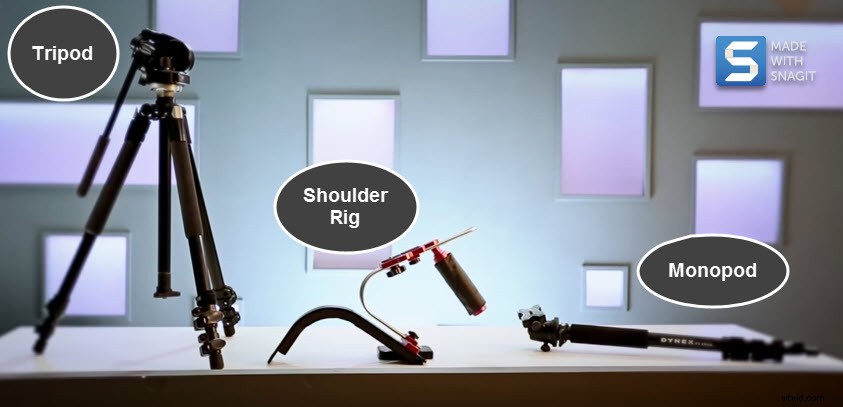
- The tripod is the most well-known, generally a great choice if you won’t be moving too often.
- If you’re shooting on the go, a shoulder rig uses your body’s center of gravity to steady your camera. It adds a level of stability unattainable with hand-held shots, but the mobility that a tripod lacks.
- A monopod is a solid middle-ground solution between the shoulder rig and a tripod. It offers the stability of a tripod, with the get-up-and-go of a shoulder rig. It’s amazing how cumbersome two extra legs can be.
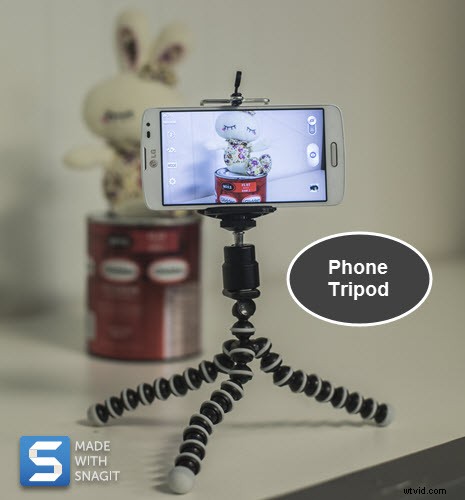
- Don’t forget about stabilizing your smartphone or tablet; it’s likely the most convenient camera that you actually bring with you. You can get a holder that securely mounts your mobile device to your existing camera tripod. Or, instead go for a smaller phone tripod, designed exclusively for mobile devices. These are more convenient than lugging a full-size tripod, and some are flexible, able to wrap around objects so you can easily film from uneven surfaces.
Yes, It’s Worth the Effort
Take a tip from the pros. They’ve been hauling tripods for ages, often to inhospitable, far-flung places, solely because it really does pay off in the final footage.
Now that you’ve captured crystal clear videos, are you ready to produce your project? Edit, add effects, create a green screen effect, and more with Camtasia. Download a free trial now, and take advantage of these free online tutorials.