
People love video compilations and it’s not a tricky job to make one on your own. On this page, you can learn from the step-by-step guide on how to make compilation videos.
Well-edited video compilations that encompass only curated video clips have become one of the better approaches for many professional YouTubers to monetize their channels. This simply results from the simple fact that people love compilation videos, and a good one will totally make their days.
Just imagine how many compilation videos have captivated us when we’re scrolling on our smartphones – epic fail compilations that crack you up, gameplay compilations that bring gamers thrills, meme compilations that make you want to share with peeps, trailer compilations that help you discover movies that suit your taste in less time, etc.
The thing is, do you want to make a good compilation video with your own hands? I hope you do since it is actually quite easy with the correct tool. What follows is the illustrated guide to making a great compilation of video clips with the best free video compilation maker. Now let’s get started.
Do Not Miss: Top 10 Gaming Video Editing Software, Best 10 TikTok Video Editing Apps, Best Windows Movie Maker Alternatives
Best Free Video Compilation Maker You Should Have
FilmForth is the best free video compilation maker that helps to make a compilation of video clips and photos with simple clicks. Meanwhile, FilmForth is also an outstanding video editor that enables you to trim videos, merge multiple videos, add special effects to videos, split videos, change video playback speed, detach audio, add transitions to videos, etc. with ease.
FilmForth is easy to use, completely free, and watermark-free, wouldn’t you agree that it’s a must-have for a video buff like you? Hit the download button below to get it on your Windows 10 or Windows 11 PC and see for yourself!

How to Make a Good Compilation Video [Step-by-step Guide]
Step 1. Create a Project in FilmForth
To make video compilations with FilmForth, make sure that FilmForth is fully installed, launch FilmForth from Windows start menu, and then hit New Project button in the program.
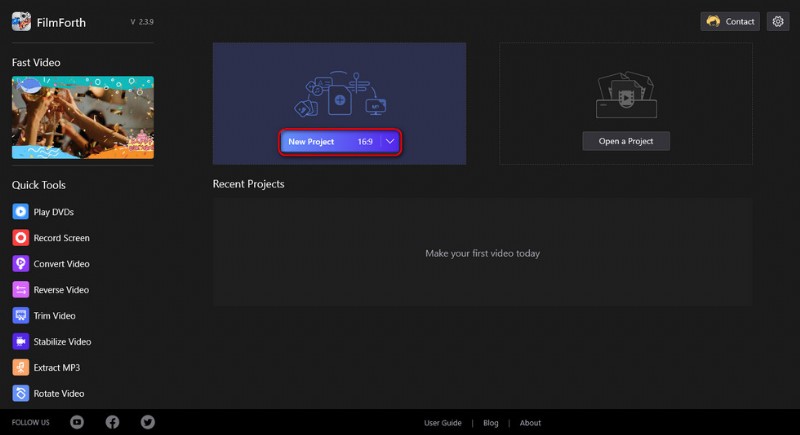
Create a New Project
Step 2. Import Video Clips into FilmForth
Drag and drop the media files into the program or click ADD VIDEO/PHOTO CLIPS button to load multiple video clips/images that you want to make a compilation video with, and you’ll see them lined up in the timeline. Drag and drop them in the timeline for repositioning.
Most-viewed compilation videos on YouTube and TikTok usually contain dozens of video clips.
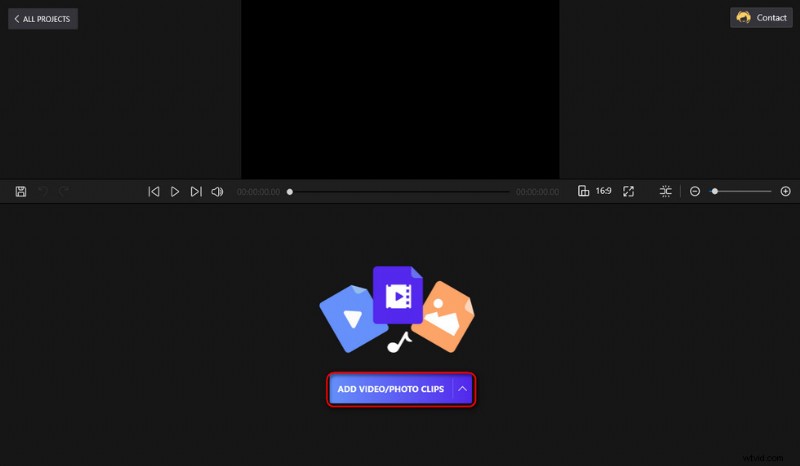
Import Video Files
Step 3. Edit the Added Video Clips
Proper video editing takes your compilation videos to the next level, and FilmForth offers a variety of practical video editing features. Click to select a video in the timeline, and hit the corresponding buttons from the pop-up operation panel below for different editing purposes.
For example, drag and move the handlebar in the timeline to trim and leave out only the key moment for each clip, for your compilation video not being too long.
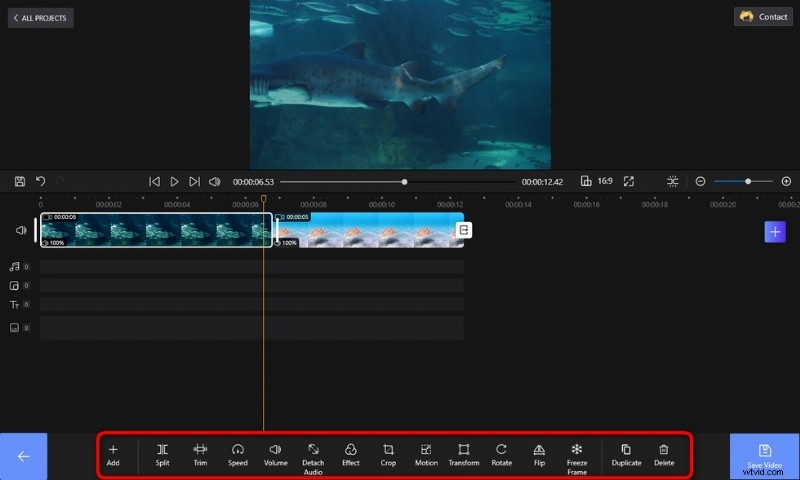
Edit Videos
Step 4. Jazz Up Your Compilation Video
FilmForth allows you to jazz up your compilation videos with smooth transitions and special effects/stickers/GIFs.
Click on the Transitions buttons between adjacent clips in the timeline to add transitions that will make the eyes of your audiences more comfortable.
Hit the Effects button to give your compilation video a novel look with an apropos amount of special effects.
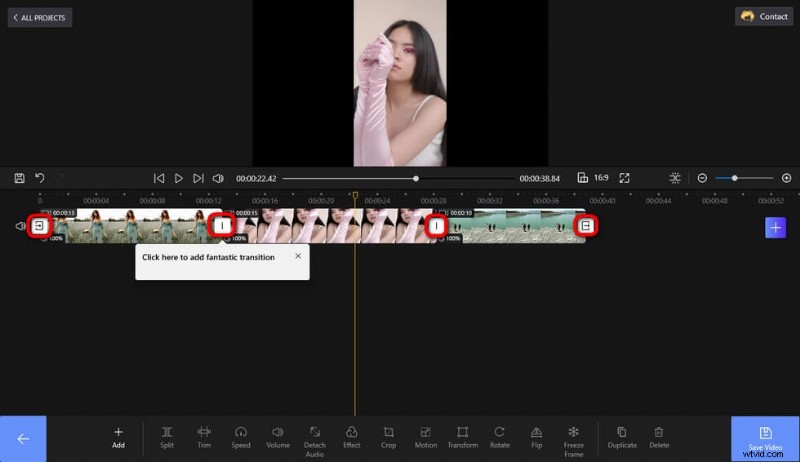
Add Transitions
Step 5. Merge and Export Compilation Video
Video clips added to the FilmForth program will be automatically combined after saving and exporting. When you’re done editing, hit the Save Video button from the lower-right side to export the video. Customize parameters like video bitrate, frame rate, audio quality, etc. and then define the output path and export the combined compilation video. And it’s time for sharing!
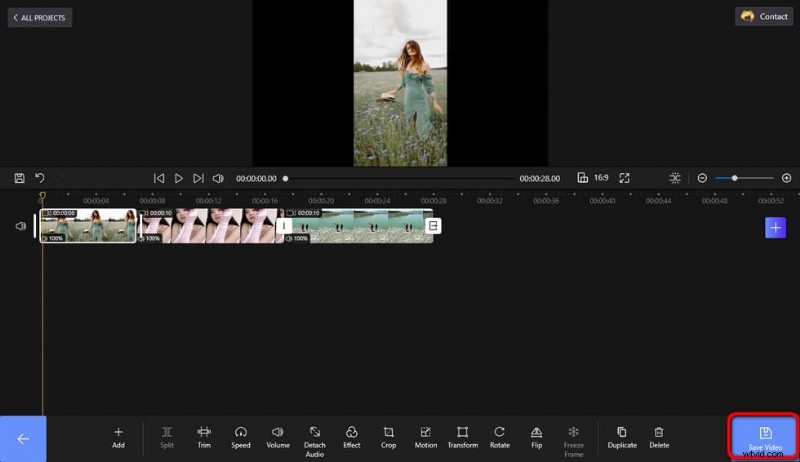
Save and Export Video
How to Make Compilation Videos on Youtube without Copyright
Although there aren’t many ethical issues, there’s something you should concern about making and uploading compilation videos on YouTube, TikTok, and other video-sharing platforms – copyright. Unfair uses of copy-protected materials for making monetizing compilation videos can bring about copyright issues and disputes, which might lead to the removal/takedown of your videos and even lawsuits against you. Learn from the below tips on how to make a video compilation without copyright.
How to avoid copyright strikes for making video compilations:
- Use your own footage to make compilation videos, and that requires no skills but some of your time.
- Get permission from the original creator(s) of the videos you intend to use in your compilation videos. Granting them a fair share of the ad revenue is a good idea.
- Use uncopyrighted video materials from free stock video websites such as Pexel and Pixabay.
- Abide by the YouTube fair use guidelines when creating your YouTube compilation videos to avoid potential takedowns.
- If you indeed used copyrighted content, which includes music, images, or videos, under the YouTube fair use act, make sure you give credit to the original creators by mentioning them in your video’s description, along with a link to their websites.
Bottom Line
Since we’re here, I do hope that you have followed the tutorials to make your own compilation video. And it’s about time you shared your video on youtube, TikTok, Twitter, Facebook, or other video-sharing platforms and blow your followers’ minds! And prior to that, making a good intro video and adding it before your compilation video will totally impress your viewers, so don’t forget to give it a go! And if this post has helped you, please share it!