
When it comes to professional video editing software, both Sony Vegas and Adobe Premiere are good choices. Sometimes, you may feel confused about which one to choose. This article will give you some hints by comparing them. (Try MiniTool MovieMaker to edit your video easily!)
If you are ready to purchase video editing software, the battle of Vegas vs Premiere will come into your mind, because both of the software are awesome video editors. Let’s take a closer look at the comparison between them.
Vegas vs Premiere
Adobe Premiere was first launched in 1991 and has become Adobe’s top timeline-based video editing software.
Vegas Pro began its life as an audio editing platform and after that point advanced into both sound and video editing. Launched in 1999, Vegas has grown to be more inclusive of visual effects and numerous post-production editing tools.
Vegas vs Premiere, which one is better? To help you get the difference between them, here we will talk about the effects on the interface, workflow, pricing of each product and shows you their pros and cons to help you make a better decision.
Vegas VS Premiere - Features
In the beginning, the features of Adobe Premiere and Sony Vegas get involved in the competition.
As professional video editors, both Sony Vegas and Adobe Premiere feature various editing functions. But when we look at the editing features, the differences are not so obvious.
Adobe Premiere does have more ability within the editing department. But there are few things that Sony Vegas does better in 3D manipulation.
If you need more motion effects, animation, and other composite effects, here is where Adobe Premiere shining at. Concerning video effects, Premiere offers a good workflow and high output quality. But VEGAS Movie Studio wins the performance race, being better optimized and thus getting the job done faster than Premiere.
If you want to continue to build your editing skills, using more advanced editing techniques, color grading, and animation, then Premiere is the platform for you.
Vegas VS Premiere - Workflow
Vegas Pro has made some unique advancements in the simplification of the workflow process. Their AI-assisted editing tools can cut down on time, and their collection tool via Vegas Prepare can keep things nice and orderly for projects with plenty of assets.
However, Adobe Premiere Pro reigns superb in its workflow process for two big reasons.
The first reason is that the perfect interface has conveniently divided up the window organization into key groups.
The second reason is Premiere along with other Adobe programs well. You can see how smooth the work is to transfer from one application to another.
Vegas VS Premiere - Pricing
Vegas has 3 versions you can one-time purchase: VEGAS Edit ($249), VEGAS Pro ($399), VEGAS Post ($599).
The subscription is available now: VEGAS Edit: $12.99/month (12months, billed annually), or $19.99/month (1 month, monthly billed); VEGAS Pro: $19.99/month (12months, billed annually), or $34.99/month (1 month, monthly billed); VEGAS Post: $29.99/month (12months, billed annually), or $44.99/month (1 month, monthly billed).
While Premiere is only available by subscription. It costs $20.99 monthly with an annual commitment. If you pay $239.88 for a full year upfront it works out to $19.99 per month.
As we can see, Adobe Premiere is seemingly cheaper than Sony Vegas. But in the long term, Sony Vegas might be better than Adobe Premiere.
Alternative to Vegas and Premiere: MiniTool MovieMaker
The above paragraphs talk about some differences between the two professional video editing software. If you are a newcomer or amateur, Sony Vegas and Adobe Premiere may be too complicated for you.
To get started easily, consider MiniTool MovieMaker. It has an easy-to-understand interface allowing everyone to create videos with no video design experience required!
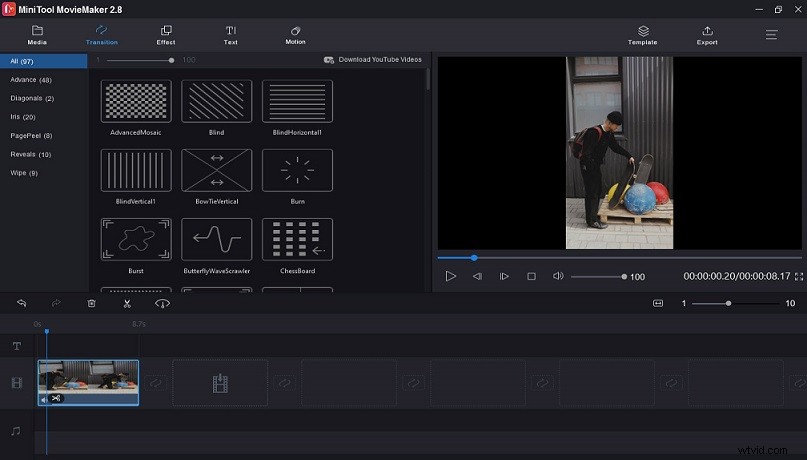
It offers wonderful tools to edit videos. It allows you to add music to video, add video filters and transitions, split and trim videos, slow down or speed up video, merge video files, add text to video, rotate and flip videos, change video brightness, contrast, and saturation.
Make your video easily and share it with your friends!
Conclusion
This post introduces the interface and features, workflow, pricing, and alternative to Vegas and Premiere. I hope my comparison of Vegas vs Premiere helped you to choose the best option for you.