
This essay elaborated on MiniTool official web page discusses the possibility of using Adobe Flash Player in web browsers in the newest Microsoft Windows 11 operating system. Besides, it offers some alternative programs to Adobe Flash.
Adobe Flash was no longer supported since the end of 2020. So, it is turned off by default in the new Microsoft Edge. For other browsers like Google Chrome, Safari, and Mozilla, they also removed the Adobe Flash player.
Yet, you can manually turn on or block flash permanently for individual websites in your browser.
How to Turn on or Block Adobe Flash Player Windows 11?
Here, we will show you how to manage the Adobe Flash Player in Microsoft Edge. For other browsers, the instructions are similar.
- Open Edge and move to Settings and more (three dots) > Settings.
- On the next screen, in the left panel, choose Cookies and site permissions.
- In the right area, under the Site permissions section, select Adobe Flash.
- Toggle on or off the Ask before running Flash option to allow or block the Adobe Flash Player on your browser.
The Allow and Block lists will be available after you visit a website that adopts Flash. The next you view a flash site, the browser will ask for permission before permitting flash to run.
Warning:
The following steps are available only when you have already installed the flash player on your computer.
Download Adobe Flash Player for Windows 11 64 Bit
If you are currently running a computer without Adobe Flash, you can try to download and install one. However, since Microsoft has removed Adobe Flash from Edge and other web browsers in the summer update in 2021, it’s hard to keep one nowadays, especially in the latest Windows 11. Yet, you can still have a try.
Most websites claiming to offer an entrance to download Adobe Flash Player finally guide you to a web page, which is an Adobe official web page telling you that they have retired Flash. What a pity!
We found a website that still holds an Adobe Flash Player installer for downloading currently, but we failed to install the program with an “application initialization error”.
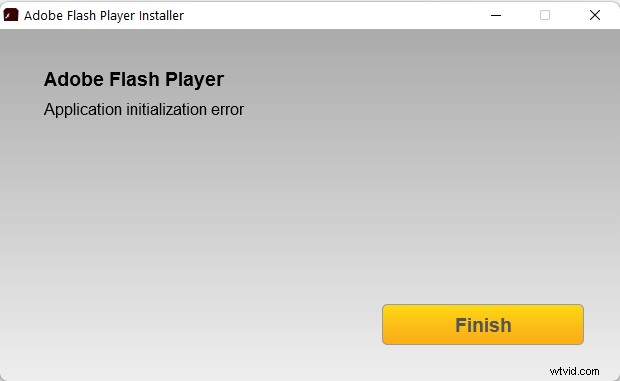
Click the Finish button again directing you to that official web page informing the retirement of Abode Flash.
Why not Microsoft Store? Only if you can search out the target Adobe Flash Player there!
So, currently, there is no way to get Adobe Flash.
Warning:
If you still have Adobe Flash’s installation package you downloaded before, you can downgrade your browser to an earlier version better before 2021 and turn off its automatic update service. Then, install the Adobe Flash Player and add it to the old browser.
Adobe Flash Player Replacements
Since it is hard to keep using Adobe Flash Player, it is wise to turn to its counterparts. These are some Adobe Flash player alternatives that are available.
- Lightspark
- Ruffle
- Gnash
- BlueMaxima’s Flashpoint
- XMTV Player
- Swfdec
- OpenSliver
- CheerpX for Flash
- Newgrounds Player
- SWF Opener
- Shubus Viewer
- SuperNova Player
- Flash Player 2021
Videos/Audio/Photos Management Tools Recommended
These applications are completely compatible with Windows 11/10/8.1/8/7.
MiniTool MovieMaker
An easy-to-use video editing software without watermarks and limits. The embedded templates enable you to quickly make personal slideshows and share them with your friends!
MiniTool uTube Downloader
Free download YouTube videos, audio, and subtitles without ads or bundles. It can operate multiple tasks simultaneously at a high speed and supports multiple file formats.
MiniTool Video Converter
Quickly convert videos and audio from one file format to another to apply to more devices. It supports 1000+ popular output formats and batch conversion. Besides, it can also record PC screens without any watermark.