
REC

Recommended: Video Production, Editing & Gear Maintenance Guide

 WTVID >> WTVID >  >> video >> Video Ideas

Step‑by‑Step Guide: Applying Shake Blur Transitions in Filmora

1. Import Your Footage

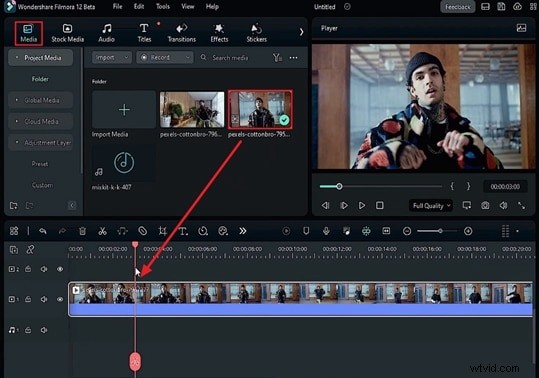
Launch Filmora and navigate to the Media tab. Drag and drop your two video files—one representing the pre‑transition footage and the other the post‑transition clip—into the media library. Once imported, place the first clip onto the timeline and position the playhead at the exact point where you want the Shake Blur transition to begin.
Step‑by‑Step Guide: Applying Shake Blur Transitions in Filmora

2. Fine‑Tune the Clip

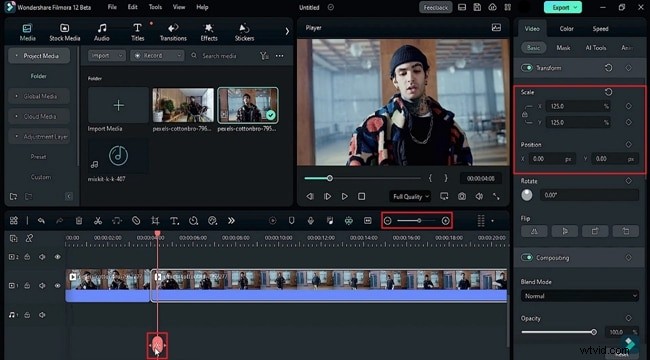
Open the Video tab on the right panel and select the Basic settings. Lock the Scale toggle to prevent unintended resizing, then adjust the X and Y values to match your project’s aspect ratio. Use the Split tool to divide the clip at the playhead, creating two separate segments. Trim the second segment as needed, remove any unused portions, and zoom in on the timeline for precise editing.
Step‑by‑Step Guide: Applying Shake Blur Transitions in Filmora

After these steps, your footage is ready for the Shake Blur effect.


  1. How to Craft a Thrilling Horror Story: Expert Tips from a Screenwriter

  2. Crafting Captivating Movie Title Sequences: Expert Guide to Stunning Opening Credits

  3. Master Budget-Friendly Practical Special Effects: Pro Tips from Shanks FX

  4. Action, Reaction, Reveal: Craft Compelling Documentaries That Captivate

  5. 30-Day Creative Photography Challenge: 30 Jaw-Dropping Trick Photography Ideas

Video Ideas
  1. Step-by-Step DIY Guide: Build a Custom Bench Prop for Stunning Portrait Photography

  2. 50mm vs 85mm Lenses: Which is Best for Portrait Photography? Expert Comparison

  3. Master Hollywood Film Noir Portraits: Expert Lighting & Mood Techniques

  4. Explainer Videos: Seeing is Believing – Unlock Visual Power for Engagement

  5. Master Dramatic Portraits: Shadow Photography Techniques for Beginners [Video Guide]

  6. Master Environmental Portraits: Expert Tips and Inspiring Examples

  7. Merge Videos Effortlessly for Free: Windows 10/11, Mac, Android & iPhone Guide

  8. 10 Must-Have Black Friday Video Ads for Jewelry Stores