
We may earn revenue from the products available on this page and participate in affiliate programs. Learn more ›
While VSCO has a reputation among trend‑setting teens, it is also a highly respected mobile photography platform. Founded in 2011, the company began by crafting Lightroom presets and Photoshop actions that replicate classic film stocks, and today it thrives as a versatile mobile editing app.
Building on its extensive collection of app‑based editing tools—including effects derived from real film scans—VSCO has introduced two new “infrared” filter sets that deliver dreamy pink and blue hues.
What Is Infrared (IR) Photography?
Infrared photography captures wavelengths beyond the visible spectrum. Traditional film required special IR‑sensitive stock and a filter; digital cameras typically include an IR‑blocking filter in front of the sensor. While some users remove this blocker or use dedicated services, most photographers leave the filter intact.
IR images exhibit a distinct look because different subjects reflect IR light in unique ways. For instance, foliage reflects IR strongly, giving it a glowing appearance, while IR penetrates a few millimeters into skin, producing soft, radiant portraits. Skies appear unusually dark because less IR light is scattered in the atmosphere.
Because IR light lacks the conventional color spectrum, IR photography often produces false colors. Kodak’s Ektachrome Professional Infrared film mapped IR to red, red to green, and green to blue. Digital cameras allow more color control, yet IR images still carry unusual tonalities.
VSCO’s New IR Filters

VSCO’s “Infrared” filters aim to emulate the signature IR look without capturing true IR light. The brand’s existing filters—IR1 for landscapes, IR2 for portraits, and IR3 for black‑and‑white—now have refined counterparts: IR4 (pink‑toned landscapes), IR5 (pink‑toned portraits), IR6 (blue‑toned landscapes), and IR7 (blue‑toned portraits). Below is a closer examination of each.
‘IR4’ Infrared Pink Landscape
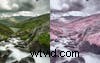
IR4 reduces saturation and nudges green tones toward a subtle pink, offering a softer, less saturated alternative to IR1.
‘IR5’ Infrared Pink Portrait

IR5 desaturates the image while maintaining natural skin tones, delivering a gentle pink tint ideal for portraits.
‘IR6’ Infrared Blue Landscape
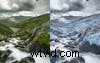
IR6 applies a cool blue cast, decreasing saturation to create a tranquil, atmospheric landscape.
‘IR7’ Infrared Blue Portrait

IR7 imparts a cool blue hue while preserving skin tones, suitable for striking portrait photography.
Initial Impressions
VSCO’s IR filters deliver striking, authentic‑looking results. The color palettes are well‑executed, though the skies lack the deep darkness characteristic of true IR images. Achieving maximum authenticity may require additional tweaks with VSCO’s other tools.
Overall, VSCO continues to establish itself as a premier mobile editing platform, and the new IR filters enhance its already comprehensive suite.
How to Get VSCO’s Infrared Filters
The VSCO app is available free on Apple iOS and Android. To access the new IR filters, you must subscribe to a VSCO Membership, priced at $19.99 per year.