
At Uscreen, we’re built on two core principles: creators deserve full ownership of their audience, data, and revenue, and the cost, complexity, and risk of a custom video membership platform often outweigh its perceived benefits.
Custom solutions promise “full control,” but in reality they add layers of systems, technical debt, and ongoing expenses that grow as your audience expands. Many creators invest months, sometimes years, into DIY stacks only to realize they’re chasing stability and scalability they never achieved.
This article explores:
- What a custom video membership platform truly entails
- Hidden costs and long‑term risks that creators frequently underestimate
- How a dedicated platform like Uscreen eliminates these burdens
- A real‑world case study of a creator who outgrew a DIY stack and saw measurable gains after migrating
Our goal isn’t to dictate the best platform for you, but to illuminate a path that often looks promising at first glance and collapses under operational pressure.
The Reality of Building a Custom Membership Platform
A custom platform is rarely a single product. It’s an ecosystem of tools, integrations, and bespoke code designed to mimic the out‑of‑the‑box experience offered by a video membership platform like Uscreen.
Typical DIY setups include:
- A WordPress‑based portal or custom‑coded website
- Third‑party video hosting and encoding (AWS, Mux, Vimeo Enterprise)
- Separate services for payments, CRM, email, analytics, and automation
- Agency‑built mobile or OTT apps
- Zapier workflows, scripts, and manual processes stitching everything together
- Ongoing developer involvement for bug fixes, updates, and maintenance
While flexible on paper, this fragmentation introduces permanent complexity and steep, unpredictable costs.
Perceived Advantages of DIYing Your Membership
Control, custom experience, and avoidance of platform lock‑in are natural incentives. Early on, a DIY stack can appear inexpensive—leveraging existing subscriptions to hosting, payments, and email services. However, these assumptions often collapse when growth accelerates.
1. Total Cost of Ownership Grows Rapidly
Building a custom platform can cost $500 k+ before launch, and maintaining it typically requires $20 k–$50 k per month for engineering, QA, DevOps, infrastructure, and app updates.
- Every new feature demands developer time.
- Each bug requires investigation and resolution.
- Platform updates for iOS, Android, and TV trigger rebuilds.
There is no “maintenance‑free” phase—each addition or change inflates billable hours.
2. Building Slows You Down Over Time
Reaching parity with an all‑in‑one platform can take 6–18 months. Post‑launch, focus shifts from adding value to keeping the system running, dealing with app store changes, security updates, and infrastructure upkeep.
3. The Member Experience Becomes Fragile
A stitched‑together stack often results in:
- Multiple logins
- Inconsistent branding across tools
- Silent integration failures
- Device‑ or browser‑specific edge cases
Such friction erodes engagement and retention, even if the content is high quality. Uscreen‑powered platforms achieve 92–93% monthly retention, with over 30% of subscribers staying beyond a year.
4. Your Business Becomes a Tech Company by Default
As the stack grows, you spend more on managing developers, prioritizing fixes, and troubleshooting systems than on content creation, marketing, or audience growth. Technical debt compounds, making even minor changes expensive and risky.
5. Scaling Introduces Real Operational Risk
Growing your audience magnifies complexity—video delivery, encoding, payments, analytics, and app performance all must scale reliably. With a custom solution, that responsibility rests entirely on you, exposing you to outages, failed payments, and costly emergency fixes.
Ultimately, many creators find themselves migrating to an all‑in‑one platform to protect their business.
Case Study: Abundance+ Overcomes a Broken Tech Stack with Uscreen
Before migrating, Abundance+ operated on a WordPress site with a patchwork of plugins and third‑party services. The stack suffered from fragility, integration issues, and limited cross‑device continuity.
- Multiple plugins led to frequent conflicts.
- Members couldn’t switch devices smoothly.
- No Netflix‑style experience across phone, tablet, and TV.
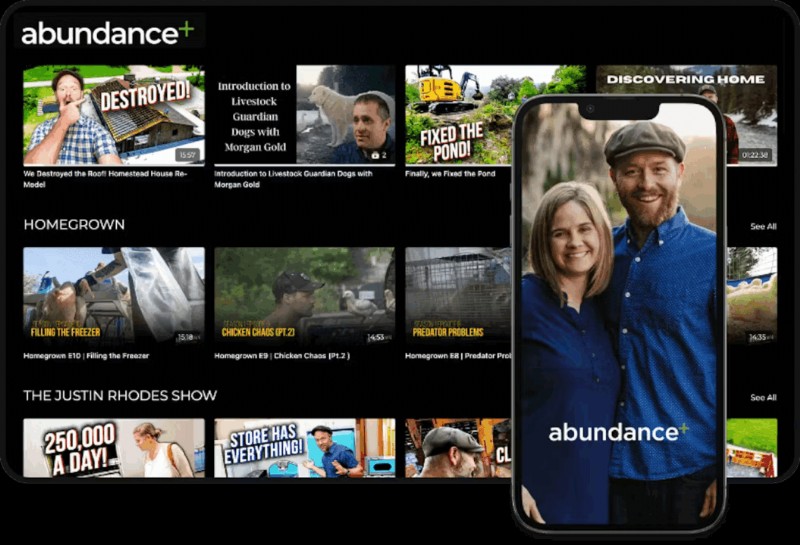
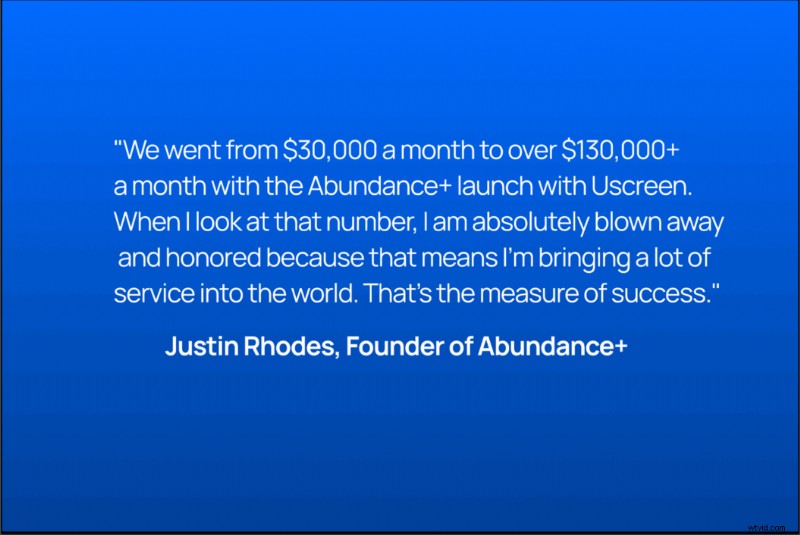
After moving to Uscreen, the technical overhead dropped dramatically. Members can now watch content on six devices—including iOS, Android, and TV—while the business experiences measurable revenue growth.
👉 Read the full Abundance+ story here.
What Uscreen Replaces for You
Comparing a custom build to Uscreen highlights stark differences in cost, responsibility, and operational load. A custom stack demands a large ecosystem of tools for video delivery, livestreaming, apps, community, billing, analytics, and marketing, plus continuous developer involvement. Uscreen consolidates all these needs into a single, fully maintained system, letting you focus on your creative business.
Uscreen vs Custom: A Realistic Cost Comparison
| Custom Build | Uscreen | |
| Initial build | Varies; often > $500k | $0 setup fee; included in contract price |
| Maintenance | $20k–$50k/month | Plans start at $149/month; typical creators pay $5k–$20k annually for app-enabled plans |
| Apps (iOS, Android, TV) | $150k–$400k per app + updates | ✅ Included in most plans with setup, launch, and ongoing maintenance |
| Video Infrastructure | AWS, Mux, Vimeo Enterprise | ✅ Included |
| Community, CRM, Email | HubSpot, Circle, Mailchimp | ✅ Included |
| Support | Build internal team | ✅ Included (end‑user support, 24/7 tech support, dedicated Success Manager, onboarding, migration, coaching) |
All‑In‑One Experience for You and Your Members
Uscreen brings a professional video catalog, built‑in community, native live streaming, flexible monetization, automations, and marketing tools into one cohesive system. Subscriptions, pay‑per‑view, courses, donations, and one‑time purchases coexist seamlessly, creating a smooth experience for creators and subscribers alike.
Built to Scale With You
Custom solutions become more expensive and fragile as you grow. Every new feature or update demands developer time, extra integrations, and higher infrastructure costs. Uscreen scales automatically—whether you have hundreds or hundreds of thousands of members—handling video delivery, apps, infrastructure, and performance for you. New features are released regularly based on creator feedback, keeping you ahead of the curve.
Powered by Uscreen, Owned by You
With Uscreen, your content, audience, data, and payments remain yours. Your membership site and apps are fully branded, reinforcing your identity and fostering long‑term loyalty.
Partner‑Level Support
Uscreen’s support ecosystem includes:
- Onboarding specialists for setup and launch
- A dedicated Success Manager for long‑term growth
- 24/7 technical and end‑user support
- Expert coaching for rapid, successful launches
- Seamless migration support
- Access to Membership+, Uscreen’s coaching hub and community
Why Building Your Own Platform is a Risky Decision
Whether Uscreen is the right fit depends on your business model, goals, and product. But the evidence is clear: building a video monetization platform from scratch rarely matches creators’ expectations. The economics, operational burden, and long‑term risk consistently outweigh the perceived benefits. Over time, many creators end up migrating to an all‑in‑one platform, often after significant investment and complexity have already accumulated.
FAQs for Creator Business Owners
Q: My members are accustomed to my current setup—how can I avoid losing them when I switch platforms?
What matters most is delivering a seamless, reliable experience. A unified platform eliminates inconsistent branding and broken integrations, reducing friction and keeping members engaged. Dedicated migration support ensures a smooth transition.
Q: I rely on a custom feature—will switching platforms affect it?
While a custom feature can be crucial, maintaining it in a DIY stack adds complexity and slows scaling. A dedicated platform offers core functionality—video hosting, community, monetization, live streaming, analytics, and apps—while continuously adding new features and improvements.
Q: Won’t members struggle to learn a new platform?
Unified experiences are typically easier for members than navigating disparate tools. Guided onboarding and migration support make the transition structured and manageable for both creators and their audience.
Q: I’m already stretched thin—how realistic is it to migrate without it taking over my time?
Uscreen’s Migrations team is designed to handle every step, from scheduled calls to email support, ensuring you move confidently from start to finish without overloading your schedule.
Q: Your pricing seems higher than my current costs—how should I think about the real cost comparison?
DIY setups appear cheaper on paper, but once you factor in developers, third‑party tools, hosting, maintenance, and support, the total cost of ownership often exceeds that of a fully supported platform. Compare the long‑term, predictable costs of Uscreen to the unpredictable expenses of a custom stack, especially as your audience grows.