
REC

Recommended: Video Production, Editing & Gear Maintenance Guide

 WTVID >> WTVID >  >> video >> Video clip

Achieve Professional Color Correction with Enhanced Auto Tone in Premiere Pro

Color plays a vital role in photography and video. I would say it gives the work soul. Premiere Pro is constantly updating their NLE, and although their color correction tools were good, it's getting even better soon. Lumetri is becoming intelligent.

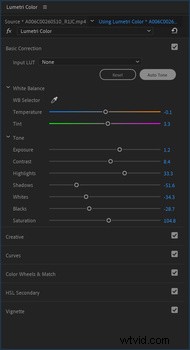
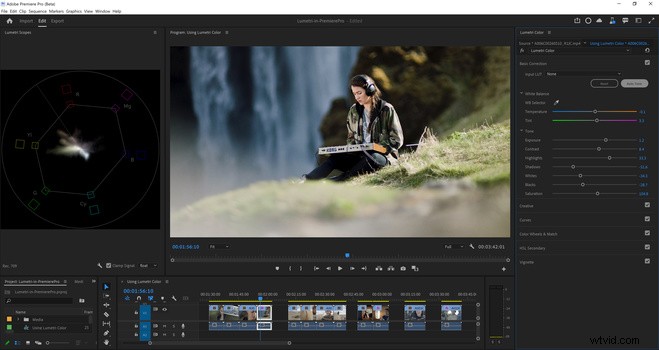
Once you press the auto-tune button, all the changes the artificial intelligence makes will be reflected in the basic color correction panel, so you can see what it's doing and make refinements as you please. 

I've used the color match feature in Premiere, which does a decent job and gives a good balanced final export in the end, but it seems like this will be able to modify the whole video's look if time is a factor. 
Achieve Professional Color Correction with Enhanced Auto Tone in Premiere Pro

It will be replacing the Auto Tone button currently found in Premiere, and it will be providing more sophisticated color correction, with better results, and with a single click. 

It now uses all the Basic Correction settings providing more nuanced results, and it gives you the ability to fine-tune the settings depending on the scene and your style.
Achieve Professional Color Correction with Enhanced Auto Tone in Premiere Pro

It is still in Beta, so if you are planning on using it now, Auto Tone should be applied before other color effects. And it is not currently compatible with log-encoded video or log-to-Rec709 LUTs. 


  1. Master LUTs for Stunning Results: Lumetri Color Tips in Premiere Pro + Free LUTs

  2. Master Color Correction in Final Cut Pro: Pro Tips for Perfect Footage

  3. From Premiere Pro to Final Cut Pro: Mastering Color Grading – First Impressions

  4. Expert Guide: Color Correct Moving Objects in Adobe Premiere Pro

  5. Master 5 Advanced Color Grading Techniques in Premiere Pro

Video clip
  1. Master Seasonal Transformations: Color Grading Tutorial in Adobe Premiere Pro

  2. Master Color Correction in Vegas Pro: Beginner's Step-by-Step Tutorial

  3. Final Cut Pro vs. Adobe Premiere Pro: Which Video Editor Wins?

  4. Master Cinematic Orange & Teal Color Grading in Premiere Pro: Easy Tutorial

  5. Adobe Premiere Pro 13 Released: Discover Powerful New Features

  6. Master Clean, Attractive Color Grading in Adobe Premiere Pro: Step-by-Step Guide

  7. 7 Pro Color Grading Tricks to Elevate Your Videos in Adobe Premiere Pro CC

  8. Master Moody Color Grading in Adobe Premiere Pro: Lumetri Tutorial