
Moving the cursor or playhead across the video timeline manually is called video scrubbing. On a video editor, video scrubbing can be done by moving the cursor forwards or backward through the timeline or moving the scrubber at the bottom of the timeline.
Any creator can use video scrubbing to navigate across the video editor’s timeline to edit faster. Scrubbing is a great way to review footage before or as you edit or simply match your video clips with your shot list.

The best use of video scrubbing comes when you’re creating long-form content that requires you to go through multiple clips from one end to the other. It’s also great when you’re editing B-roll videos as you can swiftly skim through footage.
When making videos for business or social media, scrubbing through footage is more important than ever. Each social media platform has an ideal (and usually pretty short!) length allowed for video, for example 60 seconds on TikTok and 15 seconds on Instagram Stories. Reviewing raw footage can help you decide which frames can help you make the best impact in the shortest time.
A good video timeline should have thumbnails of each frame that denotes the content of the video clip to easily scrub through to and fro as you need. This saves a lot of time and eases out the process of creating videos, no matter the platform. In some video editing platforms, you can even stretch the timeline to change the rate of video scrubbing. It will allow you to scrub through and review in a more detailed manner.
The scrubbing rate differs from software to software. However, a good video editor will make sure that timeline scrubbing is seamless and adjusted automatically according to the length of the video clips.
How to use video scrubbing?
It’s super easy to use. All you need to do is move your cursor above the scrub bar and drag it in the desired direction to navigate through video clips.
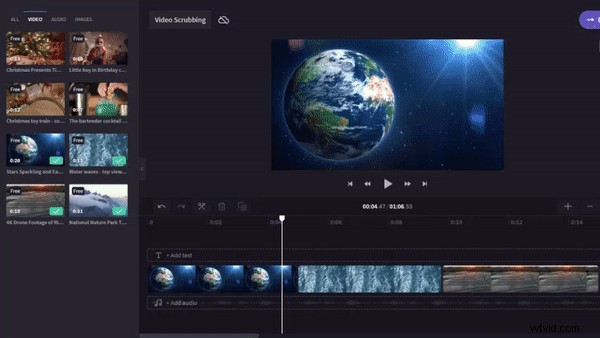
The scrub bar is usually below the timeline or the video that you’re editing or watching.
Get scrubbing and editing!
Be it watching your favorite show on Netflix, consuming family videos on your smartphone, or editing your videos for social media platforms, we’re scrubbing videos without realizing it.