
If you’re watching a movie and it’s set in an out-of-this-world location, production has more than likely used computer-generated technology called chroma key.
Chroma key is a magnificent and highly popular film and video-making tool. So how can you take advantage of chroma key green screen for your own video from the comfort of your home?
This blog will discuss the ins and outs of chroma key and how to make a chroma key green screen video using Clipchamp online editor. Let's discuss:
What is chroma key?
What is the chroma key color code?
What is the chroma key green fabric?
Can chroma key be blue instead of green?
How important are green screen backgrounds for video?
What are some examples of green screen effects that can be used in everyday videos?
Can chroma key green screens be used for OBS and live streaming?
How to use green screen on iPhone and mobile in social media videos?
How to make a chroma key green screen video effects using Clipchamp
What is chroma key?
Picture yourself watching the weather forecast with the presenter standing in front of the electronic weather map. How did they do this? What special effects did they use? The answer is chroma key.
Chroma key is a special effect achieved by the use of green or blue screen, chroma key green or blue paint. The feature enables users to remove a specific colour from an image or video, allowing the removed portion of the clip to be replaced with a different visual.

What is the chroma key colour code?
Chroma key is famously known for its distinct green colour, but did you know you can use chroma blue key as well? Chroma key green and chroma key blue are the best colours to use.
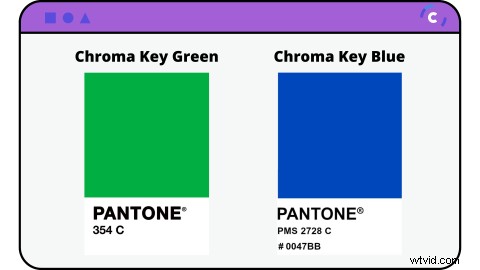
Chroma key colour code: Green
Chroma key green is valued as approximately 354C in the Pantone colour matching system.
Chroma green can be displayed in many different formats. Below is green screen colour green in different values useful for both digital and physical production:
Green Screen as RGB colour value: 0, 177, 64
Green Screen as CMYK colour value: 81, 0, 92, 0
Green Screen as Hex colour value: #00b140
Green Screen as Websafe colour value: #009933
Chroma key colour code: Blue
Alternatively, instead of using green screens, users can use chroma key blue. The blue Pantone colour matching system values the colour as approximately 2728C.
Chroma key blue can also fit into many different colour values. Here is a list of other chrima blue values useful for digital and physical production:
Chroma Blue as RGB colour value: 0, 71, 187
Chroma Blue as CMYK colour value: 90, 68, 0, 0
Chroma Blue as Hex colour value: #0047bb
Chroma Blue as Websafe colour value: #0033cc
What is the chroma key green fabric?
Chroma key green fabric is a single colour fabric backdrop that is used to create the green screen effect.
The green background is seamless so no shadows or false colour representations occur during filming or photography. Green screen fabric can be purchased from ebay, Amazon or usually any electronics online retailer.
Can chroma key be blue instead of green?
Yes!
Chroma key blue does exist and can be used if you do not have a bright green background, or prefer to use a blue screen.
How important are green screen backgrounds for video?
Depending on what style of motion picture you are shooting, chroma key green screen can be an important element to add to your production.
Whether it’s for a business product photo or short film, green screen allows users to show the same content in a more unique, creative way. Visual effects make your video production stand out from the crowd, bring quality and production to a whole new level.
What are some examples of green screen effects that can be used in everyday videos?
The options are endless when it comes to what you can create when using a green screen or blue screen background. With the help of the latest editing software, anything is possible! Let’s take a look at some examples of green screen effects that you can achieve at home in your everyday videos.
1. Meet your favourite celebrity
We will most likely never meet our favourite celebrity in real life. Make your wish a reality with the help of chroma key. Edit yourself or customers standing next to their idol.

2. Extreme sports and stunts
Take the danger out of surfing a monster wave by using a green screen instead! It’s safer, far easier and no training required.

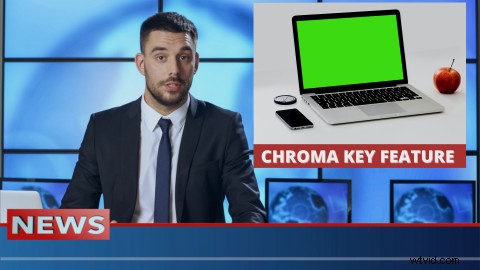
3. News headline
Launching a new product? Let people know by delivering the breaking news with a newsroom backdrop. Set the scene without even being there in person.
Can chroma key green screens be used for OBS and live streaming?
Yes! Chroma key green screens can be used for OBS and live streaming. With OBS chroma key, you can chroma key images and videos.
If you’re a streamer, portable green screens can fit to the back of your gaming chair, allowing you to have the green background only where you need it. Learn more about how to do chroma key compositing here.
How to use green screen on iPhone or mobile in social media videos?
Social media platforms like Instagram and TikTok have a built in green screen filter available for users to enjoy.
If your social media platform does not offer a personalised green screen, Clipchamp's online video editor allows you to quickly and easily create a vertical and horizontal green screen video to share with your followers in minutes.
How to make a chroma key green screen video effects using Clipchamp
Special effects are made simple using our green screen video editor. Change backgrounds, add exciting special effects or transport your video to a whole new world without leaving your browser! Save, share and enjoy.
If you want to learn how to take your video to the next level using chroma key, check out our step-by-step guide to making a green screen video.
Create your chroma key green screen video today!
Sign up today to Clipchamp and begin creating your new masterpiece.
If you’re unsure where to start, check out our collection of green screen templates so you don’t need to start from scratch. We’ve even included customizable motion titles and transitions for you to personalize your specific branding. All you need to do is add your own personal flair!