
Artificial Intelligence (AI) has already transformed video post-production. There are now AI tools for everything from captioning to special effects to editing. It’s even possible to generate extra frames to extend a clip that’s too short. However, these AI models all work with video that has already been created. The next frontier is live video.
Visual Reasoning AI is a new technology born from a partnership between PTZOptics and Moondream.ai. It brings scene understanding to cameras and live video workflows in real time. It’s free, open source, and runs in any modern web browser.
But what is it exactly, and how does it work?
Vision Language Model
Large Language Models (LLMs) have dominated the AI conversation in recent years. Trained on text data, they power the chatbots and virtual assistants that have become increasingly familiar. But an LLM only understands words.
A Vision Language Model (VLM) like Moondream is different. A VLM can understand video, images and audio as well as text inputs. This means Moondream can interpret visual and audio information, then generate text and other outputs in response to what it is “seeing.”
Moondream is an open-source VLM created by M87 Labs, based in Seattle. It is designed for understanding images, detecting objects and analyzing scenes. Because it is open source, it can be installed and run locally at no cost. Cloud-based access is also available, though that does involve usage fees.
Visual Reasoning AI
Visual Reasoning AI brings practical automation to professional audio-visual workflows, like streaming, broadcasting and live production. At its core, the technology generates natural language descriptions of what a camera captures in real time.
Beyond description, it can locate and highlight any object specified in plain language, as well as count and track objects within the camera’s field of view. Perhaps most notably, it analyzes scenes to anticipate what is likely to happen next, triggering automated responses like moving robotic cameras, sending alerts or updating dashboards.
The result is a flexible tool that can be configured across a wide range of production scenarios.
How it works
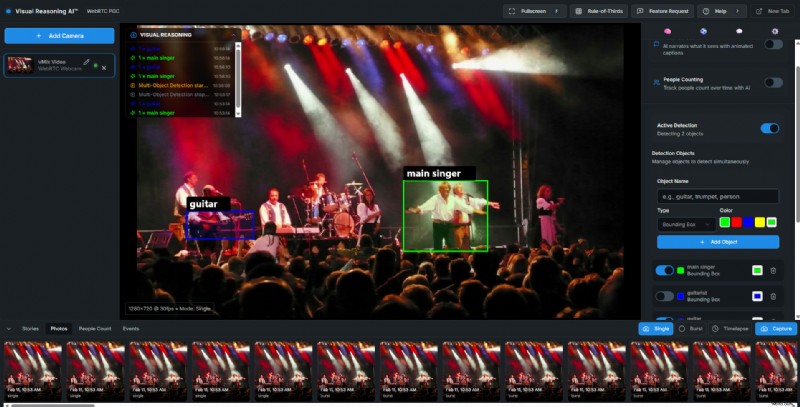 Image courtesy: Visual Reasoning AI
Visual Reasoning is a cloud-based solution, meaning there is no software to download or install and no special hardware required. It runs on desktop computers, laptops, tablets and smartphones through any modern web browser, and is compatible with any camera, including webcams, PTZ cameras and smartphone cameras.
After logging into the Visual Reasoning website, connected cameras can be added to the interface. The Moondream VLM processes a single video frame at a time, so to analyze live video it captures multiple frames at a set interval. These images are uploaded to the Moondream.ai platform, where the AI interprets changes across time.
It’s worth noting that this frame-by-frame approach introduces a natural limitation. At a two-second interval, the system is well suited to environments with moderate pacing (meetings, presentations, worship services) but may struggle to keep up with rapid action like fast-paced sports. The interval setting allows operators to balance responsiveness against processing load, but real-time continuous analysis is not what this system currently offers.
The AI can describe a scene in natural language, identifying people, objects and locations. It can also track and count the number of people appearing in a video feed over time. The multi-object detection feature draws bounding boxes around specific items in the scene — an operator simply types a description in plain English, such as “door,” “book” or “man in red shirt,” and Visual Reasoning maps a colored box around the item. Multiple objects can be identified simultaneously, with customizable box colors.
Visual Reasoning and video production
The Visual Reasoning website offers nine free, open-source tools for professional AV and broadcast use. The most compelling demonstrate what becomes possible when AI scene understanding is applied to live camera control.
PTZ Auto-Tracker
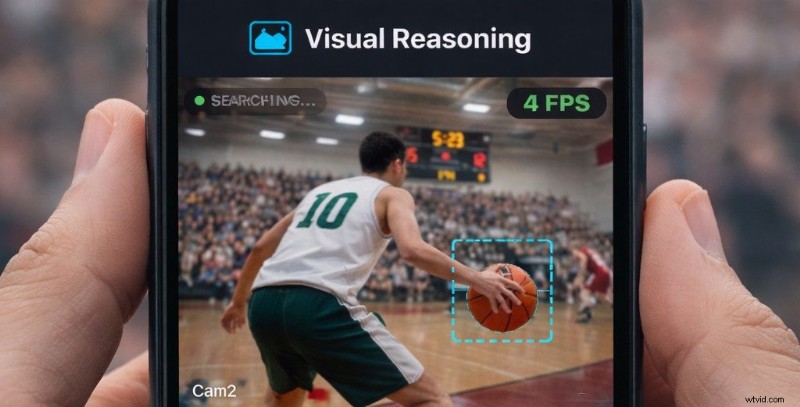 Image courtesy: Visual Reasoning AI
The PTZ Auto-Tracker combines Visual Reasoning AI with PTZOptics camera control to create an intelligent tracking system. Rather than relying on motion detection or fixed zones, it accepts natural language descriptions of its subject (“the speaker in the blue jacket” or “the player with the ball”) and controls the camera to pan, tilt and zoom accordingly. For productions without dedicated camera operators, such as worship services, conference presentations or small-scale sports broadcasts, this is where the technology’s potential is most immediately apparent.
Multimodal Fusion
Multimodal Fusion is perhaps the most ambitious of the nine tools. It simultaneously analyzes video and audio, giving Visual Reasoning a fuller sensory picture of the scene. In a presentation setting, this means the system can detect who is speaking and switch cameras automatically. At a live music performance, it can identify the sound of a particular instrument and direct a PTZ camera to follow that performer — a capability that typically requires a skilled human director making split-second decisions.
The Scoreboard Extractor reads and digitizes scoreboard information from any video feed. A camera pointed at a gym scoreboard or stadium display provides the source, and the AI extracts the relevant data. Sports currently supported include football, soccer, basketball and volleyball, with the ability to specify which data to monitor. The extracted information can then be overlaid on a broadcast feed.
Color Assistant
The Color Assistant tool can analyze the color characteristics of a reference image. It will then provide recommendations for matching your camera settings. This is ideal for multi-camera productions where you need consistent color across different camera models. You can also use the Color Assistant tool to achieve a specific cinematic look. The AI model understands color temperature, saturation, contrast and tonal characteristics.
Zone Monitor
Zone Monitor lets you define custom regions in your video feed. It then automatically detect when specific objects or people enter, exit or remain in those zones. This could be useful for wildlife filmmakers, triggering remote cameras to follow specific animals and ignoring other species.
Scene Describer
The Scene Describer automatically generates natural language descriptions of what’s happening in your video feed. It’s could be helpful for content analysis or as an accessibility feature.
Detection Boxes
Detection Boxes identifies the objects you choose in your video feed and draws precise bounding boxes around them.
Smart Counter
Smart Counter uses Visual Reasoning AI to accurately count people, vehicles or any objects you specify as they enter and exit a scene.
Scene Analyzer
With Scene Analyzer, you can ask questions about what’s happening in your video. Visual Reasoning AI will then respond with instant answers.
The power of Visual Reasoning
The Visual Reasoning system is designed to be modular — its tools can be configured and combined to suit different production environments. A demonstration on the company’s website illustrates this with a boardroom meeting scenario. As participants enter the room, the AI counts and identifies them. Once the meeting begins, Visual Reasoning determines who is speaking and switches the camera view accordingly. It also detects when a video feed appears on a monitor and cuts to that source.
The system extends to more dynamic environments like live music. By monitoring audio alongside video, it can detect a vocalist and direct a camera to follow them. During an instrumental solo, it recognizes the sound, identifies the corresponding instrument and performer within the scene, and moves a PTZ camera to capture them. When the solo ends, it cuts back to a wide shot of the full stage.
Because Visual Reasoning is built on a vision-language model, it accepts natural language instructions rather than requiring traditional programming. This means operators can describe what they want the system to do in plain terms and reconfigure it relatively quickly for different contexts, such as conferences, houses of worship, live theatre, sports coverage, and so on. Instructions can be prepared ahead of an event, with the system then operating autonomously during the production.
Trying it out
There is a Playground page on the Visual Reasoning website where you can experience the technology and try out the tools. You can use it with your smartphone, desktop computer, laptop or tablet. Simply add your email and Visual Reasoning sends you a link to get logged in. There is a limit to how many requests you can send to the AI. However, you can go to the Moondream.ai website to request a free API key for more access.
A major step forward for AI video production
Visual Reasoning represents a significant step forward for AI video production and broadcasting. When paired with PTZOptics cameras, it enables automated camera systems that can be tailored to specific production scenarios. The technology is open source and free to use, which means its development is likely to accelerate as adoption grows and more users contribute to its evolution.