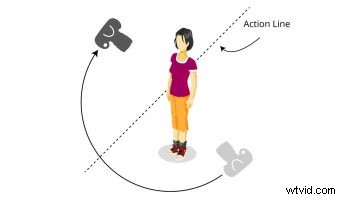
One of the coolest things about television, film and video production is the way that camera angles can alter the viewer’s perception of reality. This is particularly true in the case of continuity of motion and screen direction. Understanding how camera position impacts screen direction is important for two reasons: so producers can harness this knowledge to create compelling and believable sequences, and, even more importantly, to avoid making mistakes that might unintentionally create confusion.
Screen Direction
When shooting a video sequence of a person walking, running, biking, driving or otherwise traveling from one location to another, the direction the subject moves across the screen is far more important than the direction the subject actually travels in the real world. In fact, continuity of motion has very little to do with the direction a subject actually moves. Video producers must always be mindful of the fact that continuity of motion is all about the position of the camera in relation to a moving subject. Depending on where the video camera is positioned, a subject who is actually walking in a straight line can appear to change direction, and a person walking in various directions can appear to walk in a straight line. Confused? Keep reading. It will all make sense in a few paragraph’s time.Left, Right, Left
In order to illustrate, imagine a video production in which a majorette marches along in the middle of Main Street. In real life our marching majorette will walk 20 steps from South to North. Imagine also that Main Street is lined on both the East and West sides by sidewalks that run parallel to the street. With the video camera positioned on the sidewalk on the West side of the street and aimed back at the majorette, the walking subject enters the right side of the viewfinder, walks across the screen from right to left, then exits the left side of the frame. In this case, the subject traveling from South to North crosses the screen from right to left. As shown in our example of a woman walking in a park, the video camera can be positioned anywhere on the West side of the line running down the middle of the street and the subject will still travel right to left on screen, and will appear to continue in a consistent direction.


 We can even position the video camera right on the divided street line with the subject walking directly towards, or away from the camera without compromising the continuity of motion within the production.
Crossing the Line
Consider, however, how the screen direction changes if the video camera operator were shooting video from the other side of the street, with the camera on the opposite side of the line pointed back at the subject. The subject once again goes from South to North. Even though she moves in the same direction in the real world, this time she enters the viewfinder from the left side of the frame, walks from left to right, then exits the right side of the viewfinder. Our subject travels the same direction in the real world; but the opposite direction on screen. If the two shots were edited together, the subject would appear to have turned around and gone back the way from which they came.
The Action Axis
In this example, the middle of the roadway represents what production professionals refer to as the action axis. The action axis is an invisible barrier that runs through a moving subject and stretches on to infinity along the course the subject travels, separating a scene into two hemispheres.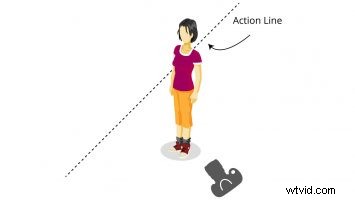 To maintain consistency of screen direction, the video camera operator must shoot all shots from the same side of the action axis. As long as the video camera stays on the same side of the subject, you will maintain consistent screen direction regardless of the actual direction your subject walks in the real world. Got it? Good.