
Congrats on purchasing our brand new Photoshop Actions – The Uptown Collection! If you’ve never used Photoshop much you might be a little intimated but as you will see in this quick tutorial, you have nothing to worry about, installing & using these Photoshop actions are actually quite easy!
How to Install Your Photoshop Actions
The fastest way:
Double click on the actions (the .atn file) once you have downloaded them. They will automatically load into the actions pallet in Photoshop.
** Note: Sometimes when you restart your computer the actions may disappear when choosing this install method **
The more reliable and better method
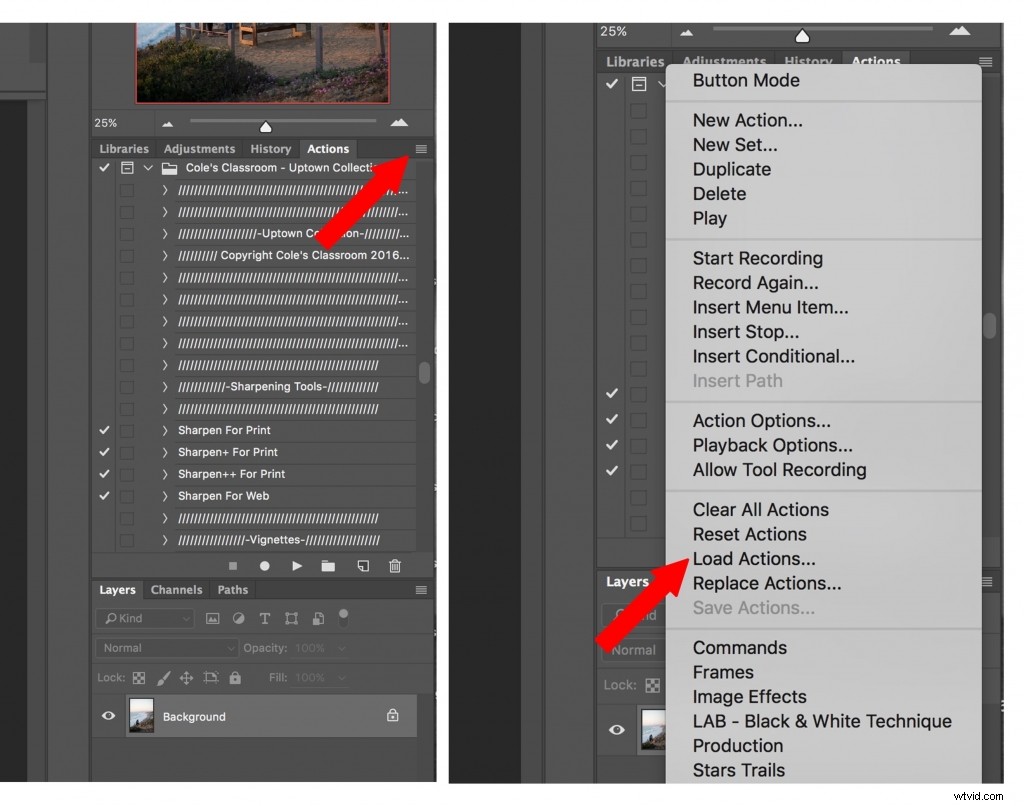
- After downloading, save your actions to an easy to find folder
- Open Photoshop and and go to the actions palette *Note: if you don’t see your actions palette go to window and click “actions” in the dropdown menu*
- Click the actions palette menu button on the top right corner of the actions palette
- From the menu select “Load Actions”
- Select the actions inside the folder where you saved them ( file ending in .atn)
- Click open and the actions will load into the actions palette
Your actions will remain loaded in the actions pallet unless you delete the original folder where you saved the actions
Watch this Quick Video Tutorial Showing How to Install Photoshop Actions
New to Photoshop? Make Sure to Watch this Video with Me Walking You Through How to Use the Photoshop Actions!
Enjoy the Cole’s Classroom Uptown Photoshop Actions!
Cole & Walter