
In this video Unmesh Dinda from the PiXimperfect channel takes a look at an interesting app for mobile devices that uses A.I. to enhance images and can (at least one paper) fix blurred images – how well does it work and what are its limitations? read on.
The Remini – AI Photo Enhancer (available for free with a paid PRO version for both Android and iOS) has several features for improving your mobile images including scratch fix, colorizing old B&W images portrait mode, and art effect. But really the main innovation here is the A.I.-powered enhance photo and video effects.
What is the nature of the effect and how well does it do – well, we have downloaded and gave it a go ourselves and it does seem to work on some images. Especially portraits with artificial blur (see the example image we shot below with the lemon – the white line shows our face with and without the effect – pretty impressive).
On some images, however, we saw little effect especially if the face was not dominant enough in the photo. Really the main issue is that you have very little over what this magical effect does and how it works. It can be really effective or do close to nothing. It would be nice if you would be able to choose the target for the “de-blur” as well as choose how much of this effect will be used.
Our lemon image – before and after
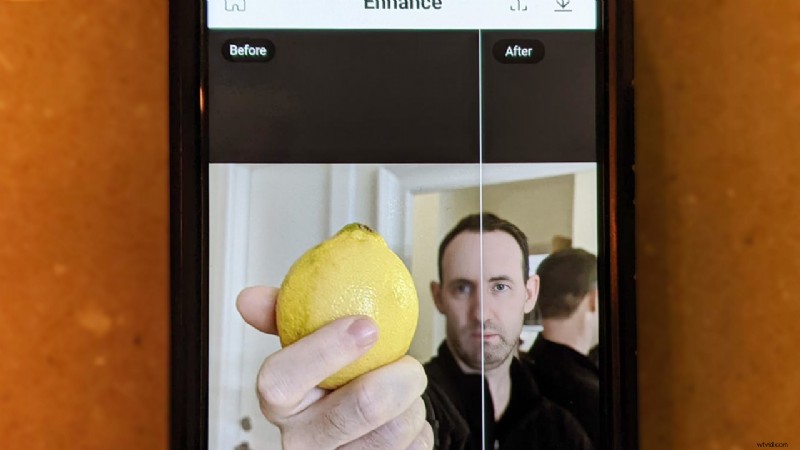
We are pretty doubtful as to how well this can carry over to high-resolution images on a computer at the moment but for mobile/web purposes this can actually be a pretty useful tool if you need a quick fix that can’t really be done in any other way that we are aware of.
Is this the future of editing? it seems that both Adobe and some of its competitors (Skylum for example has been pushing A.I. very hard) certainly think so and A.I. has been quickly being added to Photoshop and other editing software and we will not be surprised if a similar feature will find its way into desktop software in the next year or two.
We have yet to try the video feature of this tool but feel free to try it and let us know how effective it really is fox fixing blurred videos. Just keep in mind that the free version takes quite a bit of time to process for photos (videos will probably be much longer) and has quite a few ads as well as a 5 images per day limit.
You can find a lot more photo/video editing related videos and articles on our dedicated editing subsection.